Chapter 8: From the substrate up showed how X-Ray Calc calculates the curve of one structure. A fit has to find the structure. X-Ray Calc does this by a search. It calculates the curves of many structures, scores each one against your measurement, and keeps the best. This chapter explains the score, χ², and the search, a particle swarm. It also explains why two runs of the same fit end on different numbers. The examples use the measured Co/C multilayer CoC5 and its fitted model from Chapter 6: The Bragg law with refraction.
What χ² measures
X-Ray Calc compares the calculated curve with the measured one at every measured angle. The number it shows in the Chart Info bar is χ²:
N is the number of measured points. and are the measured and calculated intensities at the i-th angle. and are two optional weights. Lower is better. χ² = 0 means a perfect match.
The formula takes the logarithm of the curve. The reflectivity falls by many decades between the critical edge and the end of the curve (Chapter 4: Why the curve falls so steeply). A plain difference of intensities would see only the first few points. On the logarithm, a curve that is 10 % too high has the same difference at every angle.
Each difference is then divided by . Near the critical edge the reflectivity is close to 1. Its logarithm is then close to 0, so these points weigh the most. Take the same 10 % error at R = 0.5 and at R = 10⁻⁶. The logarithms are −0.30 and −6, so the first point counts (6 / 0.30)² ≈ 400 times more. The factor 1000 and the division by N − 1 only set the size of the number.
Two more things enter the sum. The points at both ends that the resolution blur can’t compute are left out (Chapter 8: The resolution). The calculated curve is also raised to the R min floor wherever it falls below it (Chapter 14: The floor: one count).
The weights
PW χ² is the peak weight, and it is checked by default. X-Ray Calc averages the measured curve over a moving window of 5 % of its points. A point more than three times above that average is on a Bragg order. It gets the weight / average. Every other point gets the weight 1. So the fit works harder on the orders. The periodic stack sets the orders. The fringes between them depend more on the substrate and the top layers.
TW χ² weights the points by angle. The list offers None (the default), sqr (θ²), line (θ), sqrt (√θ), 1/sqr (1/θ²) and 1/sqrt (1/√θ). sqr pushes the fit toward the high angles, and 1/sqr toward the critical edge. θ here is the value on the chart axis, so it is 2θ when the 2θ box is ticked.
The Chart Info bar also shows the plain χ². It is the same sum with both weights set to 1. The fit never minimizes it. It lets you compare fits made with different weights.
The scale
Solve scale in χ² is checked by default. It deals with the one factor that multiplies the whole measured curve: the scale that normalization sets. For every structure it scores, X-Ray Calc finds the scale that gives the lowest χ². It finds it exactly and at no extra cost. The scale may move from the normalized one by at most the factor 1 + Window (0.2 by default). The Chart Info bar shows the result as scale. Chapter 14: Letting the fit solve the scale sets the window.
Table 9-1 scores one structure against one curve under different settings. The structure never changes, but χ² runs from 0.81 to 50.
Table 9-1: One structure, several χ² values. The CoC5 fitted model of Chapter 6 scored against the measured CoC5 curve by X-Ray Calc 3.9.4.1250, with 2θ ticked, λ = 1.541874 Å (the wavelength the file gives), Δθ = 0.009° and a fitting range of 2θ = 0.40–8.4°. The scale is the factor the solved scale moved from the normalized one.
| Setting | χ² | plain χ² | scale |
|---|---|---|---|
| The defaults: PW χ² on, TW χ² None, Solve scale in χ² on | 3.396 | 3.267 | × 0.992 |
| PW χ² off | 3.267 | 3.267 | × 0.992 |
| TW χ² sqr | 49.76 | 3.278 | × 0.971 |
| TW χ² 1/sqr | 0.8140 | 3.506 | × 0.899 |
| Solve scale in χ² off | 3.398 | 3.268 | anchored |
The plain χ² removes the weights, but it keeps the scale. With 1/sqr the solved scale moved by a different factor. The plain χ² changed with it.
Why a fit needs a global search
Think of χ² as a height over a map. The map has one direction for each free parameter. A fit of a two-layer period with every H, σ and ρ free has six directions. The best structure is the lowest point of this χ² surface.
The simplest search walks downhill from the starting model until every direction goes up. This is how local methods such as gradient descent and Levenberg–Marquardt work. They stop in the nearest valley. For XRR that is often the wrong one. Li et al. (2023) describe the χ² of a multilayer as highly nonlinear with many local minima. A local method then finds the right answer only when the starting model is already close to it.
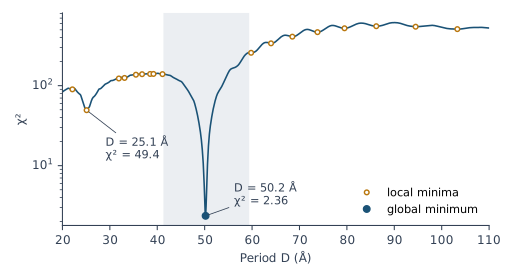
Figure 9-1 shows one direction of the CoC5 χ² surface. It changes the period and keeps every other parameter at its fitted value. The deepest valley is at D = 50.2 Å, with χ² = 2.36. The scan finds 17 more local minima between 20 and 110 Å. The next lowest is at 25.1 Å, half the true period, with χ² = 49.4. A stack with half the period puts its orders on the 2nd and 4th measured orders. A downhill walk reaches the true period only if it starts between 41.3 and 59.4 Å. From anywhere else it stops in a side valley.
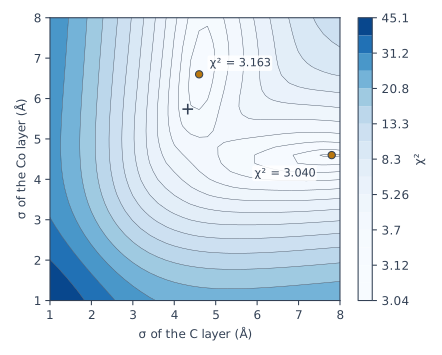
Other valleys come from pairs of parameters that change the curve in the same way. In a period of two materials, the two roughnesses are such a pair (Chapter 7: Interlayers). Figure 9-2 maps χ² over the two roughnesses of CoC5. It has two valleys. In one, the C layer has σ = 7.8 Å and the Co layer 4.6 Å, with χ² = 3.040. The other has the pair the other way round, 4.6 Å for C and 6.6 Å for Co, with χ² = 3.163. A low ridge separates them. A downhill walk ends in the valley nearer its start. The expert’s fit of this curve lies in the second valley.
The swarm
X-Ray Calc searches with a particle swarm. The method is Lévy-flight particle swarm optimization (LFPSO), described for X-Ray Calc by Li et al. (2023) and extended in X-Ray Calc 3 (Penkov et al. 2024).
A particle is one complete candidate structure: a value for every free H, σ and ρ. Population is the number of particles. In every iteration, X-Ray Calc calculates the curve and χ² of every particle. So a fit of 5000 particles over 200 iterations, the book’s default, scores about a million structures.
Where the swarm starts
With SeedR checked (the default), the particles are spread at random over the whole range of every parameter, from its Min to its Max in the Fitting Limits dialog. The starting model then plays no part. With SeedR unchecked, the particles are scattered around the starting model, within ±Ksxr of each range (0.2, so ±20 %). In Polynomial mode the SeedR box is grayed out. The swarm then always starts around the starting model. Chapter 15: Choosing What to Fit: Free Parameters and Limits sets the ranges.
How a particle moves
In each iteration every particle takes a step. The step combines three parts:
- its previous step;
- a pull toward the best particle of this iteration;
- a pull toward the best structure found so far.
Each pull is multiplied by a new random number at every step. So the particles circle around the good regions and don’t all follow the same path. This is the particle swarm of Kennedy, Eberhart and Shi (2001). A step is at most Vmax of the parameter’s range (0.3 by default). A particle that crosses a limit bounces back into the range, at half its speed.
Lévy jumps
In some iterations the previous step is replaced by a Lévy step. Most Lévy steps are small, but some are very long (Figure 9-3). A long jump can carry a particle over a hill into another valley. At the start of a fit, 70 % of the iterations use Lévy steps. By the end, 30 % do. When the best χ² stops improving, the share rises by 5 percentage points for every iteration without improvement since the last shake, up to 90 %. Three Lévy jumps in ten aim at a randomly chosen particle instead of the best one.
Going Deeper: the step as a formula
For one parameter of one particle, with position x and step v, each iteration does
Here b is the value of the best particle of this iteration, and g is the value of the best structure found so far. and are random numbers between 0 and 1, drawn afresh for every step. The pulls are . The constriction factor
keeps the steps from growing without limit. The Help writes it as χ and the pulls as φ. It has nothing to do with χ². Constriction factor is checked by default in the Advanced fitting settings dialog. In a Lévy iteration the previous step v is replaced by the Lévy step.
The textbook particle swarm pulls each particle toward its own best position so far (Kennedy et al. 2001, p. 312). X-Ray Calc’s swarm keeps no memory for each particle. Its b is the best particle of the current iteration.
Shakes: leaving a valley
Even with Lévy jumps, the whole swarm can settle in one valley. Every particle then sits near the same point, and the best χ² stops improving. A shake starts the search again from the best structure so far.
A shake is due when the best χ² has failed to improve in more than Jmax iterations since the last shake (default 1). While the swarm is still spread out, X-Ray Calc waits up to 3 more iterations. Then the shake does the following:
- The swarm is scattered again around the best structure so far.
- The largest step Vmax and the scatter Ksxr are multiplied by k2 (1.41), so the new swarm reaches farther.
- The best χ² that a particle must beat is multiplied by k1 (1.41). For a while the swarm accepts a structure somewhat worse than the best. This lets it climb out of the valley.
After SHmax + 1 such shakes (3 + 1 = 4), the next shake returns the swarm to the best structure found in the whole run and restores Vmax and Ksxr. The cycle then repeats. The best structure found is never lost.
Shakes make a clear difference. In the benchmark of the X-Ray Calc 3 paper, the swarm without shakes lowered the cost from 25 to 10 in 30–40 iterations and then stopped improving. With shakes, the cost fell sharply right after a shake (Penkov et al. 2024, Fig. 6).
The book leaves the advanced settings at their defaults. The X-Ray Calc 3 paper names the two shake factors the other way round: its k1 is the dialog’s k2. This book uses the dialog’s names.
When the fit stops
A fit stops for one of three reasons:
- it has run the number of Iterations;
- the best χ² has fallen below the Tolerance of the Advanced fitting settings dialog (0.005);
- you click the Stop button, which appears at the top of the chart while the fit runs.
It then returns the best structure found in the whole run and shows it in the structure panel.
When the computer has a graphics card, X-Ray Calc scores the whole swarm on it at once. The GPU computes in single precision. Its χ² agrees with the processor’s within 1 %. The χ² and the curve shown at the end are always recalculated on the processor, so they match what Calc > Run gives for the fitted model. Each fit of this chapter, 5000 particles over 200 iterations of the Co/C curve, took 2.2–2.6 s on an NVIDIA GeForce RTX 5080. GPU fitting is on by default. The setting is Use the GPU for fitting when one is available (theta scans), on the Calc & Fit page of File > Settings.
The time grows in proportion to both the population and the iterations. In the X-Ray Calc 3 paper, a larger population helped more than more iterations. About 200 iterations were enough (Penkov et al. 2024, Fig. 7d). Chapter 16: Population before iterations sets both.
Random seeds: why two runs disagree
Many choices of the swarm are random: the start positions, the random numbers in each step, the Lévy steps, and whether an iteration uses a Lévy step at all. A computer makes these numbers from a start value, the seed. The same seed gives the same numbers. By default the Seed field of the Advanced fitting settings dialog is blank. Every fit then draws a new seed. So no two runs follow the same path. The program saves the seed each fit used, with the project and in Result > Export fit results. Type it into Seed to repeat that fit exactly, with the same model and settings on the same device. A fit on the graphics card and one on the processor still differ, even from the same seed. The Seed field itself is not saved with the project.
Two runs can end in the same valley with slightly different numbers. They can also end in different valleys. Chapter 3: Run it again gave two runs of the demo with the same mean period, 42.30 Å, but with χ² = 0.0139 and 0.0916 and different densities.
Table 9-2 shows five runs of the CoC5 curve that differ only in the seed. They use Polynomial mode of order 3, with σ and ρ paired. This is the author’s default for a multilayer. The starting model is the fitted model of Chapter 6 with its period set to 50.23 Å, the value that Chapter 6: The Bragg law with refraction reads from the orders.
Every run put the mean period at 50.15–50.23 Å. The roughnesses split into two groups. Seeds 1, 2 and 3 gave the C layer the smaller σ, about 4.6 Å, and the Co layer about 6.3–6.4 Å. Seeds 4 and 5 did the opposite. These are the two valleys of Figure 9-2. The Co density moved between 6.00 and 6.57 g/cm³, and χ² between 1.60 and 1.80.
Table 9-2: Five fits of the measured CoC5 curve that differ only in the random seed. Polynomial mode of order 3 with σ and ρ paired, population 5000, 200 iterations, and the settings of Table 9-1. H and D are means over the 20 periods. The value in bold sits on its lower limit. Calculated by X-Ray Calc 3.9.4.1250.
| Seed | χ² | D (Å) | H of C (Å) | σ of C (Å) | ρ of C (g/cm³) | H of Co (Å) | σ of Co (Å) | ρ of Co (g/cm³) |
|---|---|---|---|---|---|---|---|---|
| 1 | 1.797 | 50.23 | 31.12 | 4.63 | 2.08 | 19.11 | 6.41 | 6.55 |
| 2 | 1.781 | 50.21 | 31.05 | 4.59 | 2.09 | 19.17 | 6.34 | 6.57 |
| 3 | 1.747 | 50.22 | 30.97 | 4.64 | 2.08 | 19.24 | 6.44 | 6.57 |
| 4 | 1.600 | 50.22 | 31.46 | 6.58 | 2.18 | 18.76 | 4.52 | 6.27 |
| 5 | 1.736 | 50.15 | 31.41 | 6.26 | 2.18 | 18.75 | 4.41 | 6.00 |
The same start fitted in Periodic mode, with the period held at 50.23 Å, gave almost the same result from eight seeds: χ² = 1.987–1.988, a σ of 4.68–4.70 Å for C and 6.69–6.81 Å for Co. Periodic mode has fewer free parameters. Here its χ² had one valley. Polynomial mode lets each thickness change with depth. The extra freedom opened more valleys.
What this means when you fit
Read χ² as a comparison. It ranks structures fitted to the same curve with the same settings. It doesn’t tell you that a fit is right. Chapter 18: Judging a Fit checks the orders, the edge and the fringes.
Set the limits with care. With SeedR checked, the limits are the search space and the starting model is not used. Chapter 15: Generous limits sets them.
Run every fit more than once. Each run starts from a new seed, as long as the Seed field is blank. A number that changes between runs is not fixed by your curve.
Sources
- X-Ray Calc Help, Fitting: Understanding the Cost Function (the formula; the logarithm; each residual relative to log I_calc, so the points near the edge weigh the most; the ends left out by the convolution; the R min floor; the plain χ², never minimized; χ² comparable only between fits with the same PW, TW and scale settings); Peak Weight Function (a moving window of 5 % of the points, and the weight I_exp / average above 3 times the average); Basic Fitting Parameters and Theta-Weighted Chi-Square (Iterations, Population, Shake, SeedR and its gray box in Polynomial mode, PW χ², the TW list with θ as the chart-axis value, Solve scale in χ², Window 0.2); Solving the Measured Scale (the best scale for each candidate, found exactly in the same pass); Advanced Fitting Settings (Tolerance 0.005; Constriction factor; Seed, blank by default, the seed of each fit recorded, the same seed repeating a fit on the same device, and the field not saved with the project; SHmax 3, Jmax 1, Vmax 0.3, k1 and k2 1.41, Ksxr 0.2; the paper’s k1 is the dialog’s k2); Convergence Enhancements (limits that reflect at half speed; the Lévy share from 70 % to 30 %, plus 5 points per iteration without improvement, at most 90 %; 30 % of the Lévy jumps aimed at a random particle; a shake delayed up to 3 iterations while the swarm is spread by 1 % or more); Constriction Factor (φ = 4.1, the coefficient ≈ 0.7298, and p the best particle of the current iteration); Running a Fit (the three reasons to stop); GPU Acceleration (single precision, χ² within 1 % of the processor’s, the final numbers recalculated on the processor).
- The X-Ray Calc 3 source (release 3.9.4.1250): χ² (
Shared\Math\unit_calc.pas:188–279) and its weights (unit_calc.pas:167–186); the fit loop, the Lévy share and the shake condition (XRayCalc3\LFPSO\unit_LFPSO_Base.pas:941–1120); the seed taken from the Seed field, or drawn anew for each run when the field is blank, and recorded in the fit record (XRayCalc3\Units\unit_CalcOrchestrator.pas,NewFitSeed;XRayCalc3\Views\frame_ProjectPanel.pas, the keyseed; the Seed field and its hint infrm_FitSettings.dfm); the shake (unit_LFPSO_Base.pas:912–940); the step clipped at Vmax and a crossed limit reflected at half speed (unit_LFPSO_Base.pas:526–555); the best of the iteration and of the run (unit_LFPSO_Base.pas:835–894); the start inside the range or around the starting model (unit_LFPSO_Irregular.pas,RangeSeedandXSeed); Polynomial mode always starting around the starting model (unit_LFPSO_Poly.pas:262–264), with SeedR grayed out (frame_CalcSettings.pas,cbSeedRange.Enabled); the four group boxes of the Advanced fitting settings dialog, General, LFPSO, Irregular and Polynomial (frm_FitSettings.dfm). The labels are fromframe_CalcSettings.dfm,frm_FitSettings.dfm,frame_ChartInfo.dfm,frame_ChartPages.dfm,frm_settings.dfmandfrm_Main.dfm. - Li, M., Mikki, S., Uzoma, P. C. & Penkov, O. V. (2023). An efficient method for the experimental characterization of periodic multilayer mirrors: a global optimization approach. IEEE Trans. Nucl. Sci. 70, 650–658. The χ² of a multilayer is highly nonlinear with many local minima, so a local method converges only from a start close to the answer (p. 653); the particle swarm update (p. 653, Eqs. 11–12); the Lévy flight (p. 654, Fig. 2 and Eqs. 18–24). The paper’s χ² (Eq. 10) divides by log R_exp and has no weights and no factor 1000. The program divides by log I_calc, and the book follows the program.
- Penkov, O. V., Li, M., Mikki, S., Devizenko, A. & Kopylets, I. (2024). X-Ray Calc 3: improved software for simulation and inverse problem solving for X-ray reflectivity. J. Appl. Cryst. 57, 555–566. The Shake LFPSO algorithm (§2.3, pp. 558–560, Fig. 4); without shakes the cost fell from 25 to 10 in 30–40 iterations and then stopped improving, and with shakes it fell sharply after a shake (Fig. 6, pp. 562–563); a limit of about 200 iterations and a larger population (Fig. 7d, p. 563).
- Kennedy, J., Eberhart, R. C. & Shi, Y. (2001). Swarm Intelligence. Morgan Kaufmann. The particle swarm in real numbers: each particle is pulled toward its own previous best and toward the best of its neighbors, and its step is clipped at Vmax (pp. 312–313).
- Fitting procedure (Penkov, Peng & Fu 2026): §8.4, the spread of a parameter across seeds measures what the curve leaves undetermined and is not an error bar of the instrument; §10.14, the random seed decides which of the two roughness minima a fit lands in. Methods paper, §4: the author’s default of Polynomial mode, order 3, with σ and ρ paired.
- The measured curve CoC5 (a Co/C multilayer of 20 periods) is from the fitting procedure’s data deposit (CC BY 4.0),
curves/CoC5.csv, read in place. The χ² settings are those of the deposit’s periodic CoC5 fit (jobfit-20260918-222443-960a), at λ = 1.541874 Å, the wavelength the file gives (Chapter 10), without smoothing and with Δθ = 0.009°, the expert’s width for this curve: Normalize (Auto), a floor of one count (), the range 2θ = 0.40–8.4°, and the deposit’s limits (H of C 21.33–42.67 Å, H of Co 12–24 Å, σ 1–8 Å, ρ of C 1.5–2.4 g/cm³ and of Co 6–8.9 g/cm³). - Calculated for this chapter (2026-09-24, rerun 2026-09-25) with the X-Ray Calc 3.9.4.1250 engine on an NVIDIA GeForce RTX 5080: Table 9-1, the period scan of Figure 9-1, the roughness map of Figure 9-2, the five Polynomial fits of Table 9-2 and eight Periodic fits, each with a fixed seed so that it can be repeated.
scripts/figures/ch9_engine_data.pyruns them and keeps the results infigures-src/ch9/.scripts/figures/fig_9_figures.pydraws the figures and prints every number quoted. The engine takes θ, so it applies the TW weights θ² and 1/θ² to θ. On the 2θ axis the sum is 4 and 1/4 times as large. Table 9-1 gives those values (the engine’s are 12.44 and 3.256). The fitted CoC5 model was made at λ = 1.5406 Å, so at the file’s wavelength its orders sit slightly off, and it scores a little higher than a fit made at 1.541874 Å. The factor of 400 for the point at R = 0.5 is computed on the page.
Cross-references: Chapter 3: Run it again; Chapter 4: Why the curve falls so steeply; Chapter 6: The Bragg law with refraction; Chapter 7: Interlayers; Chapter 8: The resolution; Chapter 12; Chapter 14: Letting the fit solve the scale; Chapter 15: The near-bound rule; Chapter 16: Population before iterations; Chapter 17: Step 1, one period with the period free; Chapter 18: Judging a Fit; Chapter 26: The scale; Appendix A: Notation and Units; Appendix B: Menus, Buttons and Keys; Appendix D: Glossary.