Before you fit a new kind of structure, find out which part of the curve each parameter moves. The author of the fitting procedure described this step in one sentence: “just calculate some models and try to see how the curve changes depending on changes in structure.” This chapter does it for the Co/C starting model of Chapter 12: Checking the start on the chart.
Why check before you fit
A fit moves many parameters at once. When the result disagrees with the data, you need to know which parameter to look at. The sensitivity check gives you a map from parameter to feature. The fitting procedure asks for it before the first fit of each structure type. The map is kept for later, because it “tells you which parameter to move when a fit disagrees with the data”.
The map has one line per change. It names the feature of the curve that moved:
- the positions of the Bragg orders;
- the heights of the orders relative to each other;
- the heights of the highest orders;
- the level between the orders;
- the shape and position of the critical edge.
Write down the feature that moved. The numbers belong to this model. The features carry over to the next sample of the same kind.
Doing it in X-Ray Calc
The fitting procedure has no program step for the check. In X-Ray Calc you can do it in two ways.
Two models side by side:
- Select the starting model and choose Project > Duplicate Model.
- In the copy, change one value.
- Choose Calc > Calc all models (F6), or click the Calculate all button on the chart toolbar. X-Ray Calc calculates every model, and the chart shows both curves.
- Write down what moved. Then set the value back, or delete the copy and duplicate again.
One model, live: click the small arrows beside a value in the structure panel. Each click changes the value by the step in the Increment box of the structure toolbar (10, 5, 1, 0.25, 0.1 or 0.01; 0.1 by default). X-Ray Calc recalculates the curve at once after each click. A value you type is not recalculated until you choose Calc > Run (F5).
To change the layer ratio and keep the period, link the two layers of the period. Tick the box in front of each layer name. Then an arrow click that adds to one thickness takes the same amount from the other. Linking works for two layers of a stack with N > 1.
The variants and what they move
The fitting procedure lists the changes to make, one at a time:
- the period, 2 % longer and 2 % shorter;
- the layer ratio both ways, at the same period;
- the σ of each layer at the two ends of its fitting limits;
- the density of each layer, 15 % higher and 15 % lower;
- a different surface layer;
- N halved and doubled.
For CoC4 the ratio moves 2 Å between Co and C. The σ limits are one laboratory’s: 1 and 8 Å. The surface layer variant is that laboratory’s too: 20 Å at 1.2 g/cm³, against the starting 15 Å at 0.9 g/cm³. Table 13-1 is the resulting map. Figure 13-1 shows six of the changes.
Table 13-1: The sensitivity map of the CoC4 starting model. Each row changes one parameter. “Decades” are steps of log₁₀ R; 0.3 decades is a factor of 2. Positions and the edge are in 2θ. Calculated by X-Ray Calc 3.9.4.1250 at λ = 1.541874 Å and Δθ = 0.012°.
| Change | What moves | The numbers |
|---|---|---|
| period ±2 % | the positions of the orders | order 6 moves 0.19–0.20°; heights change by at most 0.17 decades; the edge stays |
| layer ratio, 2 Å moved between Co and C | the relative heights of the orders | more Co lowers orders 2, 4 and 6 and raises orders 3 and 5; less Co does roughly the opposite; positions stay; the edge moves 0.01° |
| σ of C or of Co at 1 or 8 Å | the high orders and the level between the orders | σ = 1 Å raises order 1 by 0.03 decades and order 6 by 2.5 decades; the two layers give nearly the same change |
| density of Co ±15 % | all order heights together, and the edge | every order by 0.15–0.20 decades; the edge by +0.026° and −0.030° |
| density of C ±15 % | the edge, and a little of every height | the edge by +0.014° and −0.016°; heights by 0.05 decades |
| surface layer 20 Å, 1.2 g/cm³ | the level between the orders | the valleys between orders 1 and 4 move by up to 0.15 decades; orders 1–4 change by 0.02 decades or less |
| N = 10 or 40 | the order heights | orders 2–6 fall by about 0.5 decades at N = 10 and rise by 0.4–0.5 decades at N = 40; the level between the orders stays |
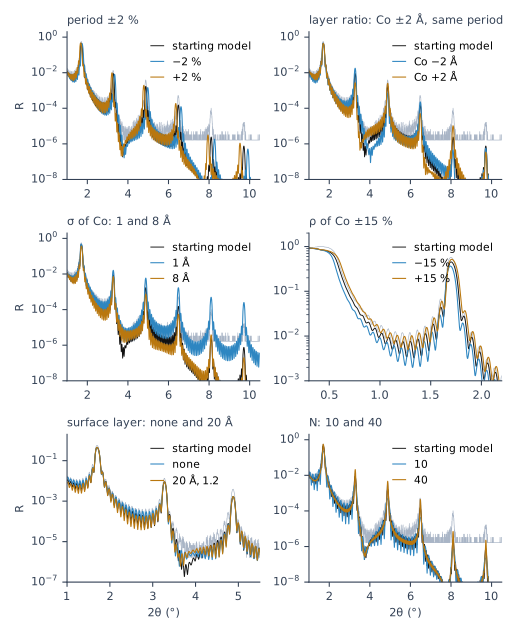
Two results of the map deserve a note. The σ of C and the σ of Co move the curve in nearly the same way. So a fit can trade one for the other, as Chapter 7: Interlayers showed on this curve. And the density of Co moves every order and the edge together. A wrong scale raises or lowers the whole curve in a similar way, and a fit held at a wrong scale absorbs it as density or roughness. Chapter 14: Letting the fit solve the scale deals with it.
Try it yourself. Choose a parameter and move the slider. The curves were calculated in advance by X-Ray Calc, one parameter at a time, for the steps shown.
Two rules for reading a curve
The map leads to two rules. The fitting procedure uses them for every fit.
“Peaks have priority.” The procedure goes on: “The level between the peaks is set by the ends of the stack, the top layer and the substrate side, not by the period structure. A mismatch between the peaks is corrected at the top layer or the substrate side, not by moving the period structure.” The map shows why. σ changes the level between the orders, but it changes the orders as well. The surface layer changes the level between the orders and leaves the orders alone. So when the orders fit and the level between them doesn’t, look at the ends of the stack first. On the residual strip under the chart, this is a stretch between two orders that sits above or below zero while the orders themselves sit near zero.
“Larger diffraction orders carry the smaller details.” σ = 1 Å moves order 1 by 0.03 decades and order 6 by 2.5 decades. The layer ratio shows most in orders 2 to 6. The first order fixes little beyond the period. Chapter 6: The higher orders carry the fine details explains why.
What this means when you fit
Make the map once for each structure type. Keep it with the project. The same kind of sample from the same process moves the same features.
Use it when a fit disagrees. Find the feature that is off and look up the parameter that moves it (Chapter 18: When an order fails).
Report it. The map is part of a fit report (Chapter 23: The report, item by item).
Sources
- Fitting procedure (Penkov, Peng & Fu 2026): §3.1, the variants, one change each, before the first fit of a structure type: period ±2 %, the layer ratio both ways at the same period, each σ at the two ends of its bounds, each density ±15 %, the surface-layer variant of the preset, N halved and doubled, at the settings of the fit; §3.2, the features to write down, “Only the feature, not the numbers”; §3.3, the two rules, quoted; §3.4, the map kept for judging a fit and reported (“tells you which parameter to move when a fit disagrees with the data”).
- The expert’s ruling that the step belongs in the procedure (Supplementary S3, ruling 47, 2026-09-18), quoted. The paper’s Table 2 lists no program step for procedure step 3.
- The procedure’s preset (
skill-v5\presets\csmic-empyrean.json), one laboratory’s values: the σ bounds 1–8 Å and the surface-layer sensitivity variant, 20 Å at 1.2 g/cm³. - The X-Ray Calc 3 source: an arrow click on a value recalculates at once and a typed value does not (
XRayCalc3\Components\unit_XRCLayerControl.pas,ValueChange); the Increment steps (XRayCalc3\Views\frame_StructurePanel.dfm); two linked layers, a thickness change on one applied the other way on the other, in stacks with N > 1 (XRayCalc3\Components\unit_XRCStackControl.pas:418–445,unit_XRCLayerControl.pas,IncreaseThickness); Calc > Calc all models (F6) and the Calculate all toolbar button, both theCalcAllaction (XRayCalc3\Forms\frm_Main.dfm); the residual strip, one line for each visible model against the linked curve (XRayCalc3\Forms\frm_Main.pas,RefreshResiduals, release 3.9.4.1250; Help Charts & Visualization → Residual Strip, whose example is “a fringe field sitting high between two orders”). - X-Ray Calc Help, Fitting: Solving the Measured Scale (a wrong scale multiplies the whole curve; a fit held at it absorbs a scale too low as extra roughness and one too high as extra density contrast).
- Calculated for this chapter (2026-09-24, rerun 2026-09-25) with the X-Ray Calc 3.9.4.1250 engine: the starting model of Chapter 12 and 30 changed models, one parameter each, at λ = 1.541874 Å and Δθ = 0.012°.
scripts/figures/ch13_engine_data.pyruns them, keeps the curves infigures-src/ch13/and writes the data of the web figure.scripts/figures/fig_13_figures.pydraws Figure 13-1 and prints every number of Table 13-1 (figures-src/ch13/numbers.txt). The measured curve is the import of Chapter 11.
Cross-references: Chapter 6: The higher orders carry the fine details; Chapter 7: Interlayers; Chapter 12: Checking the start on the chart; Chapter 14: Letting the fit solve the scale; Chapter 15: Generous limits; Chapter 17: Raising the order; Chapter 18: When an order fails; Chapter 18: The residual by band; Chapter 23: The report, item by item; Chapter 25: Does the curve carry this number?; Chapter 26: The number of periods; Appendix B: Menus, Buttons and Keys; Appendix D: Glossary.