The fit settings decide how hard X-Ray Calc searches and what it compares. Three of them need a decision for every curve: the size of the swarm, the resolution Δθ, and the number of runs. This chapter makes those decisions for the Co/C multilayer CoC4, with the limits of Chapter 15: The near-bound rule. The other settings keep the values of Table 16-1.
The settings, and the ones you change
The settings are at the top right of the working area, as Chapter 14: Figure 14-3 shows. X-Ray Calc starts with 100 Iterations and a Population of 100. That swarm is too small for a multilayer.
Table 16-1: The fit settings this book uses for a multilayer, and where each one is explained.
| Setting | Value | Explained in |
|---|---|---|
| Population | 5000 (2000 for a single film) | this chapter |
| Iterations | 200 | this chapter |
| Δθ | from a scan, for each curve | this chapter |
| Shake, SeedR | both ticked (SeedR is grayed out in Polynomial mode) | Chapter 9 |
| PW χ² | ticked | Chapter 9 |
| TW χ² | None | Chapter 9 |
| Solve scale in χ², Window | ticked, 0.2 | Chapter 14 |
| Advanced Settings | as they are | Chapter 9 |
| Mode | one period with the period free, then Polynomial | Chapter 17 |
Population before iterations
The Population is the number of particles in the swarm. The Iterations are the number of steps they take. The fitting procedure puts it this way: a larger population is what finds the right minimum, and more iterations of a small swarm do not. The X-Ray Calc 3 paper found the same (Chapter 9: When the fit stops). So set the population first.
One laboratory tested this on curves calculated from a known structure. With 500 and 2000 particles the thicknesses came out 0.13 Å wrong. With 5000 or more the errors were 0.03–0.07 Å. At 500 the contamination layer was undetermined. 50 iterations were worse than 100. 200 were no better than 100. The author’s own projects used a population of 5000 in every multilayer fit of 2026. A single film uses 2000 (Chapter 21: The single-film exceptions).
Table 16-2 fits CoC4 with five swarms, five runs each.
Table 16-2: CoC4 fitted with five combinations of population and iterations, five runs each with different seeds. “Lower valley”: runs that ended with the smaller σ in the C layer. The runs in the other valley ended at χ² = 1.318. The time is the mean per run on the author’s PC. Δθ = 0.012°, Periodic mode with the period held, the limits of Chapter 15 and the data of Chapter 14. Fitted by X-Ray Calc 3.9.4.1250.
| Population × iterations | Runs in the lower valley | Lowest χ² | σ of C (Å) | Time per run |
|---|---|---|---|---|
| 500 × 200 | 3 of 5 | 1.2783 | 3.23 ± 0.97 | 1.0 s |
| 2000 × 200 | 4 of 5 | 1.2780 | 2.88 ± 0.79 | 1.8 s |
| 5000 × 200 | 5 of 5 | 1.2779 | 2.53 ± 0.00 | 3.4 s |
| 500 × 2000 | 5 of 5 | 1.2766 | 2.53 ± 0.00 | 7.7 s |
| 5000 × 100 | 5 of 5 | 1.2779 | 2.53 ± 0.00 | 1.8 s |
CoC4 has the two σ valleys of Chapter 9: Figure 9-2. In the lower one, C has σ = 2.53 Å and Co has 4.22 Å. In the other, the two values swap: C has about 4.3 Å and Co 2.6 Å. With 500 particles, two runs of five ended in the higher valley. With 2000, one run did. Their σ values then spread by almost 1 Å. With 5000 particles every run found the lower valley.
A small swarm run ten times longer also found it. But 500 × 2000 took 7.6 s, more than twice as long as 5000 × 200, for the same number of scored structures. Ten times the iterations made the run 7.7 times longer. Ten times the swarm made it only 3.5 times longer, because the graphics card scores the whole swarm at once.
Choosing Δθ by a scan
Δθ is the width of the blur that X-Ray Calc applies to the calculated curve (Chapter 8: The resolution). The fit never changes it. It depends on the instrument and on the measurement, so you choose it for each curve. The fitting procedure chooses it by a scan:
- Fit the curve at a start value of Δθ until the fit has converged.
- Type the next value of your window in Δθ, choose Calc > Auto Fitting (F7) and click Run. Note χ².
- Repeat for every value of the window, in steps of 0.001°.
- Keep the Δθ with the lowest χ².
- Run the full set of runs once at that Δθ (Several runs, and their spread).
One run at each Δθ is enough for the scan, because the scan compares the resolutions. The set of runs comes after it. Each point is a new fit. A recalculation of one fitted structure at another Δθ is not a scan, because that structure was fitted at the old Δθ. χ² values can be compared only over the same range and with the same weights.
The window belongs to your instrument. One laboratory’s window is 0.012–0.015°. The author’s own projects used values from 0.009 to 0.026°, set for each measurement.
Figure 16-1 shows the scan for CoC4. In the window, one run at each Δθ gave χ² = 1.2779, 1.2479, 1.2334 and 1.2337. The lowest is at 0.014°, so the rule picks 0.014°. Outside the window χ² falls a little further, to 1.2320 at 0.016°. Then it rises.
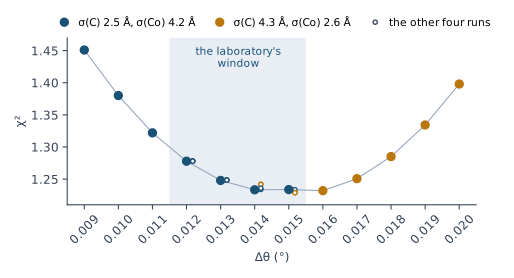
The figure shows more than the minimum. At 0.012 and 0.013° all five runs ended in the same valley, with χ² within 0.0008 of each other. At 0.014° two of the five runs ended in the swapped valley. At 0.015° three did. From 0.016° on, the single run ended there too. So the choice of Δθ decides which layer the fit gives the larger σ. At 0.014° and above, this curve doesn’t settle it.
The fringe contrast as a check
The fringes between the first two Bragg orders show the blur most clearly. Their contrast is each fringe maximum divided by the minimum next to it, averaged over the fringes. If the model’s fringes are deeper than the measured ones, Δθ is too small. Report the comparison beside the scan, and let the scan decide.
In X-Ray Calc, select the fitted model, calculate it with Calc > Run (F5) and choose Result > Fit report …. Its group Fringes between orders 1 and 2 gives the mean contrast, measured and calculated (Chapter 18: The fringes). You can also zoom in on the band and read a few pairs with the cursor, in the X and Y boxes of the Chart Info bar (Chapter 11: The Chart Info bar).
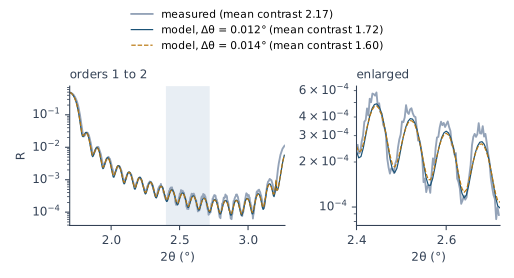
For CoC4 the measured mean contrast is 2.17. The model gives 1.94 at Δθ = 0.009°, 1.72 at 0.012° and 1.60 at 0.014°. At every Δθ of the scan the model’s fringes are shallower than the measured ones, so the check never asks for a larger Δθ. The scan still picks 0.014°, because χ² is summed over the whole fitting range and the fringes are one feature in it. On CoC4 the check and the scan point different ways, and you report both.
Several runs, and their spread
X-Ray Calc draws a new random seed for every Auto Fitting (Chapter 9: Random seeds). You can type a seed instead. The Advanced Settings button opens the Advanced fitting settings dialog. Its General group has a Seed box. Each fit records the seed it used, in the project and in the exported fit results. With the same seed, settings and starting model, a fit repeats exactly, but only on the same device. For the spread, leave Seed blank and run the fit five times at the chosen Δθ. One laboratory found that three runs understated the spread about 2.5 times. From five runs on, the spread stayed the same.
- Select the starting model in the project panel and choose Project > Duplicate Model. The copy becomes the active model.
- Choose Calc > Auto Fitting (F7) and click Run. The fit changes the copy. The starting model stays as it was.
- Choose Result > Export fit results… and save the result under the number of the run.
- Repeat from step 1 until you have five runs.
Every run starts from the same starting model. With SeedR ticked, a Periodic or Irregular run starts spread over the limits, so the runs are independent of each other. In Polynomial mode SeedR is grayed out, and the swarm starts around the model. A fit writes its result into the model. So a second Polynomial run on the same model would start around the first result. A fresh copy of the starting model avoids this. Run keeps the limits as they are. Calc > Resume Fitting would move them (Chapter 15: The density ceiling).
What to report. Report the run with the lowest χ². Beside each of its parameters, give the sample standard deviation of that parameter over the runs. Use the standard deviation. The range grows with the number of runs, while the standard deviation stays about the same. Don’t average the runs. A mean over the runs is a structure that no run found.
Table 16-3 does this for CoC4 at Δθ = 0.014°.
Table 16-3: CoC4 at Δθ = 0.014°, the value of the scan: the run with the lowest χ², and the sample standard deviation of each parameter over five runs. Two runs ended in the swapped σ valley. The period, C plus Co, stayed at 54.70 Å in every run because Periodic mode holds it. Population 5000, 200 iterations, the settings of Table 16-1. Fitted by X-Ray Calc 3.9.4.1250.
| Layer | H (Å) | σ (Å) | ρ (g/cm³) |
|---|---|---|---|
| C (Top) | 11.64 ± 0.05 | 0.00 ± 0.18 | 0.768 ± 0.030 |
| C (ML) | 31.35 ± 0.03 | 2.52 ± 0.97 | 2.023 ± 0.027 |
| Co (ML) | 23.35 ± 0.03 | 4.21 ± 0.90 | 7.303 ± 0.029 |
The best run has χ² = 1.2334, and the five runs spread by 0.0042. The thicknesses are fixed to within 0.05 Å. The σ values of C and Co spread by almost 1 Å. That is the swap between the two valleys, and at this Δθ the curve doesn’t decide it. Report them as undetermined. The top layer’s σ stays at 0, as in Chapter 15. These runs hold the period at 54.70 Å, the value read from the orders. With the period free, the fit moves it to 54.79 Å. Every run then gives C the larger σ (Chapter 17: Step 1, one period with the period free).
What this means when you fit
Check every setting of Table 16-1 before the first fit, above all in a project you did not make.
Set the population before the iterations: 5000 × 200 for a multilayer.
Choose Δθ by a scan over your laboratory’s window, one run at each value. Keep the lowest χ², and report the fringe contrast beside it.
Run the fit five times at the chosen Δθ. Report the best run, with the standard deviation of each parameter beside it.
Then compare the modes (Chapter 17: Step 1, one period with the period free) and judge the fit (Chapter 18: Judging a Fit). Chapter 23: The report, item by item lists what to report: Δθ with its scan, the settings and the runs.
Sources
- Fitting procedure (Penkov, Peng & Fu 2026): §8.1, Δθ a tuning parameter of the instrument that varies between instruments and measurements, never fitted and never taken from another operator’s project; §8.2, Δθ chosen by a scan of refits over the laboratory’s window with the first seed, the lowest χ² kept, the full seed set run once at the chosen value, every point a refit rather than a rescoring, the chosen value a setting of this fit; §8.3, the fringe contrast between orders 1 and 2 as a check, deeper model fringes meaning too small a Δθ, the scan deciding; §8.4, several seeds, the sample standard deviation over the seeds reported beside the lowest-χ² seed, the standard deviation because the range grows with the number of seeds, no mean over seeds; §8.5, the χ² weights; §8.6, population before iterations.
- The procedure’s preset (
skill-v5\presets\csmic-empyrean.json), one laboratory’s values:instrument.resolution_deg(start 0.012°, window 0.012–0.015°, step 0.001°);optimizer.population(5000 for a multilayer, 2000 for a single film),optimizer.iterations100,optimizer.seeds.count5; and inprovenance, three seeds understating the seed spread about 2.5-fold and the spread stable from five, and population 5000 and 100 iterations kept because 500, 2000 and 50 iterations were worse and more was no better. - The procedure’s benchmark (
XRR-Fitting-Skill\benchmark\results\FINDINGS.md, curves calculated from known structures): item 9, the thickness errors at population 500 and 2000 (0.13 Å) against 5000 or more (0.03–0.07 Å), the surface layer undetermined at 500, 50 iterations worse and 200 no better than 100; item 8, the χ² minimum of the Δθ scan at 0.015° and 0.014° for a true 0.013°; item 4, the W/WC split wrong by up to 2 Å with a small seed spread. - The procedure’s history (Supplementary S1): v4 tuned Δθ by the fringe contrast within 0.012–0.015°; v5 made the χ² scan decide.
- The methods paper on the procedure (Penkov, Peng & Fu 2026, arXiv:2609.28926), Table 1 (the angular resolution “tuned from the contrast of the secondary fringes, 0.012 to 0.015° here” and population before iteration count, both held) and §4 (the audit of 51 of the author’s projects: Δθ from 0.009 to 0.026°, set for each measurement; population 5000 in every multilayer fit of 2026 except the two CoC4 reference projects, at 500). The book’s default of 5000 × 200 is the author’s decision (2026-09-23); the preset keeps 100 iterations.
- The X-Ray Calc 3 source: Iterations and Population at 100 on the settings panel (
XRayCalc3\Views\frame_CalcSettings.dfm,edFIter,edFPopulation), and the values a project falls back to, Δθ 0.015 among them (frame_CalcSettings.pas,LoadFromINI); SeedR grayed out in Polynomial mode, where the engine always starts around the model (frame_CalcSettings.pas,rgFittingModeClick), and the fitted values written back into the model (XRayCalc3\Components\unit_XRCStructure.pas,FromFitStructure); Project > Duplicate Model making the copy the active model (XRayCalc3\Views\frame_ProjectPanel.pas,DuplicateModel,AddModel); the Seed box in the General group of Advanced fitting settings, blank for a new seed on every run (XRayCalc3\Forms\frm_FitSettings.dfm,edSeed, and its hint;XRayCalc3\Units\unit_CalcOrchestrator.pas,PrepareLFPSO,NewFitSeed), and the seed each fit used saved in its fit record (BuildFitRecord), all as of release 3.9.4.1250; the same seed repeating a fit only on the same device (X-Ray Calc Help, Fitting); Result > Export fit results… and what it writes (XRayCalc3\Forms\frm_Main.dfm;XRayCalc3\Units\unit_CalcOrchestrator.pas,ExportFitResultsToJSON); the group Fringes between orders 1 and 2 of Result > Fit report … (XRayCalc3\Forms\frm_FitReport.dfm,frm_FitReport.pas). The settings of the expert’s CoC4 project are read from itsparams.dsc(submission/zenodo/fits/CoC4-expert-full-fit.xrcxof the procedure’s deposit). - X-Ray Calc Help, Fitting: Basic Fitting Parameters (the settings and their defaults), GPU Acceleration (the swarm scored at once on the graphics card); Calculation (the resolution, default 0.015°).
- Penkov et al. 2024 (J. Appl. Cryst. 57, 555–566), Fig. 7d: a larger population helps more than more iterations (by link from Chapter 9).
- The measured curve CoC4 is from the fitting procedure’s data deposit (CC BY 4.0),
curves/CoC4.xrdml, prepared as in Chapter 14. - Calculated for this chapter (2026-09-24, rerun 2026-09-25) with the X-Ray Calc 3.9.4.1250 engine, with the seeds of the preset’s list so that the numbers can be repeated.
scripts/figures/ch16_engine_data.pyruns the 25 fits of Table 16-2 and the 32 fits of the scan (figures-src/ch16/population.json,resolution.json; the fringe contrasts are the engine’s comparison between orders 1 and 2), and calculates the curves of Figure 16-2.scripts/figures/fig_16_figures.pydraws Figures 16-1 and 16-2 and prints every number of the chapter (figures-src/ch16/numbers.txt). Your own runs in the program will differ in the last digits, because the program draws a new seed for every fit unless you type one into Seed.
Cross-references: Chapter 1: Table 1-1; Chapter 2: Your first calculation; Chapter 3: Why this is not yet a result; Chapter 8: The resolution; Chapter 9: Random seeds; Chapter 11: The Chart Info bar; Chapter 14: Letting the fit solve the scale; Chapter 15: The near-bound rule; Chapter 17: Step 1, one period with the period free; Chapter 18: The fringes; Chapter 18: What the runs don’t agree on; Chapter 21: The single-film exceptions; Chapter 23: The report, item by item; Chapter 24: A Δθ copied from another project; Chapter 24: One run; Chapter 25: Do five runs agree on it?; Chapter 26: The resolution; Appendix A: Notation and Units; Appendix B: Menus, Buttons and Keys; Appendix D: Glossary.