A fit ends with a χ² and a structure. This chapter decides whether you can report them. The fitting procedure judges a fit by several checks on the curve and by the spread of the result over repeated runs. It judges the fits that Chapter 17: Periodic or Polynomial? ended with: CoC4 in Polynomial mode of order 1, CoC5 with one period and the period free, and the Chapter 3 demo at order 1 and order 3. Each was run five times (Chapter 16: Several runs, and their spread).
χ² is one check among several
The author judged fits by χ². The author’s words when the procedure was written down were “The KPI is ChiSQR.” The procedure keeps χ² and adds checks beside it: “Chi2 alone is not the judgment. It is one check among the following.” (§10.1)
The reason is in the demo. Its order-1 fit gave the same χ² of 6.40 in all five runs. Its drift was still wrong by 1.6 Å (Chapter 17: Raising the order). On CoC4 the order-1 fit has χ² = 0.959, well under the laboratory’s limit. Two of its Bragg orders still come out at a quarter of their measured height. χ² sums the misfit over thousands of points. A feature that holds a few of them can be wrong without moving the sum much.
The author also gave a rule for a very large χ²: “small ChiSQR is the indicator itself, ideally below 10. If it’s above 100, something is wrong, usually the low angles are not cut properly.” The laboratory’s preset now sets the limit at 1.3, for its own weighting and range. It keeps the second part of the rule as an alarm. Above 100, check the start of the fitting range and the scale before you change anything in the model (§10.4; Chapter 14: Where the fitting range starts and ends).
Table 18-1 lists the checks and one laboratory’s limits for them.
Table 18-1: The checks of a fit and one laboratory’s limits, from the preset of the fitting procedure. The limits were set on two Co/C curves, CoC4 and CoC5, fitted over θ = 0.22–3.2° with four orders present, at Δθ = 0.012°, with the θ weighting off and the point weighting on, and with the scale solved in the fit.
| Check | What it compares | Limit (one laboratory) |
|---|---|---|
| χ² | the misfit over the fitting range | below 1.3 for a multilayer; above 100, check the conditioning first |
| Order table | the calculated peak of each visible Bragg order divided by the measured one | every visible order within 0.75–1.25 |
| Edge | calculated against measured at three angles on the critical edge | within a factor of 1.5 |
| Fringes | the contrast of the fringes between orders 1 and 2 | reported, no limit |
| Residual by band | the mean of log₁₀(calculated / measured) in each of eight bands | above 0.1 in size: a warning |
| Near a limit | every free parameter against its Min and Max | within 5 % of the range: extend and refit |
| Density | the fitted densities | not judged |
The fits of this book are all outside it in some way. CoC4 is fitted at Δθ = 0.014° over eight orders, out to 2θ = 13.4°. CoC5 is fitted out to 2θ = 13.2°. The demo is a different material, calculated without noise. χ² values also don’t compare between conditionings. In the paper on the procedure, the expert’s fit and a test session’s fit of the same curve changed places when each was scored under the other’s range, scale and Δθ.
Reading the checks in X-Ray Calc
Result > Fit report … works out every check of this chapter for one model:
- Click the fitted model in the project tree, so that the triangle moves to it.
- Choose Calc > Run (F5). The report needs the model’s calculated curve.
- Choose Result > Fit report ….
The Fit report window has five groups (Figure 18-1): Bragg orders, Critical edge, Fringes between orders 1 and 2, Residual by band and Parameters within 5 % of a bound. The first line of the header names the model and its data. The second gives the scale. The report multiplies the measured curve by the scale that the last calculation solved, as χ² and the chart do (Chapter 14: Letting the fit solve the scale). So its ratios match what you see on the chart. The angles are in 2θ when the chart shows 2θ.
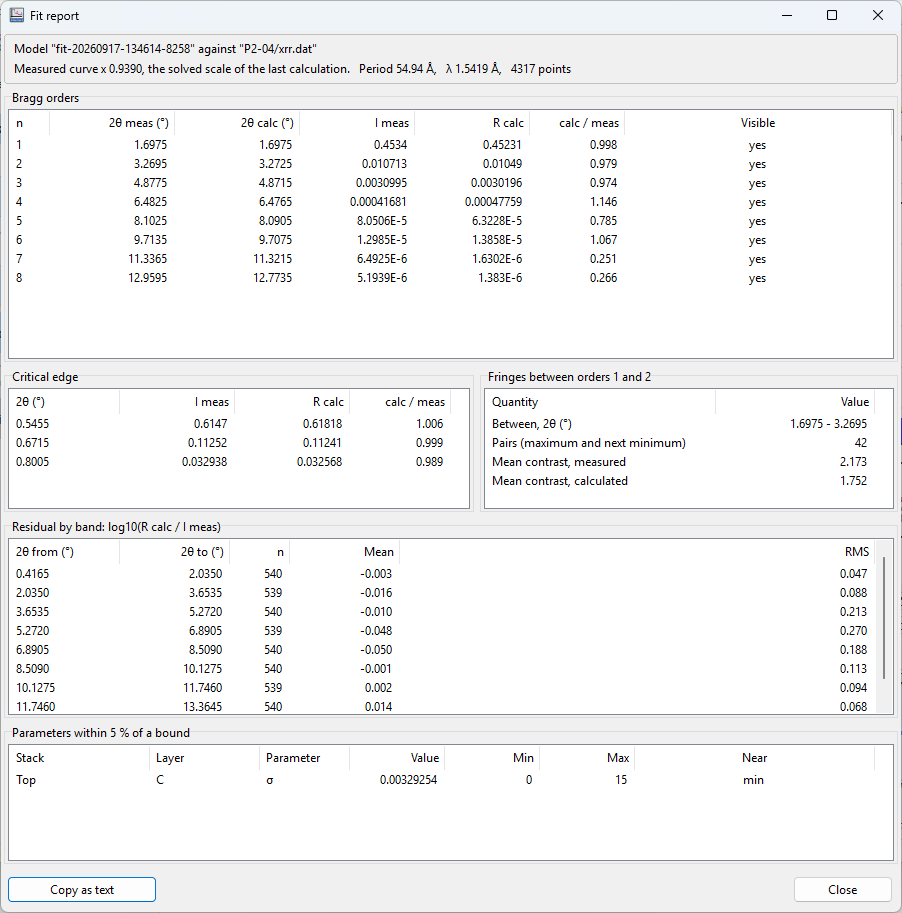
The window shows numbers only. It marks no pass or fail, because the limits belong to your laboratory. Copy as text copies every table, with tabs between the columns, so you can keep it with the fit. The report needs a model with linked data, calculated by angle.
The order table
The order table writes down what the author checks first on the chart: whether the Bragg peaks are where they should be, and as high. For every visible order, it gives the measured peak, the calculated peak and their ratio, calculated divided by measured. An order is visible when its measured maximum stands more than 3 times above the background (Chapter 11: Numbering the orders). The peak is the highest point in a window around the order’s predicted position, on each curve separately.
The limit is 0.75–1.25. The first version of the procedure accepted 0.5–2, and the second tightened it. The expert’s own fits of the qualification curves lay at 0.69–1.76, so the author was asked whether the band should be widened. The author kept it: “I expected that after all you can do it better than me, so I would keep 25%”.
Table 18-2: The order table of CoC4, Polynomial mode of order 1, the run with the lowest χ² (0.959). Peaks in counts: the value on the chart divided by one count. The calculated peak is at the chart’s scale. Fitted by X-Ray Calc 3.9.4.1250.
| Order | 2θ measured (°) | Measured (counts) | Calculated (counts) | Calculated / measured |
|---|---|---|---|---|
| 1 | 1.698 | 349 900 | 354 400 | 1.01 |
| 2 | 3.269 | 8268 | 7911 | 0.96 |
| 3 | 4.878 | 2392 | 2265 | 0.95 |
| 4 | 6.482 | 322 | 365 | 1.13 |
| 5 | 8.102 | 62 | 48 | 0.77 |
| 6 | 9.713 | 10.0 | 11.1 | 1.11 |
| 7 | 11.336 | 5.0 | 1.3 | 0.26 |
| 8 | 12.960 | 4.0 | 1.1 | 0.28 |
Orders 1 to 6 pass. Order 5 passes near the lower edge of the band, at 0.77. Orders 7 and 8 fail, in this run and in every other run and mode of Chapter 17, at 0.26–0.42. Figure 18-2 shows the ratios of all five runs, next to CoC5 and the demo.
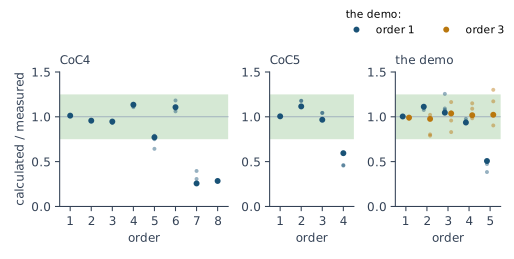
CoC5 fails order 4 in every run, at 0.46–0.59. The demo shows the other side. Order 1 fails order 5 at 0.50. Order 3 passes every order in its best run, at 0.98–1.04. But one order-3 run, with χ² = 0.389, puts order 5 at 1.30. So a verdict belongs to one run. The mode or the order alone doesn’t decide it.
Look at the orders that fail. Figure 18-3 shows them in counts. Order 7 of CoC4 is one point of 5 counts, and order 8 one point of 4. The tail has many points of 2–4 counts. These two count as orders only because they sit where the line through the strong orders puts them (Chapter 11: Numbering the orders). The model has almost no peak there, 1.3 and 1.1 counts. Order 4 of CoC5 is a real peak. The model follows its shape, and most of its points lie at 8–13 counts. The measured maximum is one point of 16 counts. The ratio compares the model’s peak with that one point.
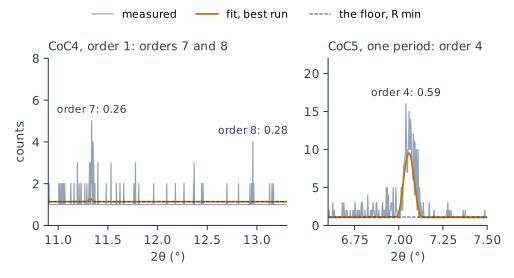
Both kinds of fail count. The limits were set on curves with four orders present. Orders 7 and 8 of CoC4 lie beyond them, so the verdict says that the 25 % band is applied outside its calibration. CoC5 has four orders. The procedure’s own qualification sessions failed that same order in two of three rounds. When an order fails says what to do next.
The edge
The edge check compares the curve on the critical edge, the steep fall after the plateau. It takes three angles between θ_max and the first minimum of the calculated curve, at a quarter, a half and three quarters of the way. At each, the calculated value divided by the measured one must lie within a factor of 1.5 (§10.3–10.4).
The edge is where the scale was set (Chapter 14: Setting the scale). A fail means the scale no longer fits the model. The model has moved away from the one the scale was set with. Then normalize again with the fitted structure as the model, and fit again. The author’s words: “sometimes you need to renormalize again if the model moves far away” (§4.2).
On CoC4 the order-1 fit gives 1.06, 1.01 and 1.00, at 2θ = 0.543°, 0.669° and 0.798°. On CoC5 the fit with one period gives 1.15, 0.95 and 0.96, at 2θ = 0.507°, 0.606° and 0.708°. Both pass. The plateau of a model can have a very shallow minimum of its own, where the edges of two materials meet. The report takes the first minimum only after the curve has risen 5 % above it again, so such a ripple doesn’t end the edge. Look at the three angles in Critical edge before you read the ratios. They must lie on the fall.
The fringes
The fringes between orders 1 and 2 show the blur of the resolution most clearly. Their contrast is each maximum divided by the minimum next to it, averaged over the band (Chapter 16: The fringe contrast as a check). On CoC4 the measured mean contrast is 2.17 and the order-1 fit gives 1.75. On CoC5 they are 2.29 and 1.76. In both, the model’s fringes are shallower.
The fringe check is reported. It has no limit. The procedure’s pass criteria are χ², the orders and the edge (§10.4). When the fringes and the peaks disagree, the peaks win (§10.13). The Bragg peaks carry the period structure. Fringes that don’t match are the first place to suspect a missing surface layer. The author ruled this way on a CoC4 fit whose peaks passed and whose fringes didn’t: “In this case I select peaks. Non matching fringes can mean something on the surface (light hydrocarbons) we omit in our model.”
The residual by band
The last curve check divides the fitting range into eight equal bands of θ. In each band it takes the mean of log₁₀(calculated / measured) over every point. A mean of 0.1 is a factor of 1.26: the model sits 26 % above the data over the whole band, or the same amount below it at −0.1. That is a warning (§10.4). Look at the ends of the stack first, the contamination layer and the substrate (§10.4; Chapter 13: Two rules for reading a curve).
A band catches a misfit that no single peak shows. Figure 18-4 compares the two demo fits. Order 1 gives three warnings: +0.10, −0.13 and +0.12, in bands 3, 4 and 6. A straight-line drift lets the model drift away from the data between the orders, first on one side and then on the other. Order 3 keeps every band within 0.01.
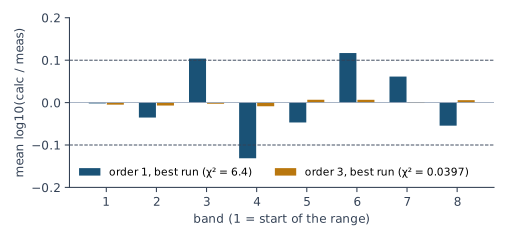
On CoC4 the order-1 fit stays within 0.043, and on CoC5 the fit with one period stays within 0.045. So neither warns. The last three bands of CoC4 sit at +0.026 to +0.043: the model lies above the data in the tail. That is the floor (Chapter 14: The floor). R min was set at one count before the fit. The chart draws the model divided by the solved scale, 0.877, so the floor stands at 1.14 counts, above the one-count points of the tail (Figure 18-3). The effect is small, well under the warning.
Residual by band in the Fit report lists the eight bands with their mean and rms. The rms is taken around zero. It includes the fringes and the orders, so read the mean.
The chart shows the same residual point by point, in a strip under the curves. Result > Residual strip > Show turns it on or off. It is on by default. The strip draws log₁₀(calculated / measured) at every measured point. A line above zero is a model above the data. A line below zero is a model below the data. The numbers are the Fit report’s. The strip uses the same eight bands and the measured curve at the scale solved in the last calculation. Each visible model gets its own line, in its own color, so two fits of one curve can be compared on one strip.
Three more items of the same menu are also on by default:
- ±0.1 lines mark the warning level.
- Band means draws the mean of each band as a step over the band. These are the means of Residual by band.
- Floored points draws the points on the floor as gray dots. A point is on the floor when the model is within 1 % of R min, or when the measured value, at the solved scale, is at or below R min. These points are not a misfit. But the band means still count them, as the report does. So a band mean that rests on gray dots shows the floor.
The vertical range of the strip is fixed at −1 to +1. The strip needs linked data and a calculation by angle. It is part of the chart, so a zoom or a pan moves it with the curves, and a copy or an exported image includes it.
Near a limit
A parameter that ends on a limit or within 5 % of the range from it is reported with the limit. The limit is extended and the fit repeated before any value is read (Chapter 15: The near-bound rule). The Fitting Limits dialog marks such cells in yellow. Chapter 17 widened the limits of CoC4 and CoC5 this way before the fits of this chapter. Two kinds of limit stay: a σ at 0, and a density at the ceiling of the bulk value. The contamination layer of CoC4 ends with σ at 0 in the best run.
What the runs don’t agree on
Chapter 16: Several runs, and their spread reports each parameter with its standard deviation over the runs. The procedure turns that spread into a rule. When the spread of a parameter is larger than the precision you would claim for it, report the parameter as undetermined, without a number (§10.7). The runs disagree by more than the number would claim. One laboratory’s precision limits: 0.5 Å for a thickness and for σ, 0.2 g/cm³ for a density, and 0.1 Å for the period.
For a Polynomial fit, test the value in each period. Leave the coefficients out of the test. The specimen has thicknesses. It has no coefficients. The Thickness page draws the per-period values of each run (Chapter 17: Reading a drift in X-Ray Calc). The ends of the stack, the top and the bottom period, spread the most, so test them.
Table 18-3: The run with the lowest χ² and the standard deviation over five runs. Undetermined: the standard deviation is larger than one laboratory’s limit (0.5 Å for H and σ, 0.2 g/cm³ for ρ, 0.1 Å for D). CoC4: Polynomial mode of order 1, with H of C and Co at the top and the bottom period. CoC5: one period, with the period free. Fitted by X-Ray Calc 3.9.4.1250.
| Parameter | CoC4, order 1 | CoC5, one period |
|---|---|---|
| D, top period (Å) | 55.00 ± 0.05 | 50.19 ± 0.02 |
| D, bottom period (Å) | 54.61 ± 0.05 | (same) |
| H of C, top / bottom (Å) | 31.66 ± 0.36 / 31.05 ± 0.41 | 30.71 ± 0.22 |
| H of Co, top / bottom (Å) | 23.34 ± 0.32 / 23.55 ± 0.44 | 19.49 ± 0.20 |
| σ of C (Å) | undetermined (4.30 ± 0.80) | undetermined (5.52 ± 0.59) |
| σ of Co (Å) | undetermined (2.62 ± 0.71) | undetermined (4.50 ± 0.85) |
| ρ of C (g/cm³) | 2.036 ± 0.018 | 2.081 ± 0.031 |
| ρ of Co (g/cm³) | 7.589 ± 0.030 | 6.046 ± 0.086 |
| Contamination layer: H (Å) | 11.42 ± 0.28 | 9.45 ± 0.10 |
| Contamination layer: σ (Å) | undetermined (0.00 ± 0.96) | undetermined (2.12 ± 3.27) |
| Contamination layer: ρ (g/cm³) | 0.919 ± 0.075 | 0.966 ± 0.120 |
On both curves the thicknesses and the period are determined, and the σ values are not. The per-period thicknesses of CoC4 pass with little room, at 0.32–0.44 Å. Report the drift of the period and leave out its split between C and Co, as Chapter 17: Decide on the drift says.
The demo shows both ways a spread can mislead. Its order-1 fit agreed with itself to 0.007 Å on the drift in all five runs. The drift was wrong. Its order-3 fit found the true profile in its best run. But the five runs spread by 0.35 Å at the top period and 0.63 Å at the bottom one, so the ends of that stack are undetermined. A small spread doesn’t prove a value right. A large one doesn’t make the best run wrong. The spread shows what the curve doesn’t fix. The rule reports exactly that (§10.6).
Two layers as a sum
Sometimes the runs agree on the total of two neighboring layers and disagree on how it divides. Then report the two as a sum, and the split as undetermined (§10.8). The procedure’s example: “Two independent fits of one curve agreed on the total metal in a period to within a few tenths of an angstrom while placing the thick interlayer on opposite sides of the metal layer.”
Use the rule when at least one of the two layers is undetermined by itself and the spread of their sum is smaller than the spread of either. The layers of a two-layer period always add up to the period, so the sum is always better held than its parts. In a Co/C stack the split is still determined. In one laboratory’s tests on calculated Co/C curves, the Co thickness came out within 0.05 Å rms.
A W/B4C stack with WC interlayers is different. On calculated curves, the W thickness came out +0.88 ± 0.62 Å off, while the W and WC per period together were off by only −0.16 ± 0.29 Å. Two fits of one measured W/B4C curve agreed on the period to 0.01 Å and on the metal per period to 0.25 Å. Their W thicknesses differed by 1.7 Å. Report such a stack as the metal per period, W plus WC, with the split undetermined.
Which interface is rougher?
The two σ values of a two-material period move the same features of the curve. The fit finds two minima, one with the larger σ in each layer (Chapter 9: Figure 9-2). The procedure: “Which of them a fit lands in is decided by the random seed” (§10.14). The starting model plays no part when the swarm starts spread over the limits.
The paper on the procedure records this on CoC4. A test fit gave σ = 2.64 Å for C and 4.33 Å for Co. The expert’s fit gave the pair the other way round, 5.58 and 2.46 Å. Both had the same peaks and the same period. They differed only in the fringes between the orders. A contamination layer on top lowered χ² from 7.94 to 6.09 and still didn’t settle which layer is rougher. The author passed the fit.
CoC5 does the same in this chapter. Of the five fits with one period, three gave C the larger σ, 5.53 Å against 4.50 Å for Co, at χ² = 0.6825. Two gave Co the larger one, 6.04–6.06 Å against 4.45–4.46 Å for C, at χ² = 0.705. That is why σ is undetermined in Table 18-3.
So the assignment is not a check. Judge the fit by the peaks, the edge and χ². Report the σ values as fitted. Don’t claim which interface is the rougher one.
Asymmetric interlayers: fit each assignment
An interlayer is a thin layer of mixed material at an interface (Chapter 7: Interlayers). The two interfaces of a period often grow differently. A heavy metal deposited onto a light amorphous layer mixes differently from a light material deposited onto a dense or crystalline metal. But a metal layer thin enough to stay amorphous can make the two interfaces alike (§10.9). So the side of the wider interlayer is not a property of the material pair. It is a question for each fit.
Without other evidence, fit every admissible assignment (§10.10):
- The wider interlayer on the interface where the metal is deposited onto the light layer.
- The wider interlayer on the other interface.
- The two interlayers equal.
Run each of them five times. Report all three, each with its χ² and its spread. The split stays undetermined unless a check of this chapter rules out one of the assignments. A χ² difference smaller than the spread over the runs doesn’t choose between them.
In X-Ray Calc, set each assignment through the limits. Give the interlayer that must be wider a Hmin above the Hmax of the other one. X-Ray Calc can’t hold two layers equal during a fit. For equal interlayers, give both the same H and freeze it. Fit, then repeat with a few other values of H, and keep the one with the lowest χ² (Chapter 19: Testing the model on CoC4 and CoC5).
Evidence from another measurement can decide the assignment instead: transmission electron microscopy or photoelectron spectroscopy. Then fit only that assignment, and say in the report where it came from. Check it against the fit afterward. A declaration that holds only while the metal layer is crystalline doesn’t hold for a fit that returns that layer too thin to be crystalline (§10.11). An assumption can decide the assignment too. The report must then say it is an assumption.
When an order fails
When an order fails, the procedure first applies the two rules of Chapter 13 (§10.12). The level between the peaks is set by the ends of the stack: the contamination layer and the substrate. The fine structure of the high orders is set by the layer ratio, the interfaces and the drift. Change those before anything else. When the first fit passes every check, don’t fit again, except for the runs and the limits that the earlier chapters require.
This decides the question that Chapter 17 left open. A higher order of the Polynomial profile is kept only if it passes every check of this chapter (§9.8). On CoC4, order 3 fails orders 7 and 8 in every run, like order 1. It also fails order 5 in three runs. On CoC5 it fails order 4, like the fit with one period. So order 3 is not kept on either curve. The demo’s order 3 passes every check in its best run and is kept.
CoC4 and CoC5 still fail their weak orders in every mode. A fit that doesn’t reach the data after these steps goes to Chapter 19: When the Fit Will Not Converge. That chapter takes up the two causes, a bad measurement and a model that is too simple.
Writing the verdict
Write the verdict one check at a time, with the calibration of the limits (§10.5). Table 18-4 does it for the three fits of this chapter.
Table 18-4: The verdict, check by check, for the best run of each fit, with one laboratory’s limits of Table 18-1. Fitted by X-Ray Calc 3.9.4.1250.
| Check | CoC4, order 1 | CoC5, one period | The demo, order 3 |
|---|---|---|---|
| χ² | 0.959: pass | 0.6825: pass | 0.040: pass |
| Order table | orders 1–6 pass; 7 (0.26) and 8 (0.28) fail | orders 1–3 pass; 4 (0.59) fails | orders 1–5 pass (0.98–1.04) |
| Edge | 1.06, 1.01, 1.00: pass | 1.15, 0.95, 0.96: pass | 1.00, 1.00, 1.00: pass |
| Fringes (reported) | 2.17 measured, 1.75 fitted | 2.29 measured, 1.76 fitted | not read |
| Residual by band | largest 0.043: no warning | largest 0.045: no warning | largest 0.009: no warning |
| Near a limit | contamination σ at 0 | none | every density at its Max |
| Undetermined | σ of C and Co; contamination σ | σ of C and Co; contamination σ | D at both ends; H of Si and Mo in the bottom period |
| Calibration | outside: 8 orders, Δθ = 0.014° | outside: range to 2θ = 13.2° | outside: Si/Mo, calculated without noise |
| Verdict | fail: orders 7 and 8 | fail: order 4 | pass |
A fail is a result. Report it with the fit. Don’t widen a limit of this chapter until the fit passes.
What this means when you fit
Read χ² last. Above 100, check the range and the scale first. Below the limit, it still doesn’t pass the fit.
Build the order table for every visible order. Look at a failing order in counts before you act on it.
Check that the edge angles lie on the edge, and renormalize with the fitted model when the edge fails.
Report the fringe contrast, and let the peaks decide when the two disagree.
Read the eight bands. A band beyond 0.1 points to the ends of the stack.
Report a parameter as undetermined when its spread over the runs is larger than your precision limit. For a profile, test the end periods.
Report a sum when a layer is undetermined and the sum is held better. Don’t claim which interface is rougher. Fit every assignment of an interlayer that nothing else decides.
Write the verdict check by check, with the calibration of each limit. A fit that fails goes to Chapter 19: Two causes, and only two. Chapter 23: A complete report for CoC4 puts the verdict into the report. A fitted density is not judged here. Chapter 20: The runs agree, the models don’t explains why.
Sources
- Fitting procedure (Penkov, Peng & Fu 2026): §10.1, χ² one check among several, quoted; §10.3, the order table, the edge check, the fringe check, the residual by band and the near-bound list; §10.4, the pass criteria (χ², every visible order, the edge), the density not judged, the conditioning alarm and the band warning; §10.5, every limit reported with its calibration, and the verdict stating when a limit is applied outside it; §10.6–10.7, the spread over the runs and a parameter reported as undetermined, tested on the per-period values of a profile; §10.8, two layers reported as a sum, with its example quoted; §10.9–10.11, asymmetric interfaces, each assignment fitted and reported, and a declared constraint tested against the fit; §10.12, the two rules of §3 before anything else; §10.13, peaks before fringes; §10.14, the two σ minima decided by the seed, quoted; §9.8, a higher order kept only if it passes every check; §4.2, renormalizing after the edge check; §4.4, a χ² limit fixed with the scale anchored not carried to a solved scale.
- The procedure’s preset (
skill-v5\presets\csmic-empyrean.json), one laboratory’s values:acceptance.thresholds(χ² 1.3, order band 0.25, edge factor 1.5, visible factor 3, conditioning alarm 100, band warning 0.1, near bound 0.05, density not judged);acceptance.calibrated_under(CoC4 and CoC5, θ 0.22–3.2°, θ weight 0 with the point weights, Δθ 0.012°, four orders, the scale solved in a window of 0.7);reporting.undetermined_precision(H 0.5 Å, σ 0.5 Å, ρ 0.2 g/cm³, period 0.1 Å);reporting.sum_not_splittrue;interfaces.modeexplore. The two records of the χ² limit’s calibration are two stages of it (the preset’sprovenance, fourth revision, v5.0.2 of 2026-09-23). The limit of 1.3 was first set with the scale anchored, as the benchmark record says (Supplementary S5.5). The two calibration fits were then run again with the scale solved within 0.7: χ² fell from 1.039 to 1.011 on CoC4 and from 0.986 to 0.903 on CoC5 (XRR-Fitting-Skill\analysis\recompute-2026-09-21\chi2max-solve-e9ad011.md). That moves the limit from 1.25 to 1.22, less than the rounding that gave 1.3. So 1.3 was kept and recorded as set with the scale solved, ascalibrated_undersays. The chapter follows the preset. The preset also records a gap: the χ² values the limit was first worked out from (0.823 for CoC4 and 0.662 for CoC5, θ weight 0) have no record outside its own text. - The rule for sums. The procedure applies §10.8 whenever the sum’s spread is smaller than either layer’s. The chapter applies it only when one of the two layers is undetermined by itself (the author’s choice, 2026-09-25), because the layers of a two-layer period always sum to the better-held period.
- The procedure’s history (Supplementary S1): the order band 0.5–2 in v1, tightened to 0.75–1.25 in v2.
- The expert’s rulings (Supplementary S3): ruling 33, “The KPI is ChiSQR.”; ruling 43, the χ² rule, quoted; ruling 28, renormalizing, quoted; ruling 52, the 25 % band kept, quoted, with the expert’s own fits at 0.69–1.76; ruling 59, peaks over fringes, quoted in part; ruling 61, the roughness assignment not judged when the peaks pass.
- The methods paper on the procedure (Penkov, Peng & Fu 2026, arXiv:2609.28926): §7.1, CoC5 failing order 4 in two of three qualification rounds; §7.4 and Table 4, the roughness pair of CoC4 decided by the seed, and the surface layer (χ² 7.94 to 6.09) not settling it; §7.5, the ranking of two fits reversing with the conditioning.
- The procedure’s benchmark (Supplementary S5.3): the period recovered to 0.01 Å rms; on W/B4C the W thickness +0.88 ± 0.62 Å against the metal per period −0.16 ± 0.29 Å; on Co/C the Co thickness within 0.05 Å rms. The two fits of one measured W/B4C curve (period 56.051 and 56.06 Å, W 11.34 and 9.61 Å, metal per period within 0.25 Å) are from the procedure’s analysis of the expert’s W/B4C reference fits (
XRR-Fitting-Skill\analysis\author-wb4c-2026-09-21\README.md). - The X-Ray Calc 3 source: the checks as the fit report computes them (
XRC_MCP\units\unit_MCPFitReport.pas): the order window around each predicted order and the largest point on each curve in it, visible above 3 times the background (the median of the last 100 points); the edge at a quarter, a half and three quarters from the first fitted point to the first minimum of the calculated curve, a minimum counted only once the curve rises 5 % above it; the fringe contrast between the measured maxima of orders 1 and 2; eight equal bands of θ with the mean and rms of log₁₀(calculated / measured) over every point; the near-bound list (unit_MCPFit.pas). The report reads the measured curve at the solved scale, as χ² and the chart do. The Fitting Limits dialog marks a value within 5 % of a limit (XRayCalc3\Units\unit_SmartLimits.pas,XRayCalc3\Forms\frm_Limits.pas). The box before the material name (hint “Pair to another layer”) moves the partner layer’s H the other way while you edit one H by hand. It links H only, is not saved and is read by no fit (XRayCalc3\Components\unit_XRCLayerControl.pas:203–212, 466–475;unit_XRCStackControl.pas:418–467). Neither the program nor its engine can tie two layers during a fit, so the equal assignment is a scan over one frozen H (checked by the X-Ray Calc session, 2026-09-25). - The Fit report window (Result > Fit report …, added for this chapter at the author’s request): the fit report worked out on the chart’s model curve, resampled onto the measured angles, against the linked data times the solved scale of the last calculation; the period of the first stack with N > 1; the near-bound list from the current limits and the 5 % rule; numbers only, with no pass or fail. The labels are copied from the running program (
figures-src/screenshots/ch18-fit-report.pngand.txt). Help: Results → Fit Report. - The residual strip (X-Ray Calc 3 source, release 3.9.4.1250): Result > Residual strip with Show, ±0.1 lines, Band means and Floored points (
XRayCalc3\Forms\frm_Main.dfm,mnuResidual), all on by default (XRayCalc3\Units\unit_Config.pas,TGraphOptions); log₁₀(calculated / measured) on the Fit report’s input and bands, a point floored when the model is within 1 % of R min or the scaled measured value at or below it (XRayCalc3\Units\unit_Residuals.pas); the range fixed at −1 to +1 (XRayCalc3\Units\unit_ResidualStrip.pas). Help: Charts → Residual Strip. - X-Ray Calc Help, Fitting → Understanding the Cost Function (χ² comparable only under the same weights and scale). Fitting also says that the χ² shown after a fit is the recompute on the processor. Up to 3.9.4.1250 the program showed the graphics card’s running best instead. From 3.9.4.1270 it shows the recompute, as the Help says.
- The measured curves CoC4 and CoC5 are from the fitting procedure’s data deposit (CC BY 4.0), prepared as in Chapters 14 to 17. The Chapter 3 demo is
ML(30x2)P3_Best.xrcxfrom the Examples folder of the installer. - Calculated for this chapter (2026-09-25). The checks of CoC4 (Polynomial mode, orders 1 and 3) and of the demo are the fit reports of the Chapter 17 runs (
figures-src/ch17/coc4-final.json,demo.json). The report compares the model with the measured curve times the solved scale, as the chart does, so its ratios and band means are used as they stand; for counts, both are divided by the solved scale ratio. All the runs were rerun on 3.9.4.1250 (2026-09-25) with the same seeds. The CoC4 and CoC5 runs gave the same χ², scale ratios, order ratios and band means as on 3.9.4.1030, the demo’s moved in the third decimal, and the edge check is that of the corrected report. CoC5 with one period and the period free (Periodic mode with the period free within ±10 %, as Free period does it) was fitted for this chapter, five runs with the preset’s seeds, and CoC4 the same way (figures-src/ch18/coc4-free.json,coc5-free.json).scripts/figures/ch18_engine_data.pyruns the fits, recalculates the curves of Figure 18-3 and writes every number of the chapter (figures-src/ch18/numbers.txt).scripts/figures/fig_18_figures.pydraws Figures 18-2 to 18-4. Counts are the value on the chart divided by one count at the anchored scale (R min). Engine X-Ray Calc 3.9.4.1250.
Cross-references: Introduction: Where to Go from Here; Chapter 1: Table 1-1; Chapter 2: The main window; Chapter 3: What the fit found; Chapter 3: Why this is not yet a result; Chapter 4: What this means when you fit; Chapter 6: What this means when you fit; Chapter 7: Interlayers; Chapter 9: Figure 9-2; Chapter 11: Numbering the orders; Chapter 12: Checking the start on the chart; Chapter 13: Two rules for reading a curve; Chapter 14: The floor; Chapter 15: The near-bound rule; Chapter 16: Several runs, and their spread; Chapter 17: Raising the order; Chapter 19: When the Fit Will Not Converge; Chapter 20: Density: A Free Parameter, Not a Result; Chapter 23: A complete report for CoC4; Chapter 24: A σ that picks its interface by chance; Chapter 25: Does the fit pass its checks?; Appendix B: Menus, Buttons and Keys; Appendix D: Glossary.