An XRR curve carries information about every layer of your sample. You can’t read the thicknesses off the curve directly. You get them by fitting a model of the sample to the curve.
What an XRR measurement records
In an XRR measurement, a narrow X-ray beam meets the surface of your sample at a small angle θ. This is the grazing angle, measured from the surface. The sample reflects part of the beam at the same angle on the other side, like a mirror. The detector is placed in the reflected beam, at an angle of 2θ from the direction of the incoming beam (Figure 1-1).
The instrument turns the sample and the detector together, so the detector always stays at 2θ. This is a 2θ–ω scan. An .xrdml file from the instrument calls it a 2Theta–Omega scan. At each angle the detector counts the reflected X-rays. The result is a curve of intensity against angle. X-Ray Calc plots it against 2θ. So does this book. Chapter 2: 2θ or θ: the angle on your screen shows the setting that switches the axis between 2θ and θ.
In Figure 1-2 the intensity falls from more than a million counts at 2θ = 0.4015° to a few counts past 2θ = 5.5°. That is more than five orders of magnitude, so an XRR curve is always plotted on a logarithmic intensity axis.
The reflectivity R is the reflected intensity divided by the intensity of the beam that hits the sample. Your instrument measures counts. Chapter 14: Setting the scale shows how X-Ray Calc puts the counts on the reflectivity scale.
The four features of a curve
Figure 1-2 is a measured curve of a Co/C multilayer: a stack of cobalt and carbon layers repeated 20 times. Four features appear on it, and on most XRR curves. Each one carries a different part of the structure.
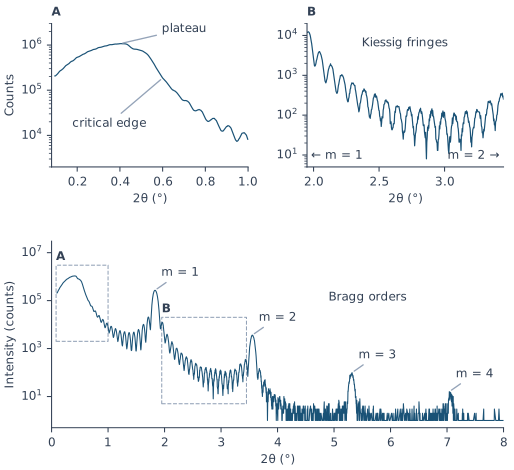
The plateau. At the smallest angles almost the whole beam is reflected. This is total external reflection. It gives the curve its flat top, the plateau. On a real curve the plateau is often short. In Figure 1-2, panel A, it is a rounded maximum at 2θ = 0.4015°. To the left of the maximum the intensity falls again. At these angles the beam lights a strip of the surface longer than the sample, so part of the beam misses it. Chapter 10: Is This Curve Worth Fitting? checks for this.
The critical edge. Total reflection stops at the critical angle , and the curve drops steeply. This drop is the critical edge. For X-rays the refractive index of every material is slightly less than 1, and depends on how far below 1 it is. That difference grows with the density of the material. So the position of the edge carries the density near the surface (Chapter 4: The critical angle and the plateau). Above the edge, the reflectivity of a single smooth surface falls roughly as 1/θ⁴. A rough surface makes it fall faster. This faster fall is where the roughness shows (Chapter 7: A boundary with a width).
Kiessig fringes. The small, regular oscillations are Kiessig fringes. X-rays reflected at the top of the coating and at its bottom interfere with each other. The phase difference between the two grows with the thickness, so a thicker coating gives more closely spaced fringes. In Figure 1-2 the fringes fill the space between the Bragg orders. Panel B magnifies them. There they belong to the whole 20-period stack. Chapter 5: Reading a thickness from the fringes reads a thickness from the fringe spacing.
Bragg orders. A multilayer repeats the same set of layers many times. The waves reflected by all the periods add up at certain angles and give tall, narrow peaks: the Bragg orders. They are numbered m = 1, 2, 3 and so on. In Figure 1-2 they stand at 2θ = 1.8295°, 3.5515°, 5.3185° and 7.0405°. Their positions are set by the period D, the thickness of one repeat. Their heights depend on how the period is shared between the layers. Some orders can be missing (Chapter 6: The layer ratio: weak and missing orders). The first order fixes little beyond the period. The higher orders carry the smaller details: the ratio of the layers, the roughness and any drift through the stack.
Where the reflected signal falls to a few counts, the curve reaches the background. Chapter 11: The plateau and the background reads its level.
What a fit gives you back
To fit a curve, you describe the sample as a model. X-Ray Calc builds a model from four kinds of object:
- A material is the chemical composition of a layer, such as Mo, SiO2 or B4C. The program uses it to look up the optical constants of the layer.
- A layer is one material with three parameters: the thickness H, the roughness σ and the density ρ.
- A stack is a set of layers. It is either single, or periodic: repeated N times.
- The structure is all the stacks together, including the substrate. The substrate is a stack of one layer of infinite thickness.
The thickness H and the roughness σ are in Å. Density ρ is in g/cm³. Each σ belongs to the upper interface of its layer. For the substrate it is the roughness of the substrate surface. In a periodic stack, the period D is the sum of the thicknesses of its layers.
A fit starts from a model that you build. The program then changes H, σ and ρ of the layers until the calculated curve matches the measured one as closely as it can. You get back the values it ends with: a thickness, a roughness and a density for every layer. The period of every periodic stack follows from the thicknesses.
Can two structures give the same curve?
Calculating a curve from a structure is the forward problem, and it has one answer. X-Ray Calc solves it exactly, with Parratt’s recursive method.
Fitting runs the other way, from a curve to a structure. This is the inverse problem, and it is much harder. Some changes to the model move the calculated curve so little that the measurement can’t tell them apart. The procedure behind this book records two such cases:
- In a period of two materials, the two roughnesses move the same features of the curve. The fit finds two answers that differ only in which layer has the larger σ. Which answer you get depends on the random start of the search.
- Two neighboring layers can have a well-defined total thickness and an undefined split. In one case, two independent fits of the same curve agreed on the total metal in a period to within a few tenths of an ångström. They placed the thick interlayer on opposite sides of the metal layer.
So X-Ray Calc finds the structure by a search. It tries a large number of structures and keeps the one whose curve matches the measurement best. Chapter 9: Why a fit needs a global search explains the search.
Going Deeper: why the curve can't be inverted directly
The detector records the intensity of the reflected beam. The phase of the reflected wave is lost. A direct inversion of the curve into a structure would need both the amplitude and the phase (Spiller 1994, p. 201). The deep layers of an absorbing coating add little to the reflected beam, so the curve fixes them only loosely. Spiller’s advice is to keep the number of free parameters small and to measure many points. A periodic stack helps, because every period is described by the same few numbers. A search that minimizes a measure of the misfit within fixed limits does work. But its result depends on that measure and on the starting model (p. 202).
The forward calculation has been checked. Curves from X-Ray Calc’s Parratt calculation (Parratt 1954) were compared point by point with those of IMD, another XRR program, for single-layer, few-layer and periodic structures. The accumulated difference over a whole curve stayed below 0.5 % (Penkov et al. 2024).
What a fit cannot tell you
Some quantities are set before the fit. The fit does not find them:
- the background of the measurement (Chapter 11: The plateau and the background);
- the angular resolution Δθ of the instrument (Chapter 16: Choosing Δθ by a scan);
- the scale that puts the counts on the reflectivity axis. You set it. The fit may adjust it only within a small window (Chapter 14: Letting the fit solve the scale);
- the substrate (Chapter 12: The substrate).
If one of these is wrong, the fit still runs and returns numbers, and the error goes into them. For example, poor alignment can lower the plateau. A scale taken from that plateau then goes into every fitted density. Chapter 26: Ten Things X-Ray Calc Does Not Fit for You gives the reason for each.
Two more limits come from the curve itself:
- A single film of a light material, such as carbon, gives its thickness and nothing else. Its roughness and density are undetermined (Chapter 21: Single Films).
- Any parameter can be undetermined. Run the same fit several times. If the values of one parameter disagree by more than the precision you would claim, report that parameter as undetermined (Chapter 18: What the runs don’t agree on).
The whole workflow on one page
Table 1-1 lists the 13 steps of the procedure in the order you do them, with the chapter of Part 3 or Part 4 that explains each one. The table gives the procedure in its tested form (Introduction: About This Book).
Table 1-1: The fitting workflow in X-Ray Calc.
| Step | What you do in X-Ray Calc | Chapter |
|---|---|---|
| 1. Read the curve | Load the curve and check it with Data > Assess XRR quality. Read the plateau maximum, the background and the Bragg orders off the chart. | 10, 11 |
| 2. Starting model | Build the structure from the design: the substrate, the layers, the periods, and a thin contamination layer on top. | 12 |
| 3. Sensitivity check | Change one parameter at a time and note which feature of the curve moves. | 13 |
| 4. Normalize | Choose Data > Normalize (Auto). Turn on Solve scale in χ², so the fit can adjust the scale within a small window. | 14 |
| 5. Smooth | Leave the curve unsmoothed. | 14 |
| 6. Floor and range | Set the reflectivity floor to one count. Choose Data > Trim so that the range covers at least the first seven predicted Bragg orders. | 14 |
| 7. Free parameters and limits | Free H, σ and ρ of every layer. Set wide limits in the Fitting Limits dialog (the Limits button). | 15 |
| 8. Settings | Set Δθ for this measurement. Set the population before the iterations. Plan to run the fit several times. | 16 |
| 9. Periodic or Polynomial | Fit one period with the period free, then Polynomial mode. Decide by the drift of the period through the stack. | 17 |
| 10. Judge the fit | Open Result > Fit report. Check the Bragg orders, the critical edge, the fringes, the residual by band and the spread of the repeated fits, as well as χ². | 18, 19 |
| 11. Density | Read the fitted densities. Report none of them as a material property. | 20 |
| 12. Single films | Apply the single-film rules, and report the thickness only. | 21 |
| 13. Report | Save the project and fill in the report. | 23 |
Sources
- Penkov, O., Peng, J. & Fu, H. (2026). An XRR fitting procedure for a laboratory LLM agent. Zenodo, doi:10.5281/zenodo.22851595. §1.3 (the background); §3.3 (the higher orders carry the smaller details); §4.3 (a wrong scale goes into every fitted density); §10.1 (χ² alone is not the judgment); §10.7, §10.8 and §10.14 (undetermined parameters, a sum without a split, the two roughness minima); §11.1–11.2 (density is a free parameter, and a low value means intermixing); §12.1 (single films); the Appendix (what the fit does not find). Sections 1–13 give the 13 steps of Table 1-1.
- The methods paper on the procedure: Penkov, O. V., Peng, J. & Fu, H. (2026). Teaching an LLM agent to fit XRR curves with X-Ray Calc 3. arXiv preprint, arXiv:2609.28926. Table 2 (the GUI action behind each of the 13 steps) and Table 1 (the three tested revisions: the scale solved inside χ², smoothing off, the range covering at least the first seven predicted orders). Table 1-1 applies the revisions to the GUI actions of Table 2. The paper’s §3 is also the source for the point that a model that misses the order peaks can still reach a low χ².
- Spiller, E. (1994). Soft X-ray Optics. SPIE. The refractive index below 1 and δ growing with the atomic density (p. 9, Eq. 2.14); total reflection below the critical angle (p. 25, Eqs. 3.7–3.8); the fall of the reflectivity as 1/q⁴, and a faster fall for rough boundaries (pp. 26 and 30); the phase of a film growing with its thickness (p. 104, Eq. 7.2); the small fringes of a multilayer as interference between the top and the bottom of the stack (p. 109, Fig. 7.2); the Bragg condition and the missing orders (pp. 105–107); the lost phase, and fitting a model instead of inverting the curve (pp. 201–202). Spiller measures angles from the surface normal and writes q for the momentum transfer. The chapter uses the grazing angle θ. At small angles 1/q⁴ is roughly 1/θ⁴.
- X-Ray Calc Help: Models → Terminology and Layers (material, layer, stack, structure; H, σ and ρ, and the upper-interface roughness); Introduction (Parratt’s method); Data → Loading XRDML Files (the 2Theta–Omega scan) and Assessing a Measurement (the footprint: below a knee angle the beam overfills the specimen).
- Penkov, O. V., Li, M., Mikki, S., Devizenko, A. & Kopylets, I. (2024). X-Ray Calc 3: improved software for simulation and inverse problem solving for X-ray reflectivity. J. Appl. Cryst. 57, 555–566. §1 (the inverse problem needs a global search); §2.1 (Parratt’s method, and the comparison with IMD below 0.5 %).
- Parratt, L. G. (1954). Surface studies of solids by total reflection of X-rays. Phys. Rev. 95, 359–369. doi:10.1103/PhysRev.95.359
- The X-Ray Calc 3 source: the substrate is copied into the calculation as it is and is not among the fitted parameters (
unit_LFPSO_Base.pas). The menu labels in Table 1-1 are those of the main window in release 3.9.4.1250, including Result > Fit report …, and the Limits button and Fitting Limits dialog are those of the structure panel. - Figure 1-2 is plotted from the measured curve CoC5 (Co/C, 20 periods, Cu Kα) of the procedure’s data deposit, CC BY 4.0, by
scripts/figures/fig_1_2_coc5_curve.py. The same script reads the angle of the plateau maximum and the angles of the Bragg orders from that curve. The intensity range in the text comes from the same data.
Cross-references: Introduction: Where to Go from Here; Chapter 2; Chapter 4; Chapter 5; Chapter 6; Chapter 7; Chapter 9; Chapter 10; Chapter 11; Chapter 12; Chapter 13; Chapter 14: Four settings, in this order; Chapter 15; Chapter 16; Chapter 17: Decide on the drift; Chapter 18: Judging a Fit; Chapter 19: When the Fit Will Not Converge; Chapter 20: Density: A Free Parameter, Not a Result; Chapter 21: Single Films; Chapter 23: Reporting a Fit Others Can Trust; Chapter 25: Ten Checks Before You Trust a Number; Chapter 26: Ten Things X-Ray Calc Does Not Fit for You; Appendix A: Notation and Units; Appendix D: Glossary.