Chapters 4 to 7 described what a structure does to the curve. This chapter shows how X-Ray Calc turns a structure into a curve: the calculation itself, the blur that makes it look like a measurement, and the settings that control both. The settings are those of Chapter 2: Your first calculation. The engine figures use the fitted model of the measured Co/C multilayer from Chapter 6: The Bragg law with refraction.
From the substrate up: the recursion
Every interface reflects a small part of the beam (Chapter 4: Why the curve falls so steeply above the critical angle). The waves reflected at all the interfaces add up. The reflection from one film, top and bottom together, was worked out in Chapter 5: Two reflections, one film. X-Ray Calc uses that result again and again, from the bottom of the structure to the top (Figure 8-1):
- Start at the substrate. It is infinitely thick, so nothing comes back from below it.
- Take the interface above it. Combine its own reflection with the reflection from everything below. The wave that went below travels through the layer and back, so it arrives later and weaker.
- Treat the result as one new “interface” and move up one layer.
- Repeat until the top surface. The result there is the reflection of the whole structure. Its square is the reflectivity R.
This is Parratt’s recursion, published in 1954. The Help calls it exact. It keeps everything the simple picture of Chapter 6 left out: the beam reflected more than once inside the stack, and the beam weakened by absorption on its way down. The simple picture treats each reflection as small and adds them once (Spiller p. 108). That works while the reflections are weak. Near a strong order the full calculation is needed (Spiller p. 109).
The inputs are the ones you set in the structure panel. A layer’s ε comes from the Henke table of its material and its density ρ (Chapter 4: Where δ and β come from). Its thickness H sets the delay. Every interface is weakened by the roughness factor of Chapter 7: A boundary with a width. The medium above the structure is vacuum.
One more setting changes the curve. Calculated values below a floor are raised to it. The floor is the R min box of the Chart Info bar (default 10⁻⁷). It applies to χ² too. Chapter 14: The floor: one count sets it.
Going Deeper: the recursion as a formula
Number the media from the top: 0 is vacuum, and the substrate is last. In medium j the wave vector across the layers is
The interface between media j and j + 1 reflects, for s-polarization,
with the roughness σ of the layer under the interface. The substrate sends nothing back, so its is zero. Then, from the bottom up,
and . The factor is the trip through layer j + 1 and back. Its imaginary part of k gives the absorption. The formula has the form of the single-film formula in Chapter 5, with standing for everything below.
The resolution: a blur of the calculated curve
A real beam is not perfectly parallel, and the detector is not infinitely narrow. So each measured point is an average over a small range of angles. The measured curve is smoother than the calculated one. Its fringes are shallower, and its peaks are lower.
X-Ray Calc copies this blur. It convolves the calculated curve with a Gaussian whose full width at half maximum (FWHM) is the Δθ of the calculation settings. Δθ is always a θ value, as Chapter 2: 2θ or θ explained. On a 2θ axis the program doubles it.
Figure 8-2 shows the Co/C model at three values of Δθ. The fringes react first. Between the 1st and 2nd orders each fringe maximum stands 7.7 times above the next minimum on average when Δθ = 0. At Δθ = 0.01° the ratio falls to 4.6, while the orders keep 0.97–0.98 of their height. At Δθ = 0.03° the fringes are almost flat, at a ratio of 1.4. The orders then keep only 0.80–0.82 of their height. The positions of the orders don’t move.
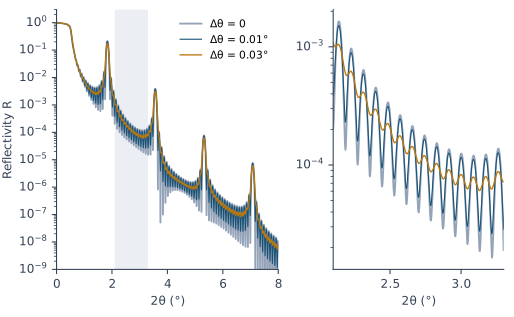
The convolution has three limits, all described in the Help. The Gaussian is cut off at ±0.1° of the chart axis. So a Δθ wider than about 0.04° (with 2θ ticked) loses its tails. At the start of the curve the Gaussian reaches below the first angle. There the program takes the value of the first point, which is the plateau when the scan starts below the critical angle. The last points are replaced by a short moving average. χ² leaves out the points at both ends. The convolution also assumes that the points are evenly spaced.
Polarization: s-type or sp-type
The Polarization setting has two choices. s-type calculates the reflectivity for the electric field parallel to the surface. sp-type calculates it for both polarizations and averages them, which is right for an unpolarized beam.
At grazing angles the two give almost the same curve. Away from the critical angle the p reflectivity is about the s reflectivity times cos²2θ. So sp-type is lower than s-type by (1 − cos²2θ)/2. Table 8-1 shows the numbers X-Ray Calc calculates for the Co/C model. Up to 2θ = 8° the difference stays under 1 %.
Table 8-1: How much lower sp-type is than s-type for the Co/C model of Figure 8-2, calculated by X-Ray Calc 3.9.4.1250, against the approximation (1 − cos²2θ)/2.
| θ (°) | 2θ (°) | sp-type lower by (%) | (1 − cos²2θ)/2 (%) |
|---|---|---|---|
| 0.5 | 1 | 0.01 | 0.02 |
| 1 | 2 | 0.06 | 0.06 |
| 2 | 4 | 0.24 | 0.24 |
| 3 | 6 | 0.54 | 0.55 |
| 4 | 8 | 0.96 | 0.97 |
So use s-type for XRR. It gives the same curve and takes about half the time. sp-type matters at large angles. Near θ = 45° the p reflectivity falls almost to zero. That is the geometry of near-normal EUV and soft X-ray mirrors.
Scanning the angle or the wavelength
Mode chooses the scan. by angle is XRR: the wavelength is fixed, and the angle runs from θ1 to θ2. The calculated points are θ1 + i·(θ2 − θ1)/N, so θ2 itself is not calculated.
by wave fixes the angle and scans the wavelength from λ1 to λ2, at the angle θ (default 85°). Its resolution is Δλ, in Å. Since 3.9.3 it reads the optical constants at every wavelength, absorption edges included. It suits mirrors that work at one angle over a band of wavelengths. This book always uses by angle.
How many points?
N is the number of calculated points: 2000 in a new session, and 1000 in a project that stores no settings. It matters only for a model on its own. When a measured curve is linked, N is not used: the model is calculated at the angles of the measured points.
Too few points skip across the fringes. The fringes of the Co/C stack, 1000 Å thick in total, are about 0.088° apart in 2θ (Chapter 5: Two reflections, one film). Figure 8-3 calculates the model at 150 points up to 2θ = 9°, a step of 0.060°. That is about 1.5 points per fringe. The coarse curve still finds the orders, but its fringes are random. A new session calculates 2000 points over 2θ = 0.01–10°, a step of 0.005°. That is about 18 points per fringe here.
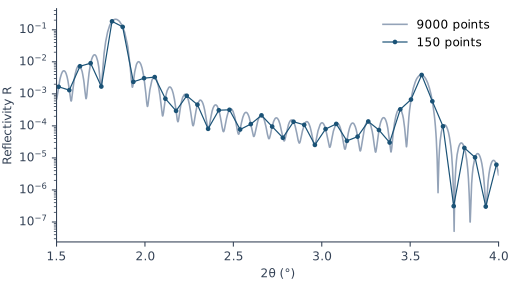
The same rule applies to a measurement. There it can’t be fixed afterward. A measured curve needs at least two points on each fringe that the instrument resolves, as Chapter 5: Reading a thickness from the fringes noted. Data > Assess XRR quality … checks it. Fringes closer together than Δθ are blurred away by the instrument, so for them the check judges the step against Δθ instead (Chapter 10: When not to fit).
A calculation is fast. The Help gives 0.05–0.25 s for a model of 300 stacks of 4 layers at 3000 points on a 16-core processor. X-Ray Calc splits the points between the processor cores. The fit also uses the graphics card when one is available (Chapter 9: When the fit stops).
What this means when you fit
Use s-type. It gives the same curve as sp-type at XRR angles, in half the time. The fitting procedure makes the same choice (§2.5).
Take λ from your measurement. The recursion uses it everywhere, through ε and through k. Chapter 10: The wavelength comes from the file reads it from the file.
Choose Δθ for this measurement, and don’t fit it. It sets the fringe contrast of the model (Figure 8-2). The fitting procedure calls it “a tuning parameter of the instrument, not a constant” (§8.1). Chapter 16: Choosing Δθ by a scan chooses it.
Mind the floor. It lies under the calculated curve and under χ² (Chapter 14: The floor: one count).
Sources
- X-Ray Calc Help, Calculation: Algorithm (the exact Parratt recursion, vacuum above, a semi-infinite substrate, ε from the Henke tables, the roughness factor, the R min floor in the curve and in χ²); Calculation Modes (the points θ1 + i·(θ2 − θ1)/N; Δθ as the FWHM in θ of a normalized Gaussian cut at ±0.1°, too wide above about 0.04° with 2θ ticked; the convolution edges: the first 0.1° convolved with the angles below the start taken at the first point’s value, the last points replaced by a short moving average, and the ends left out of χ²; evenly spaced points; the by-wave mode, its default θ of 85°, Δλ, and optical constants read at every wavelength from 3.9.3); Polarization (s-type and sp-type, Rp ≈ Rs cos²2θ away from the critical angle, Rp near zero at θ ≈ 45°); Number of Points (2000 in a new session, 1000 in a project that stores none, not used with a linked curve); Multi-Threading (0.05–0.25 s for 300 stacks of 4 layers at 3000 points on 16 cores). The Help’s Calculation names the command Calc > Calculate. The menu reads Calc > Run (reported with Chapter 2).
- Parratt, L. G. (1954). Surface studies of solids by total reflection of X-rays. Phys. Rev. 95, 359–369. The recursion formula, solved from the bottom medium, whose reflection is zero because it is infinitely thick (p. 361, Eq. 8).
- Spiller, E. (1994). Soft X-ray Optics. SPIE. The single-film formula applied layer by layer to build any structure (p. 105, Eq. 7.6); the kinematical approximation, which neglects multiple reflections and the depletion of the beam (p. 108), and the full theory needed near a strong maximum (p. 109).
- Fitting procedure (Penkov, Peng & Fu 2026): §2.5, s-polarization, because s and p give the same reflectivity at grazing incidence and the s-only calculation runs twice as fast; §8.1, the resolution “is a tuning parameter of the instrument, not a constant”, never fitted and never inherited from another operator’s project.
- The X-Ray Calc 3 source (release 3.9.4.1250): the recursion (
Shared\Math\unit_calc.pas,TotalRecursiveRefraction) and the wave vectors k = (2π/λ)√(ε − cos²θ) (unit_calc.pas,FresnelCoefficients); the resolution width Δθ × K, with K = 2 on a 2θ axis (unit_calc.pas, the calls ofConvolute), and the normalized Gaussian kernel over ±0.1° (unit_calc.pas,ConvolutionWeights); the convolution edges (unit_calc.pas,Convolute: the first points convolved with the start value, thenMVAon the last points; before 3.9.4.1050 the first 0.1° was copied unconvolved); N = 2000 in a new session and 1000 in a project that stores none, and θ2 = 10 in a new session (XRayCalc3\Views\frame_CalcSettings.dfm,edNandedEndTeta;frame_CalcSettings.pas,LoadFromINI); the labels by angle, by wave, s-type, sp-type (XRayCalc3\Views\frame_CalcSettings.dfm) and the Calc & Fit page of the settings (XRayCalc3\Forms\frm_settings.dfm:399). - Calculated for this chapter (2026-09-24, rerun 2026-09-25) with the X-Ray Calc 3.9.4.1250 engine at λ = 1.5406 Å, with the reflectivity floor lowered to 10⁻¹⁵: the CoC5 expert model of Chapter 6 at three resolutions, in s- and sp-polarization, and at 150 points.
scripts/figures/ch8_engine_data.pyruns the calculations and keeps the curves infigures-src/ch8/.scripts/figures/fig_8_figures.pydraws Figures 8-2 and 8-3 and computes the order heights, the fringe contrasts, the points per fringe and Table 8-1. The fringe spacing λ/(N·D) and the 18 points per fringe of a new session are computed on the page.
Cross-references: Chapter 2: Your first calculation; Chapter 4: Where δ and β come from; Chapter 5: Two reflections, one film; Chapter 7: A boundary with a width; Chapter 9: When the fit stops; Chapter 10; Chapter 12; Chapter 14: The floor: one count; Chapter 16: Choosing Δθ by a scan; Chapter 26: The resolution; Appendix A: Notation and Units; Appendix B: Menus, Buttons and Keys; Appendix D: Glossary.