A fit can only find what the measurement holds. This chapter gets the measured curve into X-Ray Calc with the right angles and the right wavelength. It then asks the program whether the curve is worth fitting at all. The example is the measured Co/C multilayer CoC5 of Chapter 6: The Bragg law with refraction, loaded from the file the diffractometer wrote.
Two ways in: an .xrdml file or a text file
X-Ray Calc reads a measured curve in two forms. An .xrdml file is what a PANalytical or Malvern diffractometer writes. A text file holds two columns, the angle and the intensity. To load either one:
- In the project panel, select the Data folder, or any item in the project.
- Choose Data > Load …. The Load curve from file dialog opens with the filter XRDML (PANalytical).
- Pick the file. X-Ray Calc chooses the reader from the file’s extension.
The curve becomes a new item under Data and a new series on the main chart. Data > From clipboard does the same for two columns copied from another program.
An .xrdml file carries more than the two columns. It records the angle axis of the scan, the wavelength, the counting time of each point, any attenuation factors, and which points counted zero. X-Ray Calc uses all of it. It also keeps the path of the file. Data > Assess XRR quality … reads the file again from there.
A text file carries only the two columns, and X-Ray Calc reads it strictly. One TAB or one space must separate the numbers. A line with a third column, two spaces or an angle that doesn’t start with a digit is skipped, and nothing tells you so. After the first line without a TAB, the rest of the file is read as space-separated. The * lines at the top of the file are kept as the item’s description.
2θ or θ: the mistake a text file lets you make
Chapter 2: 2θ or θ introduced the 2θ box of the calculation settings. It decides whether the chart and the angle fields are in 2θ or in θ. An .xrdml file says which axis it was scanned in, and X-Ray Calc converts it to the unit the box shows.
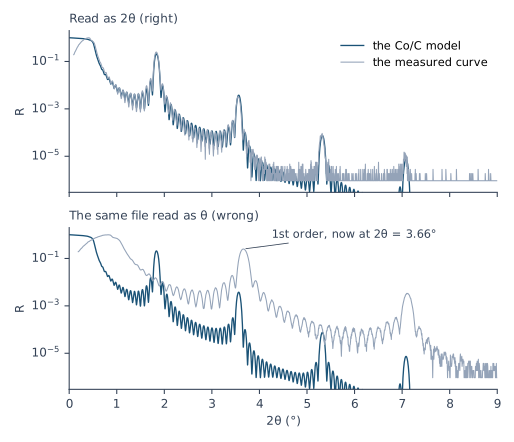
A text file is not converted. X-Ray Calc takes its first column in the unit the box shows at the moment of loading. Ticking or unticking the box later does not convert a curve already loaded. So a file in 2θ loaded with the box unticked is read as θ. Every point then sits at twice its angle.
Figure 10-1 shows the result for CoC5. Read correctly, its first order is at 2θ = 1.83°, on the first order of the model. Misread, it moves to 2θ = 3.66°, next to the model’s second order. The model that matches it has about half the period: the side valley at D/2 in Chapter 9: Figure 9-1. The critical edge also moves to twice its angle. Because θc grows as the square root of the density (Chapter 4: The critical angle and the plateau), a model would need about four times the density to match it.
The wavelength comes from the file
An .xrdml file records the X-ray lines of the tube and the optics in the beam path. When you load it, X-Ray Calc writes the wavelength it implies into the λ(Å) field of the calculation settings. No message tells you so; one line in the item’s description does. The rule for a copper tube is:
- Both Kα lines reach the specimen (the file names Kα, and there is no monochromator or hybrid mirror in the incident beam): λ is the Kα1 and Kα2 wavelengths averaged with the intensity ratio the file gives. For copper with a ratio of 0.5 this is 1.541874 Å.
- A monochromator or a hybrid mirror selects Kα1: λ is the Kα1 wavelength, 1.540598 Å for copper.
CoC5 was measured through a graded mirror that passes both lines. Its file gives a ratio of 0.5. So X-Ray Calc sets λ = 1.541874 Å.
The difference matters for the period. At fixed angles the Bragg law makes the period proportional to λ. A fit made at 1.540598 Å when both lines were measured puts the period 0.08 % too low. For CoC5 that is 0.04 Å, from the 50.23 Å of Chapter 6 to 50.19 Å. One laboratory changed its standard wavelength from 1.5406 to 1.54187 Å for this reason, after a test curve of known structure returned a period 0.055 Å short.
A text file carries no wavelength. The λ(Å) field then keeps the value it had, which is 1.54043 Å in a new project. Type the wavelength of your measurement into it before you calculate or fit.
What the import does to the counts
An .xrdml file stores counts. X-Ray Calc divides each count by its counting time, which gives counts per second. It multiplies in the attenuation factors when the file has them. It then scales the whole curve so that its largest value is 1.
That 1 is only a scale for the chart. It is not a measured reflectivity. On a well-aligned specimen the largest value is the plateau below the critical edge. On a misaligned one the plateau is lower. The largest value can then be the first order (procedure §1.5). Data > Normalize (Auto) sets the scale a fit works at (Chapter 14: Setting the scale).
A zero count can’t be drawn on a logarithmic axis. X-Ray Calc replaces each one by the smallest positive rate before it, but by no more than 1000 counts/s. The item’s description says how many points were replaced.
The description also gives what you need to find one count on the scaled curve:
For CoC5 the file records 4635 points counted 0.176 s each, and a peak rate of 6 107 733 counts/s at 2θ = 0.40°. It has no attenuation factors. So one count is 1 / (6 107 733 × 0.176) = on the scaled curve. X-Ray Calc replaced 2085 zero counts. Chapter 14: The floor: one count sets the reflectivity floor to one count.
Is this curve worth fitting?
Data > Assess XRR quality … answers this question before you fit. It runs eight checks on the selected curve. Each check gives a verdict (pass, warn, fail or unknown), the value it found, the threshold it used and a sentence explaining why. The window’s title shows the worst verdict. An unknown verdict doesn’t count toward it.
Some checks need facts that no file records: the detector’s linear limit, the length of the specimen and the width of the beam. You type them into the window. Left empty, a check that needs one says unknown. X-Ray Calc never supplies a value of its own. Other checks need a design: the period, the total thickness or the critical angle of the structure you meant to make. With Use the current structure as the design checked, they take it from the active model.
To assess a curve:
- Set up the active model as the design, for example the model you will fit (Chapter 12: Building the Starting Model).
- Select the curve in the project panel.
- Choose Data > Assess XRR quality … to open the window.
- Type the detector’s linear limit into Detector max, cps, and the specimen length and beam width into Sample length, mm and Beam width, mm, if you know them.
- Click Assess.
- Click Copy summary and file the text with the measurement.
Table 10-1 shows the eight checks for CoC5. The design is the Chapter 6 model. Without a design, only the zero-count check reaches a verdict.
The table gives each check a readable name. The Check column of the window shows a short key instead. In the order of the table, the keys are counting, plateau_vs_first_order, total_reflection, orders_visible, range_below_background, sampling, footprint and zeros.
Table 10-1: The assessment of CoC5, from its .xrdml file, with the fitted model of Chapter 6 as the design and without a design. Resolution 0.009°, Visible factor 3, Min pts / fringe 3, and no detector limit, specimen length or beam width. Calculated by X-Ray Calc 3.9.4.1250, whose assessment is the one the dialog runs.
| Check | What it looks at | Value for CoC5 | With the design | Without |
|---|---|---|---|---|
| Counting | The highest rate the detector saw, against its linear limit | 6 107 730 counts/s | unknown | unknown |
| Plateau vs first order | The first order over the low-angle maximum | 0.250 (the design allows 0.212) | warn | unknown |
| Total reflection | The scan starts below the critical angle and rises to a plateau | starts at 2θ = 0.10°; design edge at 2θ = 0.52° | pass | unknown |
| Orders visible | Orders above the background, against the design | 4 of 7 (the design expects 4) | pass | unknown |
| Range below background | The part of the scan at or below the background | 60.8 % of the points | unknown | unknown |
| Sampling | Points per Kiessig fringe | 29.4 | pass | unknown |
| Footprint | The angle below which the beam is wider than the specimen | needs the specimen length and beam width | unknown | unknown |
| Zeros | Points that counted zero | 2085 (45.0 %), from 2θ = 4.06° | warn | warn |
Reading the CoC5 result
Plateau vs first order: warn. The first order stands at 0.250 of the low-angle maximum. The design’s own curve gives at most 0.212. Either the plateau was measured too low, as it is when the specimen is slightly misaligned, or the first order is higher than this structure can make it. In the first case the plateau is not a safe point to set the scale. Chapter 14: Letting the fit solve the scale lets the fit solve the scale instead.
Orders visible: pass. Orders 1 to 4 stand at 268 742, 3623, 99 and 16 counts. Orders 5 to 7 reach only 3 counts each, three times a background of one count. An order must stand more than three times above the background, so they don’t count. The design also puts four orders above the background. The fitting range needs the real orders (Chapter 14: Where the fitting range starts and ends).
Zeros: warn. 2085 points, 45 % of the curve, counted zero. The first is at 2θ = 4.06°. The background past that angle is one count, a floor rather than a measured level.
Sampling: pass. The fringes of a 1000 Å stack are 0.088° apart in 2θ. The step of 0.003° puts 29.4 points on each fringe, far above the minimum of 3 (Chapter 8: How many points?).
Counting and footprint: unknown. The detector saw at most 6.1 million counts/s. Whether that is within its linear range depends on the detector, and only its manual says. The footprint check needs the specimen length and the beam width. Type them in, and both checks give a verdict.
When not to fit
A fail is different. It means the measurement can’t carry a fit, and no model will repair it. Measure again when the assessment reports one of these fails:
- a first order above the low-angle maximum. A true reflectivity can’t do that. The plateau was cut, usually by misalignment or by a specimen shorter than the beam footprint.
- fewer than two points per fringe, on fringes the instrument resolves. The step skipped across fringes that were there to be measured, so no fit can match them.
- a scan that starts at or above the critical angle, or whose largest value is its first point. The plateau was never measured.
One warn belongs here too: fewer visible orders than the design expects. The orders the structure should show are missing. The curve can’t fix what they carry.
Fringes finer than the resolution are a different case. The instrument blurs the curve over Δθ (Chapter 8: The resolution: a blur of the calculated curve). A Gaussian blur of FWHM Δθ keeps this fraction of the contrast of fringes spaced P apart, both in θ:
That is 41 % when P = 2Δθ and 3 % when P = Δθ. A stack of total thickness T has P = λ/(2T) (Chapter 5: Two reflections, one film). At Δθ = 0.009° the fringes of a stack thicker than about 4900 Å are gone, and no step can bring them back. The sampling check allows for this. When the fringe spacing is at or below Resolution, deg, it judges the step against the resolution instead. It passes when the step is at most half the resolution. It warns when the step is coarser, because the features the instrument does resolve are then undersampled. Such a curve is fine to fit. Its orders and its edge are measured as well as on any other curve.
A fit that won’t converge has only two causes: a bad measurement or a model that is too simple (Chapter 19: Two causes, and only two). The assessment rules out the first before you start.
What this means when you fit
Load the .xrdml file. It brings the right angles, the right wavelength and the counts the checks need.
Check the angle and the wavelength before anything else. Find one feature you know on the chart. Read λ(Å) against your instrument.
Assess every curve with its design. Read every warn, and don’t fit a curve that fails.
Sources
- X-Ray Calc Help, Experimental Data: Loading Data from File (the dialog, its filters, the new item and series); Loading XRDML Files (the axis brought to the unit of the 2θ switch; counts over counting time with attenuation factors; the curve normalized to 1 at its maximum, a presentation scale that is the first order on a specimen whose plateau is depressed; the wavelength from the file, 1.541874 Å for Cu with both lines, Kα1 behind a monochromator or hybrid mirror; a period fitted at Kα1 when the doublet was measured comes out 0.08 % short); Data Format (two columns, one TAB or one space, the lines skipped, a text file not converted and not converted later); Assessing a Measurement (the eight checks, the verdicts, the fields no file records, the design, the background as the median of the last 100 points, the visible factor, the file re-read from its path). File Formats → Experimental Data Files.
- The X-Ray Calc 3 source, where it differs from or adds to the Help: the reader chosen by the extension (
Shared\Universal\unit_xrdml.pas:130–133); the wavelength rule, which also needs the file to name K-Alpha (unit_xrdml.pas:279–299), written into λ(Å) with one description line and no message (XRayCalc3\Views\frame_ProjectPanel.pas:1804–1809); a zero replaced by the smallest positive rate before it, capped at 1000 counts/s (unit_xrdml.pas:534–547; the text reader,XRayCalc3\Units\unit_SeriesIO.pas:116, 144–145); any line without a TAB switching the rest of a text file to spaces, and only the*lines at the top kept (unit_SeriesIO.pas:98–150, 266–291); the assessment (XRC_MCP\units\unit_MCPAssess.pas, shared byfrm_XRRAssess), a visible order counted only above the visible factor times the background (unit_MCPAssess.pas:722–857), its sampling check, which judges the step against the resolution when the fringe spacing λ/(2T) is at or below it (unit_MCPAssess.pas:905–992), and its re-reading of the file (XRayCalc3\Forms\frm_Main.pas:647–700,actDataAssessExecute“). The labels are fromfrm_Main.dfm,frame_ProjectPanel.dfmandfrm_XRRAssess.dfm. - Fitting procedure (Penkov, Peng & Fu 2026): §1.3, the background floored at one count, and a floored tail carries no background information; §1.4 (rule 4), the wavelength from an
.xrdmlwins; §1.5, the curve normalized to 1 is not a measurement anchor, the maximum can be the first order, and one count = 1 / (peak count rate × counting time); §1.6, a first order above the maximum below the critical edge means a depressed plateau and an unsafe scale anchor. - The instrument preset of the procedure (
skill-v5\presets\csmic-empyrean.json, provenance): the laboratory’s wavelength changed from 1.5406 to 1.54187 Å, the Kα1 + 0.5 Kα2 mean, after a benchmark period came out 0.055 Å short at 1.5406 Å. - The measurement CoC5 (a Co/C multilayer of 20 periods on glass) is from the fitting procedure’s data deposit (CC BY 4.0),
curves/CoC5.xrdml, read in place: a continuous 2Theta-Omega scan, 4635 points at 0.176 s each, a PIXcel3D-Medipix3 detector, Kα1 1.540598 Å, Kα2 1.544426 Å, ratio 0.5, no monochromator. - Calculated for this chapter (2026-09-24, rerun 2026-09-25) with the X-Ray Calc 3.9.4.1250 engine: the import of CoC5 and its assessment with and without the design (the CoC5 expert model of Chapter 6), and the model curve of Figure 10-1 at λ = 1.541874 Å and Δθ = 0.009°.
scripts/figures/ch10_engine_data.pyruns them and keeps the results infigures-src/ch10/.scripts/figures/fig_10_figures.pydraws Figure 10-1 and prints every number of Table 10-1 and of the text, including the order heights in counts. One count, the 0.08 % ratio of the two wavelengths and the 0.04 Å it moves the CoC5 period are computed on the page. So are the contrast a Gaussian blur of FWHM Δθ leaves on a sinusoidal fringe, and the two thicknesses, at Δθ = 0.009° (the expert’s width for CoC5) and a step of 0.003° in 2θ.
Cross-references: Chapter 2: 2θ or θ; Chapter 4: The critical angle and the plateau; Chapter 6: The Bragg law with refraction; Chapter 8: How many points?; Chapter 9: Why a fit needs a global search; Chapter 11: Reading the Curve Before You Fit; Chapter 12; Chapter 14: Letting the fit solve the scale; Chapter 19: The measurement: too few counts; Chapter 24: 2θ read as θ; Chapter 25: Does the curve carry this number?; Chapter 26: The wavelength; Appendix A: Notation and Units; Appendix B: Menus, Buttons and Keys; Appendix C: Where Optical Constants Come From; Appendix D: Glossary.