Before the first fit, you read a few numbers off the measured curve. They set the scale, the floor and the fitting range, and they give the start value of the period. X-Ray Calc shows the curve and the cursor position. It doesn’t find the orders or fit them for you. This chapter does that work by hand on a new curve. It assumes the curve is loaded and assessed (Chapter 10: Is This Curve Worth Fitting?). It uses the Bragg law with refraction from Chapter 6: The Bragg law with refraction.
What you read before the first fit
The example is CoC4, a Co/C multilayer of 20 periods on glass. It was loaded from its .xrdml file, so λ = 1.541874 Å comes from the file. You read four things off it:
- and , the angle and the height of the plateau maximum. The scale of the fit is anchored there, and the fitting range starts there (Chapter 14: Four settings, in this order).
- The background, the level the curve falls to past the last order. It sets the reflectivity floor of the fit.
- The Bragg orders, each with its number m. The last order you can see sets the end of the fitting range.
- The period D and the refraction term 2δ̄, from the order positions. D is the start value of the period in the model (Chapter 12: The periodic stack).
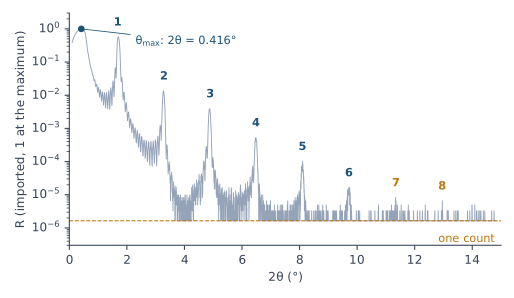
Figure 11-1 marks them on CoC4.
The Chart Info bar
Every number in this chapter is read with the Chart Info bar under the main chart. Its readouts measure different things. Two of them are easy to misread.
- X and Y are the position of the mouse cursor, in the units of the chart’s axes. X is in 2θ when the 2θ box of the calculation settings is ticked. The readout is the cursor position. It doesn’t snap to a point of any curve.
- Rmax, Xmax and Ri are the highest reflectivity, its angle and the area Σ R·Δx of the calculated curve of the active model. They cover the part of the curve that the chart shows. X-Ray Calc computes them again after each calculation and after each zoom.
- D is the period of the active model: the sum of the H fields of its stack.
Figure 11-2 shows the bar with the chart zoomed on one order.
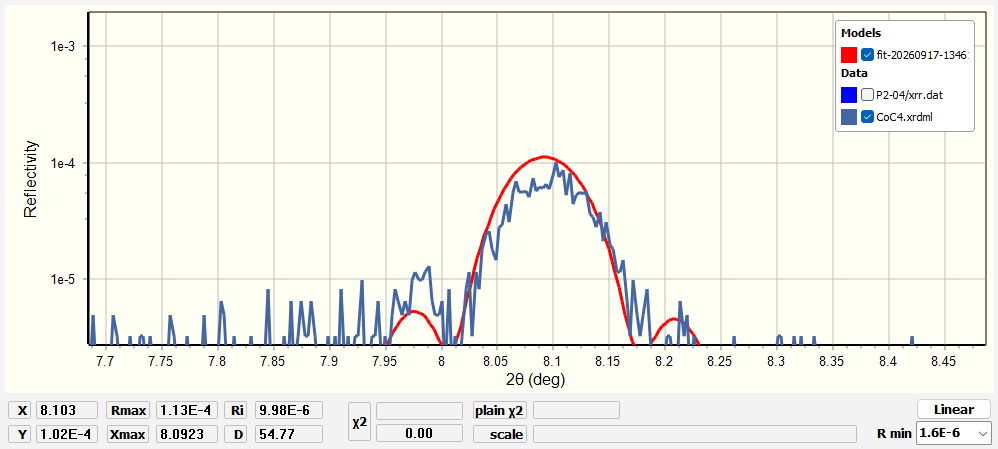
X shows three decimals at any angle, so 11.3365° appears as 11.337. Xmax shows four.
The plateau and the background
and . The plateau is the flat top of the curve below the critical edge. To read it:
- Zoom on the plateau, from 2θ = 0 to about 1°.
- Rest the cursor on the highest point. Read X and Y.
For CoC4 the maximum is at 2θ = 0.4165° (θ = 0.208°). Y is 1 there, because the import scaled the whole curve to 1 at its maximum (Chapter 10: What the import does to the counts). In counts, is the peak rate times the counting time. The item’s description gives both: 3 459 250 counts/s × 0.176 s = 608 828 counts.
Read the first order the same way. For CoC4 it stands at 0.574 of the plateau. Data > Assess XRR quality … compares this ratio with the design: the fitted CoC4 structure gives at most 0.474, so the check warns. Either the plateau was measured too low, or the first order is higher than the structure can make it. A plateau is measured too low when the specimen is slightly misaligned. It is then not a safe anchor for the scale. Chapter 14: Letting the fit solve the scale lets the fit solve the scale instead.
The background. The fitting procedure takes the background as the median of the intensities past the last visible order, and never less than one count. An .xrdml import changes this. Every zero count is replaced by the smallest positive rate before it, so the tail repeats floored values. The median of that tail doesn’t measure anything. Take the background as one count instead.
For CoC4, 1710 of the 4899 points counted zero (34.9 %), the first at 2θ = 3.75°. One count on the imported curve is
When the floored points outnumber the visible orders, as they do here, the curve carries no information about its background. The one-count floor is then your choice. Say so when you report the fit (Chapter 23: Writing the numbers).
Numbering the orders
The order number m enters the Bragg law, so each peak needs the right one. The fitting procedure numbers the orders by prediction. Predict where each order must be with refraction, take the measured maximum there, fit again, and repeat until the numbering stops changing. Spacing the orders evenly, at m times the first order, puts the high orders too high (Chapter 6: Why evenly spaced orders mislead you).
To number the orders on the chart:
- Find order 1: the strongest peak past the critical edge. Read its 2θ with the cursor.
- Predict order 2 from order 1 with the plain Bragg law, and look for the peak near that angle. Read its 2θ.
- Fit the straight line of the next section to the orders found so far. Predict the next order from the line and read its peak.
- Repeat step 3 until no order stands above the background.
- Predict every order again from the final line. Check that each measured peak is still the one nearest its prediction.
Table 11-1 gives the result for CoC4. Orders 1 to 6 stand out clearly. They make the seed of the next section. The line through them predicts order 7 at 2θ = 11.335° and order 8 at 12.958°. Each prediction has one point of a few counts within 0.002° of it. Data > Assess XRR quality … counts both as visible: with a floored background of one count, an order is visible from more than 3 counts.
Table 11-1: The Bragg orders of CoC4. Each position is the highest measured point near the prediction. The counts are the imported values divided by one count. The prediction uses the line through orders 1 to 6 (D = 54.70 Å, 2δ̄ = 2.12 × 10⁻⁵) at λ = 1.541874 Å. The last column spaces the orders evenly, as m times the 2θ of order 1.
| Order m | 2θ measured (°) | Counts | 2θ predicted (°) | Measured − predicted (°) | m × 2θ₁ (°) |
|---|---|---|---|---|---|
| 1 | 1.6975 | 349 171 | 1.6988 | −0.0013 | 1.6975 |
| 2 | 3.2695 | 8250 | 3.2730 | −0.0035 | 3.3950 |
| 3 | 4.8775 | 2387 | 4.8748 | +0.0027 | 5.0925 |
| 4 | 6.4825 | 321 | 6.4846 | −0.0021 | 6.7900 |
| 5 | 8.1025 | 62 | 8.0985 | +0.0040 | 8.4875 |
| 6 | 9.7135 | 10 | 9.7154 | −0.0019 | 10.1850 |
| 7 | 11.3365 | 5 | 11.3351 | +0.0014 | 11.8825 |
| 8 | 12.9595 | 4 | 12.9576 | +0.0019 | 13.5800 |
With refraction, every measured order lies within 0.004° of its prediction. With even spacing, order 7 is predicted 0.55° too high, a third of the 1.60° between two orders. The error grows with m.
Order 7 is weaker than order 8. The layer ratio explains it. The fitted CoC4 structure has Γ = 0.44. The strength factor sin²(mπΓ) is then 0.06 for order 7 and 1.00 for order 8 (Chapter 6: The layer ratio: weak and missing orders). A weak order in the middle of a series still has its number.
The period from a straight line
The Bragg law with refraction is a straight line in m²:
Plot sin²θm against m² for the numbered orders and fit a straight line by least squares. The slope a gives the period, . The intercept is 2δ̄. The fitting procedure seeds the period from the strong low orders, whose numbers are certain.
For orders 1 to 6 of CoC4 the line gives D = 54.70 ± 0.02 Å and 2δ̄ = (2.12 ± 0.22) × 10⁻⁵. The ± values are standard errors of the least-squares line. Adding orders 7 and 8 changes D by less than 0.01 Å.
θ in the formula is half the 2θ on the chart. Take its sine in the angle unit your calculator expects. X-Ray Calc has no command for this line.
The calculator does it. Type the λ of your measurement and the 2θ of each order you have numbered. It gives D, 2δ̄ and 2θc, and it predicts the next two orders so you know where to look for them. It opens with the six orders of CoC4.
A spreadsheet does it. Put m in column A and the measured 2θ of each order in column B. In column C, calculate sin²θ as =SIN(RADIANS(B2/2))^2, and in column D, m² as =A2^2. Then the slope is =SLOPE(C2:C7,D2:D7) and the intercept is =INTERCEPT(C2:C7,D2:D7). The period is λ / (2 √slope), and 2θc is =2*DEGREES(SQRT(intercept)). The web edition of this chapter has a calculator that does the same.
Checking the line against the edge
The intercept gives a critical angle, θc = √(2δ̄). It must fall on the critical edge of the measured curve, because δ̄ is also the average that sets the edge of the stack (Chapter 4: The critical angle and the plateau). The fitting procedure makes this the test of the numbering.
For CoC4, 2δ̄ = 2.12 × 10⁻⁵ gives 2θc = 0.527 ± 0.027°. The measured curve falls from 0.9 to 0.1 of its plateau between 2θ = 0.513° and 0.705°. It is at half the plateau at 0.588°. The line’s 2θc lies on the edge.
A wrong numbering fails the test by far. Table 11-2 fits the same six peaks with two common mistakes. When every order is numbered one too high, 2δ̄ comes out negative, which no material gives. When the 2nd order is skipped, 2θc lands at 2.34°, four times the edge. In both cases the points also scatter about the line 40 to 110 times more.
Table 11-2: The same CoC4 peaks under three numberings. The line is sin²θm against m², at λ = 1.541874 Å. The rms residual is the scatter of the points about the line, relative to the correct numbering. The measured edge is at 2θ = 0.51–0.70°.
| Numbering | Peaks used | D (Å) | 2δ̄ | 2θc (°) | rms residual |
|---|---|---|---|---|---|
| correct | orders 1–6 | 54.70 | 2.12 × 10⁻⁵ | 0.527 | 1 |
| every order one too high | the same six, called 2–7 | 61.80 | −5.72 × 10⁻⁴ | none | 40 |
| the 2nd order skipped | orders 1, 3, 4, 5, 6, called 1–5 | 46.22 | 4.17 × 10⁻⁴ | 2.340 | 110 |
If 2θc misses the edge, drop the highest orders, whose numbers are the least certain, and fit the line again. Don’t expect exact agreement, because the intercept is the least precise number the line gives. On CoC4 the line’s 2θc is 10 % below the half-plateau point.
Going Deeper: why the intercept is the weak number
The intercept is where the line meets m² = 0, far to the side of the measured orders. A small error in any position moves it a lot. On CoC4 the scan step of 0.003° alone gives it a standard error of about 10 %.
It also comes out low. The fitted CoC4 structure has 2δ̄ = 2.58 × 10⁻⁵, from the δ of its C and Co at their fitted densities. That puts 2θc at 0.582°, close to the half-plateau point. The line through the measured orders gives 18 % less. The line through the peaks of a calculated curve, with no noise at all, gives 9 % less than the δ̄ of the same structure. The Bragg law with refraction is an approximation (Chapter 6). So use the edge test to catch a wrong numbering. Don’t use it to measure δ̄.
Putting the period into the model
The seeded period goes into the starting model. Keep the ratio of the layers from your design. Scale both thicknesses of the period by the same factor, so that their sum is the seeded D. The fit then finds the ratio.
- Divide the seeded D by the period of the design.
- Multiply the H field of each layer of the period by that factor.
- Check that the D box of the Chart Info bar shows the seeded period.
- Choose Calc > Run (F5).
- Zoom on each order in turn. Compare Xmax, the model’s peak, with X on the measured peak.
In Periodic mode X-Ray Calc keeps the period at its start value. The fit moves thickness between the layers but can’t move the orders. So with the period held, the seeded period is the fitted period. Free period ± lets it move within a window around the seed. Polynomial mode lets the period change, but the fit still starts from it. The seed is close to the fitted period, within a few tenths of a percent. On CoC4 a fit with the period free moved it from 54.70 Å to 54.79 Å. χ² then fell by a fifth (Chapter 17: Step 1, one period with the period free).
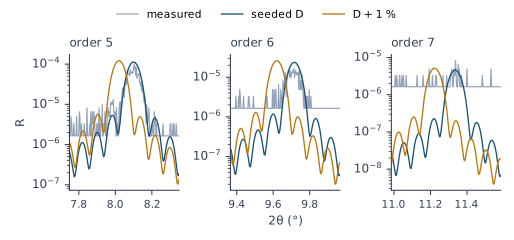
Figure 11-2 shows the check on order 5 for a model whose period is 0.07 Å longer than the seed: Xmax is 0.011° below X. Figure 11-3 shows why the check matters. A period 1 % too long moves orders 5, 6 and 7 of CoC4 by −0.080°, −0.096° and −0.112° in 2θ. An order of this stack is only 0.072° wide at half its height. So the calculated orders miss the measured ones completely, and the miss grows with m.
What this means when you fit
Read and in counts. The scale and the start of the fitting range depend on them. Note the first order against the plateau. A warn here points to the solved scale of Chapter 14: Letting the fit solve the scale.
Take the background as one count from an .xrdml file. Say that it is a floor you chose.
Number the orders by prediction, with refraction. Weak orders keep their numbers. Look for them where the line puts them.
Seed the period from the strong orders, and test the numbering against the edge. A wrong numbering gives a negative 2δ̄ or an edge several times too far out.
Check the seeded model on the chart before the first fit. In Periodic mode, unless Free period ± is ticked, the period you enter is the period you get.
Sources
- Fitting procedure (Penkov, Peng & Fu 2026): §1.2, and read in the critical-angle range, the anchor of the normalization and of the low end of the fitting range; §1.3, the background as the median past the last visible order, floored at one count, taken as one count on an
.xrdmlimport, and a curve with more floored points than visible orders carries no background information, which the report must state; §1.5, the count unit, and the orders numbered by prediction with refraction, refined by least squares and iterated until the assignment stops changing, because even spacing misassigns the high orders; §1.6, a first order high against the plateau points to a depressed plateau; §6.6, the period seeded from the strong low orders by a least-squares line of sin²θm against m², the period from the slope and 2δ from the intercept, the critical angle checked against the measured edge, and the highest orders dropped when they disagree. The paper’s Table 2 gives the GUI action behind step 1: “read θ_max/I_max by eye”. - The X-Ray Calc 3 source, where it adds to the Help: the Chart Info bar (
XRayCalc3\Views\frame_ChartInfo.pasand.dfm). X is printed with three decimals and Xmax with four; a value below 0.01 is printed in exponent form (SetCursorPos,SetPeakInfo). The cursor readout needs an active model (ChartMouseMove). Rmax, Xmax and Ri are recomputed after each calculation (XRayCalc3\Units\unit_CalcOrchestrator.pas,FinalizeCalc) and on each zoom (ChartZoom). The Linear button toggles the axis and its caption between Linear and Log (btnChartScaleClick,UpdateAxisFormat); the box under it is labeled R min (lblMinLimit). The formats are those of X-Ray Calc release 3.9.4.1250. The labels are fromframe_ChartInfo.dfm. - X-Ray Calc Help, Charts & Visualization: Interaction (zoom by dragging, a double-click to reset); Cursor Tracking; Peak Analysis (Rmax, Xmax and Ri read the active model’s calculated curve over the visible range, never the data; Ri = Σ R·Δx; D is the model’s period, the sum of the thicknesses, and is not taken from the peak spacing; X and Y are the cursor position and need an active model).
- The measurement CoC4 (a Co/C multilayer of 20 periods on glass) is from the fitting procedure’s data deposit (CC BY 4.0),
curves/CoC4.xrdml, read in place: 4899 points at 0.176 s each, 2θ = 0.10–14.80° in steps of 0.003°, Kα1 1.540598 Å, Kα2 1.544426 Å, ratio 0.5, no monochromator. The structure used for Γ, δ̄, the design of the assessment and the models of Figure 11-3 is the expert’s full fit in the same deposit,fits/CoC4-expert-full-fit.xrcx: 20 periods of C 30.67 Å (σ 5.58 Å, 1.861 g/cm³) and Co 24.10 Å (σ 2.46 Å, 8.096 g/cm³) on SiO2 (σ 4.4 Å, 2.65 g/cm³), with a period of 54.77 Å fitted at λ = 1.5406 Å. - Calculated for this chapter (2026-09-24, rerun 2026-09-25) with the X-Ray Calc 3.9.4.1250 engine: the import of CoC4 and its header (peak 608 828 counts at 2θ = 0.4165°, 3 459 250 counts/s, no attenuation factors, 1710 zero counts); the assessment with the fitted structure as the design at Δθ = 0.012° (plateau vs first order 0.574 against 0.474, warn; 8 of 9 orders visible, 6 expected); δ of C and Co at λ = 1.541874 Å (7.291 × 10⁻⁶ at 2.266 g/cm³ and 2.355 × 10⁻⁵ at 8.79 g/cm³); and the model curves.
scripts/figures/ch11_engine_data.pynumbers the orders and runs the engine, keeping the results infigures-src/ch11/.scripts/figures/fig_11_figures.pydraws Figures 11-1 and 11-3 and prints every number of Tables 11-1 and 11-2 and of the text (figures-src/ch11/numbers.txt). One count, the lines, their standard errors and the edge levels are computed on the page from these data.
Cross-references: Chapter 4: The critical angle and the plateau; Chapter 6: The Bragg law with refraction; Chapter 9: What χ² measures; Chapter 10: Is This Curve Worth Fitting?; Chapter 12; Chapter 14: Letting the fit solve the scale; Chapter 14: The floor: one count; Chapter 15: What is free; Chapter 16: The fringe contrast as a check; Chapter 17: Step 1, one period with the period free; Chapter 23: Writing the numbers; Chapter 24: A plateau measured too low; Chapter 24: Orders numbered wrong; Chapter 26: The background; Appendix A: Notation and Units; Appendix B: Menus, Buttons and Keys; Appendix D: Glossary.