A multilayer is deposited one layer at a time, often over hours. If a deposition rate changes during the run, the period changes with depth. Chapter 7: A stack that drifts showed what that does to the curve. X-Ray Calc can fit a stack with one period for every period, or with a period that changes from the top of the stack to the bottom. The fitting procedure fits every multilayer both ways and then decides between them. This chapter does that for three curves: the demo of Chapter 3, whose drift is known, and the measured Co/C multilayers CoC4 and CoC5. CoC4 carries the fit of Chapter 16: Several runs, and their spread forward, at Δθ = 0.014°.
Two ways to describe a stack
Periodic mode fits one H, σ and ρ for each layer of a stack, and every period gets the same values. The period D, the sum of the H values, stays at its start value. After every step of the swarm, X-Ray Calc scales the thicknesses back to that sum. So the fit can move thickness from one layer of the period to the other. With Free period ± ticked in the Fitting panel, D may move by up to the percentage in the box after it. The scaling then acts only when the sum leaves that window. Without the box, the fit can’t change D (Chapter 11: Putting the period into the model).
Polynomial mode lets a parameter change from period to period. Its value in period k is a polynomial in k:
Period 1 is the top period, next to the surface. C₀ is its value, and the layer’s field in the structure panel shows C₀. The Order field sets the highest power. It starts at 1, which is a straight line through the stack. Nothing holds the sum of the thicknesses in this mode, so the period is free.
The box after each field decides which parameters get a polynomial. Every layer has an unlabeled box after its H, σ and ρ fields. Its hint calls the parameter “paired”. A ticked box holds the parameter at one value in every period. A cleared box gives it a polynomial. The boxes work only in a stack with N > 1, and only in Irregular and Polynomial mode. The box before the material name is a different control. It pairs the layer with another layer.
Irregular mode fits every period of a stack on its own. A ticked box copies the value of period 1 into every period. Chapter 22: A supermirror in Irregular mode uses this mode for a stack graded on purpose.
What a drift does to the orders
A drift puts the Bragg orders of the early periods at slightly different angles from those of the late periods. The spread grows with the order number (Chapter 6: The higher orders carry the fine details). A model with one period puts all its periods at one angle for each order. It can match the low orders, because their spread is small. At the high orders its peaks come out too tall and too narrow. The fitting procedure describes the sign: the one-period fit reproduces the low orders, but shows “the calculated Bragg maxima standing clearly above the measured ones, and further above them the higher the order” (§9.3). The sign is the shape across the orders. The procedure sets no threshold on it. The author put it in fewer words: “if the large orders are not symmetrical, there is a drift.”
Figure 17-2 shows the pattern on the Chapter 3 demo. Its Si thickness changes from 25.00 Å at the top to 28.60 Å and back to 26.96 Å at the bottom (Chapter 3: What the fit found). A fit with one period, whose length was free, ended at D = 42.41 Å and χ² = 21.1. Its peaks divided by the measured peaks are 1.14, 1.89, 5.55, 3.14 and 9.29 for orders 1 to 5.
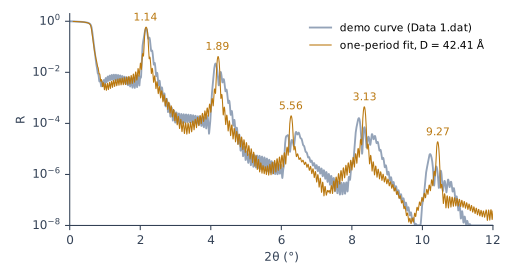
In X-Ray Calc, calculate the model and choose Result > Fit report …. Its Bragg orders table gives the calc / meas ratio of every order (Chapter 18: The order table). You can also zoom in on each order and compare Rmax in the Chart Info bar, the model’s peak, with the cursor on the measured peak (Chapter 11: The Chart Info bar). The residual strip under the chart shows the pattern without a zoom: a spike above zero at each order, taller at each higher order.
The two measured curves of this chapter don’t show the pattern. Their one-period fits make the high orders too low. For CoC4, orders 7 and 8 come out at 0.28 of the measured height. For CoC5, order 4 comes out at 0.46–0.59. The procedure fits both modes anyway, for the reason in Step 2.
Step 1: one period, with the period free
The procedure fits every new multilayer first with one period, and with the period free (§9.1):
- Choose Project > Duplicate Model. Step 2 starts from the copy.
- Select Periodic in the Mode group of the Fitting panel.
- Tick Free period ± and leave 10 in the box after it. The period may then move by 10 % of its start value either way, the window the procedure uses.
- Choose Calc > Auto Fitting (F7) and click Run. Fit five times, as in Chapter 16: Several runs, and their spread.
- Read the fitted period in the D box of the Chart Info bar.
Each layer still stays within its own H limits, so the limits must leave room for the new period (Step 2 says the same for Polynomial mode). The window is taken around the model the fit starts from. So Calc > Resume Fitting carries on from the period the last fit reached. The project file keeps the box and the percentage.
Table 17-1 shows what the free period does. The period of Chapter 11 was read from the orders of each curve before any fit. For CoC4 it was 54.70 Å, and the free fit puts it at 54.79 Å. For CoC5 it was 50.33 Å, and the free fit puts it at 50.19–50.23 Å. The differences are 0.2–0.3 % of the period. They lower χ² by a fifth.
Table 17-1: CoC4 and CoC5, five fits each with one period held at the value read from the orders, with one period free (Periodic mode, Free period ± 10 %), and in Polynomial mode of order 1 and 3 with σ and ρ ticked. D is the mean over the 20 periods. Population 5000, 200 iterations, Δθ = 0.014° for CoC4 and 0.012° for CoC5, the settings of Table 16-1, and the limits after the near-bound rule (see Decide on the drift). Fitted by X-Ray Calc 3.9.4.1250.
| Fit | CoC4: D (Å) | CoC4: χ² | CoC5: D (Å) | CoC5: χ² |
|---|---|---|---|---|
| One period, held | 54.70 | 1.2341–1.2420 | 50.33 | 0.8519–0.8521 |
| One period, free | 54.79 | 0.9751–0.9760 | 50.19–50.23 | 0.6825–0.7051 |
| Polynomial, order 1 | 54.73–54.81 | 0.9588–1.0342 | 50.13–50.22 | 0.6833–0.7069 |
| Polynomial, order 3 | 54.80–54.83 | 0.7893–0.9384 | 50.18–50.26 | 0.6156–0.6589 |
On both curves, most of what Polynomial mode gains over a held period comes from the period. Little of it comes from the drift. On CoC4, order 1 lowers χ² by only about 0.02 below the free one-period fit. On CoC5 it doesn’t lower it at all. So always compare Polynomial mode with the free one-period fit. A comparison with the held period credits the drift with what the period did.
The free period also moves other values of CoC4. The Co density goes from 7.33–7.35 g/cm³ to 7.59–7.62 g/cm³. With the period held, two runs of five gave C the smaller σ (2.53 Å against 4.23 Å for Co), and three gave it the larger one. With the period free, all five runs gave C the larger σ: 4.3 Å for C and 2.6 Å for Co. Chapters 14 to 16 fitted CoC4 with the period held, so their fitted values belong to the held period. In the program itself, one run of each on CoC4 gave χ² = 1.197 with the period held at 54.70 Å, and χ² = 0.997 in Irregular mode with every box ticked, with D = 54.77 Å. Three runs in Periodic mode with Free period ± 10 % gave χ² = 0.997 at D = 54.77 Å once. The other two gave 1.062 at 54.76 Å, with the σ pair swapped: 2.57 Å for C and 4.33 Å for Co. So in the program the free period doesn’t always settle the σ valley. Several runs show it.
Step 2: the Polynomial fit, always
The procedure runs the Polynomial fit whatever the one-period fit scored (§9.2). A fit takes seconds, so nothing is saved by skipping it. And χ² can miss a drift. When every deposition rate drifts, the drifts of the layers can partly cancel. The period then changes less than any layer. In one laboratory’s tests on a calculated Co/C stack, the Co layers got 5 % thinner from bottom to top and the C layers 3 % thicker. The period changed by only 0.29 Å. A choice by χ² never picked the drifting model. The Polynomial fit still found a period drift, of 0.39–0.52 Å.
- Select the copy of the starting model that you made in Step 1. Click it in the project tree, so that the triangle moves to it.
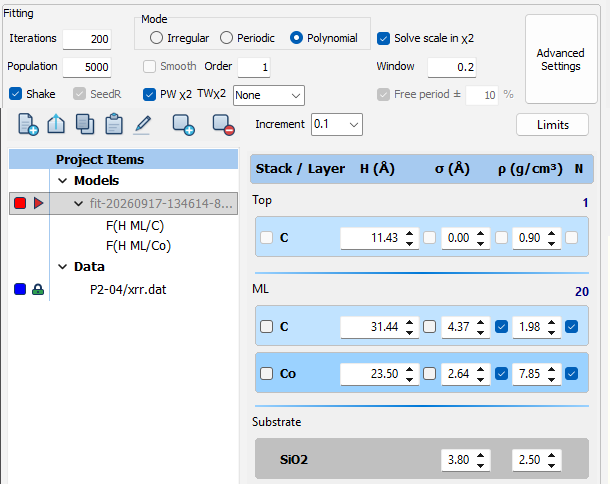
- Select Polynomial in the Mode group and type 1 in Order.
- Clear the box after H of every layer of the periodic stack. Keep the boxes after σ and ρ ticked. If your design has an interlayer, keep the box after its H ticked too.
- Choose Project > Duplicate Model. The fit runs on this new copy. The model of steps 1–3 stays as it was.
- Choose Calc > Auto Fitting (F7). In the Fitting Limits dialog, check that each Hmin and Hmax leaves room for the top period and the bottom period. Click Run.
- Select the model of steps 1–3 again, and repeat steps 4 and 5 until you have five runs.
Each run needs a fresh copy. Polynomial mode starts the swarm around the model, and SeedR is grayed out. A fit writes its result into the model. So a second run on a fitted model would start around the first result (Chapter 16: Several runs, and their spread). If X-Ray Calc asks about Extensions from the previous fitting, the model was fitted before. Click Cancel, and duplicate the model of steps 1–3 instead.
Only the thicknesses get a profile because of what drifts. A drift comes from the deposition rates. A change of rate moves the thickness of every main layer. The roughness, the density and the interlayers come from intermixing at the interfaces. The author’s laboratory holds the substrate at a constant temperature with water cooling, so intermixing doesn’t drift. Its preset keeps σ, ρ and interlayer thicknesses at one value in every period.
Reading a drift in X-Ray Calc
After a Polynomial fit, the H field of a profiled layer shows C₀, the top period. The D box shows the top period too (Chapter 3: What the fit found). The rest of the profile is in the new items under the model, one for each profiled parameter, for example F(H ML/C).
Double-click the item. The Profile function editor opens (Figure 17-3). It lists the coefficients c1 and up, and plots the layer’s value in each period. For order 1, the change of a layer from the top period to the bottom one is c1 × (N − 1). The period drift ΔD is the bottom period minus the top one. It is the sum of that change over the layers of the period:
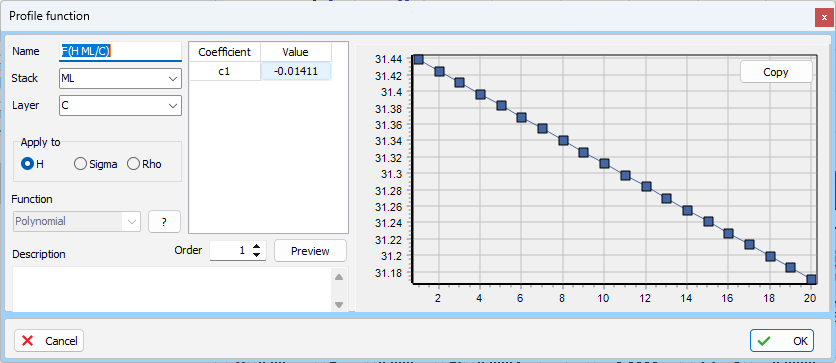
The Thickness page at the bottom of the working area draws every layer’s thickness period by period. Result > Export fit results… also writes the coefficients of every profile, under polynomials. Export the fit results after each run. The coefficients give the ΔD of every run.
Decide on the drift, not on χ²
The procedure decides on the drift (§9.7). For each of the five runs, work out ΔD. Take the run with the lowest χ², as in Chapter 16. If its ΔD is larger than 2 standard deviations of ΔD over the five runs, report a drifting stack. Otherwise report a uniform stack, and the one-period fit stands. The factor 2 is one laboratory’s value. In its tests on calculated curves, it picked the drifting model for every noisy curve with a 5 % drift in one layer, and for no curve without a drift. The test is on the drift because the drift is the claim. χ² measures how well the model fits this curve. It fell by less than the runs scatter in the laboratory’s test with cancelling drifts, while the period drift was still found.
Table 17-2: The drift test. ΔD of the run with the lowest χ², and the standard deviation of ΔD over five runs, for the Polynomial fits of Table 17-1 and of the demo. Fitted by X-Ray Calc 3.9.4.1250.
| Curve | Order | ΔD, best run (Å) | Spread (Å) | 2 × spread (Å) | Result |
|---|---|---|---|---|---|
| CoC4 | 1 | −0.39 | 0.06 | 0.13 | drift |
| CoC4 | 3 | +0.78 | 0.41 | 0.81 | uniform |
| CoC5 | 1 | +0.34 | 0.35 | 0.70 | uniform |
| CoC5 | 3 | −0.01 | 0.18 | 0.35 | uniform |
| Demo (true ΔD +1.96) | 1 | +3.57 | 0.007 | 0.01 | drift |
| Demo (true ΔD +1.96) | 3 | +1.96 | 0.97 | 1.93 | drift |
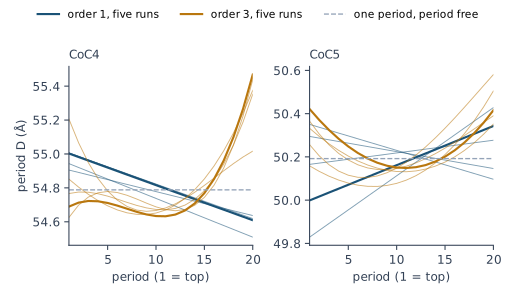
CoC4, order 1. Every run gives a period that shrinks from the top to the bottom, by 0.27–0.43 Å. The best run goes from 55.00 Å at the top to 54.61 Å at the bottom. That is 6 times the spread, so order 1 reports a drift of −0.39 Å, 0.7 % of the period.
CoC5, order 1. Here the runs disagree. Two runs made the contamination layer sharp, with σ below 1 Å, and their period grew toward the substrate by 0.34 and 0.60 Å. Three made it rough, with σ of 7–9 Å, and their ΔD lay between −0.25 and +0.11 Å. The drift followed the top of the stack. So the test reports CoC5 as uniform.
Extend the limits before you read a drift. CoC5 shows why. With the limits of Chapter 15, the Co density ended on its lower limit of 6.00 g/cm³, or within 5 % of the range from it, in three runs of five. The σ of the contamination layer ended on its upper limit in one run. In those fits every run gave ΔD between +0.20 and +0.31 Å. The test would have reported a drift of +0.23 Å. The near-bound rule of Chapter 15: The near-bound rule widened those limits in three rounds. Then the drift was gone. The limits had made it look certain. For CoC4 one round was enough. It widened the limits of the contamination layer.
Report the drift of the period. Don’t report how it splits between the layers. In the laboratory’s tests the drift of the period came out within 0.1 Å of the true one, while its split between Co and C was not determined. The curve fixes the period’s drift. The deposition record says which rate changed.
Raising the order
Order 1 draws a straight line through the stack. A drift can curve. The procedure raises the order only when the fit asks for it (§9.8). Keep order 3 only if it passes every check of Chapter 18: When an order fails. Its best χ² must also be lower than the best χ² of order 1 by more than 2 standard deviations of order 1’s χ² over its runs. Report both fits, both spreads, and the reason for the choice.
The demo shows why the order matters (Figure 17-4). Its true period is 40.00 Å at the top, 43.60 Å in period 22 and 41.96 Å at the bottom, so ΔD = +1.96 Å. Order 1 gave χ² = 6.40 and ΔD = +3.57 Å in all five runs, within 0.02 Å of each other. The runs agreed. The answer was still wrong, because a straight line can’t follow the curve. Order 3 lowered χ² to 0.040 in its best run and found the true profile: 39.98 Å at the top, 43.57 Å at its highest, 41.94 Å at the bottom. Two more runs came close. Two stopped at χ² = 0.89 and 0.94, with ΔD near +3.8 Å.
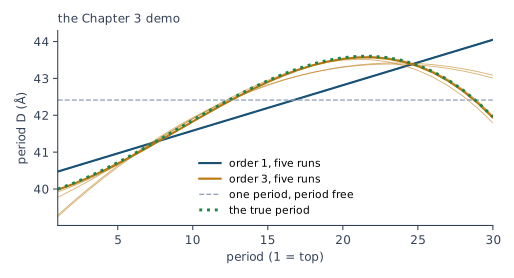
On CoC4 and CoC5, order 3 passes the χ² margin as well: 0.79 against 0.96 on CoC4, where the margin is 0.07, and 0.62 against 0.68 on CoC5, where it is 0.02. But its ΔD is not decided (Figure 17-5). The runs agree in the middle of the stack and spread at its ends. On CoC4 the best run of order 3 even has the opposite sign to order 1: +0.78 Å against −0.39 Å. Its spread, 0.41 Å, is too large for a drift. On CoC4 the two orders disagree. Order 3 also fails the weak orders of Chapter 18: When an order fails, so it isn’t kept. Order 1’s drift of −0.39 ± 0.06 Å is the one reported. Report order 3 beside it, with no drift it can decide (§9.8).
When a higher order is kept, the drift test uses its runs. The procedure’s Polynomial fit starts at order 1 and is raised only when the fit asks for it (§9.5), so the fit it tests is the one at the order it keeps. On the demo, order 3 passes every check in its best run and is kept (Chapter 18: When an order fails). Its ΔD of +1.96 Å is larger than 2 × 0.97 = 1.93 Å (Table 17-2), so the demo is reported as drifting, with the true drift. Order 1’s tight +3.57 Å is reported beside it, as the fit that was not kept.
Going Deeper: why the ends of the stack are the weak part
What this means when you fit
Fit one period first, with the period free. Use Periodic mode with Free period ± ticked at 10 %. Put the fitted period into any model you keep in Periodic mode.
Then fit Polynomial mode of order 1, with the boxes after H cleared and those after σ and ρ ticked. Check that the H limits cover the top and the bottom period. Run it five times, whatever χ² the first fit gave.
Extend every limit a run ends on, and refit both modes before you read the drift (Chapter 15: The near-bound rule).
Decide on ΔD against twice its spread over the runs. Report the drift of the period. Leave out which layer drifted.
Try order 3, and keep it only if χ² falls by more than twice order 1’s spread and the fit passes Chapter 18: When an order fails. When the two orders disagree about the drift, report both.
Then judge the fit (Chapter 18: Judging a Fit). Chapter 23: The report, item by item lists what to report for the mode: both fits with their χ² and spreads, ΔD and its spread, and the order used.
Sources
- Fitting procedure (Penkov, Peng & Fu 2026): §9.1, every new multilayer fitted first with one period and the period free; §9.2, the Polynomial (“profile”) fit run always, because a fit costs seconds and χ² can’t see a drift whose layer drifts cancel; §9.3, the one-period fit reproducing the low orders and standing above the high ones, more with each order, quoted, with no threshold; §9.4, a one-period fit that fails a check may be failing because the period drifts; §9.5, the Polynomial fit of the first order, raised only when the residual asks for it (so the drift test of §9.7 applies to the order that is kept), σ and ρ paired, interlayer thicknesses held, because deposition rates drift and intermixing does not; §9.6, the period left to float in Polynomial mode and bounded through the layer limits; §9.7, the drifting stack reported when the period drift, substrate end minus surface end, exceeds the margin times its spread over the seeds, and the split of the drift between layers not reported; §9.8, a higher order kept only if it passes every check and lowers χ² by more than the margin times the first-order fit’s spread, both fits reported; §7.1 and §7.5, the period freed and the near-bound rule; §10.13, a roughness that absorbs a misfit as a sign of a model that is too simple. The procedure’s §7.1 frees the period in Periodic mode itself, within ±10 %. X-Ray Calc’s Periodic mode does the same with Free period ±, 10 % by default.
- The procedure’s preset (
skill-v5\presets\csmic-empyrean.json), one laboratory’s values:optimizer.poly_order_first1,optimizer.pairedσ and ρ,optimizer.lock_interlayer_thicknesstrue (inprovenance: “the author’s profile model; with a water-cooled substrate holder intermixing does not drift, deposition rates do”),reporting.model_selection.margin_in_seed_spreads2.0. - The procedure’s benchmark (
XRR-Fitting-Skill\benchmark\results\FINDINGS.mdand Supplementary S5, curves calculated from known structures): item 10, the margin of 2 choosing the drifting model in every realization with a 5 % drift and never without one; item 11, the period drift recovered (+1.24 to +1.30 Å for a true +1.21 Å) while its split between Co and C was not; item 15, Co 5 % and C 3 % drifting in opposite directions, a net period drift of +0.29 Å, never chosen by χ², and a fitted period drift of +0.39 to +0.52 Å (S5; FINDINGS item 15 gives +0.39 to +0.62 Å, and the chapter follows S5). - The procedure’s history (Supplementary S1): v3 added the paired profile parameters; v4 ran a profile fit only when the one-period fit failed a check, with
poly_order3, and kept it on χ²; v5 runs both fits always and decides on the drift. - The methods paper on the procedure (Penkov, Peng & Fu 2026, arXiv:2609.28926), Table 2 (step 9: the mode chosen in the program “by peak symmetry”, Polynomial of order 3 with σ and ρ paired) and §4 (the audit: Polynomial mode of order 3 with σ and ρ paired the default in every periodic fit of the author’s projects except the two CoC4 reference projects); §6, the early CoC5 fit with its fourth order about 7 times too low and σ of Co at 9.17 Å on a 17.13 Å layer.
- The expert’s rulings (Supplementary S3): ruling 38 (2026-09-18), “if the large orders are not symmetrical, there is a drift”; ruling 44 (2026-09-18), on the early CoC5 fit, quoted in part.
- The X-Ray Calc 3 source: the Mode group and Order field (
XRayCalc3\Views\frame_CalcSettings.dfm,rgFittingMode,edPolyOrderwith default 1; saved as[FIT] ModeandPolyOrder,frame_CalcSettings.pas); Periodic mode holding the sum of the layers after every move (XRayCalc3\LFPSO\unit_LFPSO_Periodic.pas,SetStructure,NormalizeD), or keeping it within D(1 ± window) with Free period ± ticked (XRayCalc3\Views\frame_CalcSettings.dfm,cbFreePeriod,edPeriodWindow, default 10, saved as[FIT] FreePeriodandPeriodWindow;XRayCalc3\Units\unit_SmartLimits.pas;unit_CalcOrchestrator.pas); Polynomial mode’s coefficients, the polynomial value(k) = C₀ + Σ Cᵢ(k − 1)ⁱ with k = 1 at the surface, no hold on the period, the check of every period against Min and Max with the highest coefficient set to 0 first, and SeedR replaced by a start around the model (unit_LFPSO_Poly.pas,Set_Init_XPoly,CheckLimitsP,RangeSeed;Shared\Math\math_globals.pas,Poly); Irregular mode’s periods fitted one by one, and a ticked box copying period 1 into every period (unit_LFPSO_Irregular.pas); the boxes after the fields and their hint, and the box before the material name with the hint “Pair to another layer” (XRayCalc3\Components\unit_XRCLayerControl.pas), active only for N > 1 outside Periodic mode (unit_XRCStructure.pas); the Profile function editor (XRayCalc3\Editors\editor_ProfileFunction.pas); Calc > Run applying every enabled profile item (XRayCalc3\Units\unit_CalcOrchestrator.pas); Result > Export fit results… writing every coefficient of a Polynomial fit underpolynomials(unit_CalcOrchestrator.pas,BuildFitRecord,ExportFitResultsToJSON); SeedR grayed out in Polynomial mode (frame_CalcSettings.pas,rgFittingModeClick); the dialog Extensions from the previous fitting, with Clear them, Keep them and Cancel, shown before a new fit of a model that carries extensions from a fit of this session, and not for a reopened project (XRayCalc3\Units\unit_StaleExtDialog.pas;unit_CalcOrchestrator.pas,StartFitting,PrepareLFPSO;frame_ProjectPanel.pas,HasFitExtensions), all as of release 3.9.4.1250; the Project panel’s delete button, hint “Delete item” (XRayCalc3\Views\frame_ProjectPanel.dfm,BtnRecycle). The equivalence of a Polynomial or Irregular fit with every box ticked to a Periodic fit with the period free was checked in the code by the X-Ray Calc session (2026-09-24), on the engine (CoC4: χ² 0.9751 at D = 54.789 Å either way) and in the program (one run each, Step 1). - X-Ray Calc Help, Fitting: Fitting Modes (Periodic holds the period; Polynomial mode, its formula, the order limited to 1–9 and kept low, at 5 or less in practice). Reported with this chapter, where the Help and the code differed, and since corrected in the Help: Staged Fitting said a resumed fit continues from the depth profiles, which then held only in Polynomial mode (in release 3.9.4.1250 an Irregular resume also starts from the Table); Polynomial factor described (Max − Min)/Fᵖ as the search range of a coefficient, while the code uses it only for the start spread and the step, and the bound is every period inside Min and Max. Still reported: Models doesn’t describe the boxes after the fields.
- The Chapter 3 demo is
ML(30x2)P3_Best.xrcxfrom the Examples folder of the installer: Data 1.dat calculated from its model Target, whose Si thickness follows 25 + 0.14(k − 1) + 0.012(k − 1)² − 0.0005(k − 1)³ Å over 30 periods of Si on 15 Å of Mo. The fits of this chapter start from its model For fit with its limits, at λ = 1.54043 Å and Δθ = 0.015°. - The measured curves CoC4 and CoC5 are from the fitting procedure’s data deposit (CC BY 4.0),
curves/CoC4.xrdmlandcurves/CoC5.xrdml. CoC4 is prepared as in Chapters 14 to 16. CoC5 is prepared the same way from its own curve (Chapter 10): the expert layers scaled to the period read from its four orders, the contamination layer on top, the limits of Chapter 15, and Δθ = 0.012° from a scan over 0.012–0.015°. - Calculated for this chapter (2026-09-24, rerun 2026-09-25) with the X-Ray Calc 3.9.4.1250 engine, with the seeds of the preset’s list.
scripts/figures/ch17_engine_data.pyruns the fits: the four fits of Table 17-1 for each curve, five runs each, repeated with the limits widened as Widen does until no run ended near a widenable limit (figures-src/ch17/coc4-final.json,coc5-final.json; the fits before widening arecoc4.json,coc5.json); the demo in three modes (demo.json); and the curves of Figure 17-2. The row “One period, free” of Table 17-1 is Periodic mode with the period free within ±10 %, as Free period ± does it, fitted withscripts/figures/ch18_engine_data.pyon the widened limits (figures-src/ch18/coc4-free.json,coc5-free.json, 2026-09-25). The three runs with Free period ± in the program are from X-Ray Calc 3.9.4.1030. The order heights quoted for the one-period fits are at the chart’s scale. The engine can’t set a thickness limit at 0, so a widened thickness limit stops at 0.1 Å.scripts/figures/fig_17_figures.pydraws Figures 17-2, 17-4 and 17-5 and prints every number of the chapter (figures-src/ch17/numbers.txt). Figures 17-1 and 17-3 are captures of X-Ray Calc 3.9.4.1270 (2026-09-25; one run of the Chapter 18 free-period start in Polynomial mode of order 1, with the limits of Table 17-1’s fits, with sp polarization, driven byfigures-src/gui/s17.py, saved asfigures-src/fits/ch17-coc4-poly1-gui.xrcx; c1 of F(H ML/Co) −0.003351, so ΔD = −0.33 Å). The other single runs in the program are captures of X-Ray Calc 3.9.4.1030 (figures-src/screenshots/ch17-irregular-ticked-full.png,ch17-periodic-held-full.png), fitted with the program’s own seeds and with sp polarization.scripts/figures/ch17_end_periods.py(2026-09-25, the X-Ray Calc 3.9.4.1270 engine) writes the best order-1 run of CoC4 out period by period, which gives its χ² back (0.958798 against 0.958821), and scores it with one period at a time 0.3 Å thicker and 0.3 Å thinner, both layers scaled, the scale solved as in the fit. The curvature of χ² is 0.129 for period 1, 0.787 for period 11 (the largest) and 0.082 for period 20. The same script gives the standard deviation of a least-squares polynomial’s value in each period, relative to that of one period, as the square root of the diagonal of X(XᵀX)⁻¹Xᵀ: for order 3 over 20 periods, 0.750 at either end and 0.338 in the middle (figures-src/ch17/end-periods.json).
Cross-references: Chapter 1: Table 1-1; Chapter 3: What the fit found; Chapter 6: The higher orders carry the fine details; Chapter 7: A stack that drifts; Chapter 9: Where the swarm starts; Chapter 11: Putting the period into the model; Chapter 13: Two rules for reading a curve; Chapter 15: The near-bound rule; Chapter 16: Several runs, and their spread; Chapter 18: When an order fails; Chapter 18: The order table; Chapter 22: A gradient in Polynomial mode; Chapter 23: The report, item by item; Chapter 25: Is the model complete?; Chapter 26: Ten Things X-Ray Calc Does Not Fit for You; Appendix A: Notation and Units; Appendix B: Menus, Buttons and Keys; Appendix D: Glossary.