The starting model is the structure you ask X-Ray Calc to improve. This chapter builds one for the measured Co/C multilayer CoC4, from its design and from the period measured in Chapter 11: The period from a straight line. The structure panel and its dialogs were introduced in Chapter 2: Opening a demo project.
What the starting model decides
Some things in the model are never fitted. The fit keeps the materials, the order of the layers, the number of periods N of each stack and the whole substrate. Whatever you enter there is in the result. The substrate is held completely: X-Ray Calc takes its material, σ and ρ from the structure and never passes them to the fit.
The other values are start values. With SeedR checked, the swarm starts spread over the fitting limits, so the start values matter through the limits you set around them (Chapter 9: Where the swarm starts). Polynomial mode always starts around the starting model. Periodic mode keeps the period you enter, or moves it only within the window of Free period ± (Chapter 11: Putting the period into the model).
The design of CoC4 was “a 20-period Co/C multilayer on a glass substrate”, “a period of about 54 Å with C about 31 Å and Co about 23 Å per period”. A thin carbon layer of low density was expected on top. Chapter 11 measured the period as 54.70 Å.
The substrate
The fitting procedure holds the substrate fixed: its material, its density and its σ. Because the fit can’t correct them, enter the values that belong to your substrate.
The material must be a name in the materials table, such as Si or SiO2. X-Ray Calc doesn’t read the name as a formula.
The density needs care. ρ = 0 means the bulk density of the material’s table. The SiO2 table holds crystalline quartz at 2.65 g/cm³ (Chapter 4: Where δ and β come from). Glass substrates are lighter. One laboratory’s list of substrates, as an example:
- Soda-lime glass: 2.5 g/cm³, the conventional density of this glass. It has no table of its own.
SiO2at 2.50 g/cm³ has nearly the same electron density, within about 1 %. - Fused silica:
SiO2at 2.2 g/cm³. - A silicon wafer:
Siat 2.329 g/cm³. A wafer that was not etched just before deposition carries 10–20 Å of native oxide. Give it its ownSiO2layer when the fit needs it, rather than raising σ.
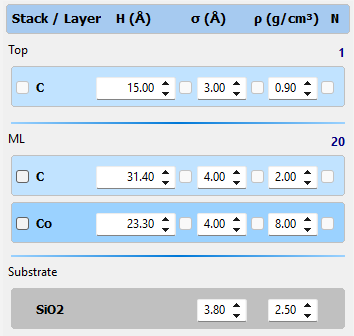
The roughness σ of the substrate is a start value in the procedure’s words, but the fit never changes it. The same laboratory uses σ = 3.8 Å for its soda-lime glass, the value its fits kept returning. Treat such a number as your laboratory’s value. Another supplier’s glass can have another σ. For CoC4 the substrate is soda-lime glass: SiO2, ρ = 2.50 g/cm³, σ = 3.8 Å.
The periodic stack
A stack is a group of layers repeated N times. The stack title shows its name and N. For CoC4:
- Choose Structure > Add Stack. The Stack properties dialog opens.
- Type a Stack name (ML) and N = 20. Click OK.
- With the new stack selected, choose Structure > Add Layer. The Layer properties dialog opens.
- Set the Layer material, H (Å), σ (Å) and ρ (g/cm³) of the top layer of the period.
- Add the second layer the same way.
Structure > Add Stack puts the new stack at the bottom, just above the substrate. Structure > Insert Stack puts it above the selected stack. Structure > Add Layer adds a layer at the bottom of the selected stack. A new layer starts as Si, 25 Å, σ = 3 Å, ρ = 0. The << and >> buttons of the Layer properties dialog move to the previous and the next layer.
The order of the layers is the order of the cross-section, from the surface down. In a stack of C over Co, C is the layer next to the surface in every period. Co is the layer next to the substrate. Enter the order that was deposited.
The thicknesses come from the design, with the period from the curve. Scale both layers of the design by one factor so that their sum is the measured period. For CoC4 the factor is 54.70 / 54 = 1.013. The design’s 31 Å of C becomes 31.40 Å. Its 23 Å of Co becomes 23.30 Å. The D box of the Chart Info bar then shows 54.70. The fit finds the ratio between the layers.
The densities start near the bulk value of each material. One laboratory starts C at 2.0 g/cm³ and Co at 8.0 g/cm³, both inside its fitting limits. σ starts at 3–5 Å in the same laboratory. CoC4 starts at σ = 4 Å for both layers.
The top of the stack: contamination layer and cap
The contamination layer stands for the hydrocarbons every surface collects in air (Chapter 7: The dirty surface: a contamination layer). It is a stack of its own with N = 1, above everything else. The fitting procedure says the layer is “listed after the periodic stack”. That wording follows the procedure’s own structure format, which lists the stacks from the substrate up. The structure panel lists them the other way round, from the surface down. So in X-Ray Calc the contamination layer is the first stack:
- Select the top stack (ML).
- Choose Structure > Insert Stack. Name the stack Top and keep N = 1.
- Add one layer: C, 15 Å, σ = 3 Å, ρ = 0.9 g/cm³.
These are one laboratory’s start values. Its preset includes the layer when the critical edge or the level between the orders doesn’t fit without it. Chapter 7 showed that CoC4 needs it, so the CoC4 model has it from the start.
A cap is a top layer that the design put there, such as the Si layer on the demo multilayer of Chapter 2. It stays as its own stack, with the values of the design. The contamination layer then goes above the cap. The cap belongs to the sample. The contamination layer comes from the air.
Figure 12-1 shows the finished CoC4 starting model.
The model as text
Structure > Edit as text … shows the whole model as JSON text, in a window titled View/Edit structure as text. Edit the text and click Save, and the structure panel follows. Cancel leaves the model as it was. Typing a model is often faster than clicking through the dialogs. It also gives you text you can keep with your notes.
The CoC4 starting model can be typed as one line:
{"Stacks":[{"T":"Top","N":1,"Layers":[{"M":"C","H":15,"s":3,"r":0.9}]},{"T":"ML","N":20,"Layers":[{"M":"C","H":31.4,"s":4,"r":2},{"M":"Co","H":23.3,"s":4,"r":8}]}],"Subs":{"M":"SiO2","s":3.8,"r":2.5}}When you open the window again, X-Ray Calc shows every key of every layer, one per line. This is the contamination layer:
{
    "M": "C",
    "H": 15,
    "HP": false,
    "HF": false,
    "Hmin": 15,
    "Hmax": 15,
    "ProfileH": "",
    "s": 3,
    "SP": false,
    "SF": false,
    "Smin": 3,
    "Smax": 3,
    "ProfileS": "",
    "r": 0.9,
    "RP": false,
    "RF": false,
    "Rmin": 0.9,
    "Rmax": 0.9,
    "ProfileR": ""
}Stackslists the stacks from the surface down. Each has a titleT, a number of periodsNand itsLayers, again from the surface down.- Each layer has its material
Mand its three values:H(thickness, Å),s(σ, Å) andr(ρ, g/cm³). HP,SPandRPmark a parameter as paired, the box after its field in the structure panel.HF,SFandRFmark it frozen (Chapter 15: Freezing a parameter).Hmin,Hmax,Smin,Smax,RminandRmaxare its fitting limits (Chapter 15: Generous limits).ProfileH,ProfileSandProfileRhold a profile of the parameter through the stack, empty when there is none.Subsis the substrate:M,sandronly.
When you type a model, you can leave out everything but M, H, s and r. A limit you leave out is set to the value itself, as Hmin and Hmax show, so set the limits before you fit.
Checking the start on the chart
Calculate the starting model with Calc > Run (F5) and compare it with the measured curve. With the curve linked to the model, the residual strip under the chart shows the difference (Chapter 18: The residual by band). Figure 12-2 does this for CoC4. The orders 1 to 6 of the model are within 0.007° of the measured ones, because the period came from them. Their heights are not yet right. Order 5 of the model reaches 2 % of the measured height, and the high orders fall off much faster. The heights depend on σ, ρ and the ratio of the layers, which the fit will find.
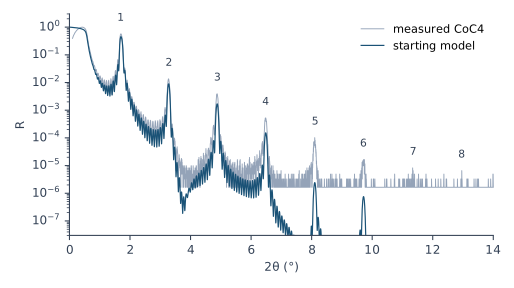
Two settings of the calculation belong to the start as well. Calculate in s-polarization, which gives the same curve as sp-type at these angles in half the time (Chapter 8: Polarization: s-type or sp-type). Keep the λ that the .xrdml file gave (Chapter 10: The wavelength comes from the file).
What this means when you fit
Get the fixed parts right first. The materials, the layer order, N, and the whole substrate stay as you enter them. Enter the density of your substrate.
Take the thicknesses from the design and the period from the curve. Scale the design’s layers so that they add up to the measured period.
Put the contamination layer on top, as its own stack. In X-Ray Calc that is the first stack, above any cap.
Check the start on the chart before you fit. The orders must already line up. Chapter 13: The Sensitivity Check uses this model to see what each parameter moves.
Sources
- Fitting procedure (Penkov, Peng & Fu 2026): §2.1, the substrate from the laboratory’s library with its material, density and σ held fixed, the library’s σ a starting value for the laboratory’s stock rather than a property of the material; §2.2, the layers from the nominal design (thickness, order, period count as deposited) as the start values, each density near bulk; §2.3, the light surface layer from the preset, as its own stack with N 1 “listed after the periodic stack”, included always, never or only when the edge or the fringe field misses; §2.4, a design cap taken from the design and kept apart from the contamination layer; §2.5, s-polarization.
- The procedure’s preset and substrate library (
skill-v5\presets\csmic-empyrean.json,skill-v5\substrates.json), one laboratory’s values: the contamination layer (C, 15 Å, σ 3 Å, 0.9 g/cm³, included “when_edge_or_fringe_field_misses”); the density starts of C (2.0) and Co (8.0) and the σ start range 3–5 Å; soda-lime glass (2.5 g/cm³ from ISO 16293-1, σ 3.8 Å, no stock table, modeled as SiO2 at 2.50 within about 1 % of its electron density), fused silica (2.2), the Si wafer (2.329, native oxide 10–20 Å as a separate SiO2 layer), and the note that 2.65 g/cm³ for glass was an error of the earlier procedure. - The design of CoC4 as given to the test sessions of the procedure’s deposit (
procedure/as-sent/stage1-CoC4-round-3.md, CC BY 4.0), quoted. - X-Ray Calc Help, Defining a Model: The Structure Editor, Terminology, Stacks (Periods) (Add Stack appends at the bottom, Insert Stack goes above the selected stack), Layers, Density 0 and the substrate density (quartz at 2.65 g/cm³ in the SiO2 table), Adding a layer (the material name must match a table), Undo, Model Text (JSON) (the keys; a limit left out is set to the value).
- The X-Ray Calc 3 source, where it adds to the Help: the substrate set from the structure and kept out of the solution (
XRayCalc3\LFPSO\unit_LFPSO_Base.pas:410–414); Add Stack appending at the bottom and Insert Stack inserting above the selected stack (XRayCalc3\Components\unit_XRCStructure.pas:230–242, 512–535,AddStack,InsertStack); a new layer as Si, 25 Å, σ 3 Å, ρ 0 (XRayCalc3\Forms\frm_Main.pas:1127–1131,LayerAddExecute); the model text and its keys, with a missing limit set to the value (unit_XRCStructure.pas:864–1050,ToString,FromString); Import structure … reading a.jsonwithStacksandSubsinto a new model (XRayCalc3\Views\frame_ProjectPanel.pas,ImportStructure); the procedure’s structure format listing stacks from the substrate up and the GUI from the surface down, with the layers inside a stack surface first in both (XRC_MCP\units\unit_MCPStructure.pas:29–38, 366–384); the residual strip under the chart, drawn for each visible model against the linked curve (XRayCalc3\Forms\frm_Main.pas,RefreshResiduals, release 3.9.4.1250). The labels are fromfrm_Main.dfm,editor_Stack.dfmandeditor_Layer.dfm. - Calculated for this chapter (2026-09-24, rerun 2026-09-25) with the X-Ray Calc 3.9.4.1250 engine: the starting model of Figure 12-2 at λ = 1.541874 Å and Δθ = 0.012°.
scripts/figures/ch12_engine_data.pyruns it and keeps the curve infigures-src/ch12/.scripts/figures/fig_12_figures.pydraws Figure 12-2 and prints the order positions and heights (figures-src/ch12/numbers.txt). The measured curve is the import of Chapter 11. The scaling factor 1.013 and the thicknesses are computed on the page.
Cross-references: Chapter 2: Opening a demo project; Chapter 4: Where δ and β come from; Chapter 7: The dirty surface: a contamination layer; Chapter 8: Polarization; Chapter 9: Where the swarm starts; Chapter 10: The wavelength comes from the file; Chapter 11: The period from a straight line; Chapter 13; Chapter 15: Generous limits; Chapter 18: The residual by band; Chapter 24: A period taken from the design; Chapter 26: The substrate; Appendix A: Notation and Units; Appendix B: Menus, Buttons and Keys; Appendix C: Where Optical Constants Come From; Appendix D: Glossary.