A fit that fails a check of Chapter 18: Judging a Fit comes to this chapter. The chapter finds the cause before you change anything. Its examples are the two measured Co/C curves of Chapter 18. CoC4 fails its Bragg orders 7 and 8, and CoC5 fails its order 4, in every mode and in every run. Both are fitted here with one period, the period free within ±10 % (Periodic mode), five runs each. For CoC5 this is the fit Chapter 18 judged. For CoC4, Chapter 18 judged the Polynomial fit of order 1, at χ² 0.959. The one-period fit of CoC4 ends at 0.975 and fails the same two orders.
Two meanings of “the fit won’t converge”
People say a fit won’t converge in two different situations. The search hasn’t settled. The runs end at different χ² values. The Convergence page is still falling when the fit stops. A value sits on its limit, or the scale pane reads at bound. A setting fixes this. The X-Ray Calc Help lists ten things to try (Troubleshooting → Fitting does not converge). Table 19-1 gives each one with the chapter that explains it.
Table 19-1: The ten items of the X-Ray Calc Help for a fit that doesn’t converge, and where this book explains each one. Every item is a setting or a check of the search. None changes the model.
| The Help says | What it fixes | Explained in |
|---|---|---|
| Widen the fit limits | a value that ends on its limit | Chapter 15: The near-bound rule |
| Increase population size | a swarm too small for the number of parameters | Chapter 16: Population before iterations |
| Increase iterations | a fit stopped before it settled | Chapter 16: Population before iterations |
| Enable Shake | a swarm caught in one valley | Chapter 9: Shakes |
| Check initial model | a start far from the answer | Chapter 12: Building the Starting Model |
| Try a different fitting mode | a mode that can't describe the stack | Chapter 17: Periodic or Polynomial? |
| Check the Bragg peak positions first | a period held at a wrong value | Chapter 11: Putting the period into the model |
| Look at the scale pane | a normalization outside the Window | Chapter 14: Letting the fit solve the scale |
| Check the chart's lower reflectivity limit | measured points under the floor | Chapter 14: The floor |
| Link the data | no measured curve to fit | Chapter 2: The main window |
The search has settled, and the curve still misses. The runs agree, and every run misses the same feature. More population, more iterations or another start changes nothing, because the swarm already finds the best this model can do with this curve. The fitting procedure means this case: “when no setting brings the calculated curve onto the measured one” (§10.13).
CoC4 is of the second kind. Its five runs end at χ² = 0.9751–0.9760. All five put orders 7 and 8 at 0.28 of their measured height. The rest of this chapter is about this case.
Two causes, and only two
The author gave the rule when the procedure was written down: “the fitting cannot be converged due to 2 reasons: measurement is bad (judgeable) or the model is too simple (this is the most common one).” The procedure adds how to judge each (§10.13). A bad measurement shows in the curve itself: too few counts, a misaligned specimen, a range that was cut short or is noisy. A model that is too simple shows as a feature that no value of the existing parameters can match. The model is the common cause, so test it first. The model is too simple says what to add. Testing the model on CoC4 and CoC5 does it for the two curves. The measurement: too few counts takes up the other cause.
The model is too simple
A model that is too simple is fixed “by adding what is missing (a light surface layer of contamination, an interlayer at an interface, a drift through the stack), not by pushing a parameter that stands in for it” (§10.13). Each addition moves its own features of the curve. Table 19-2 pairs each one with the misfit it cures.
Read the misfit on the residual strip under the chart (Result > Residual strip; Chapter 18: The residual by band). The strip shows misfits that the log-scale curves hide. A stretch above or below zero between two orders is a level that is off. A narrow spike at an order is a peak height that is off.
Table 19-2: What the model may lack, and the misfit that points to it. From the fitting procedure (§3, §9.3, §10.13) and Chapters 7 and 13.
| The misfit | Add | Explained in |
|---|---|---|
| The orders fit, and the level between them doesn't | a contamination layer on top | Chapter 7: The dirty surface |
| The heights of the high orders are off, with a σ on its limit | an interlayer at one or both interfaces | Chapter 7: Interlayers |
| The high orders are too high and grow worse with the order number | a drift of the period | Chapter 17: What a drift does to the orders |
| The level between the orders is off, and a contamination layer is already there | look at the substrate side | Chapter 13: Two rules for reading a curve |
A parameter that stands in is the sign of a missing layer: “a roughness or a density that absorbs an unmatched feature is a sign of the second cause” (§10.13). Look for a σ or a ρ on its limit, or far from what the material can have, that moves when you add the missing layer. Chapter 17 showed one on CoC5. With the limits of Chapter 15, the Co density ended on its lower limit of 6.00 g/cm³ in three runs of five. Every run showed a drift of +0.20 to +0.31 Å. With the limits widened, the drift was gone. The density on its limit had made a drift look certain (Chapter 17: Decide on the drift, not on χ²).
The contamination layer: where the rule came from
The rule comes from a real case. The expert’s CoC4 fit and a test fit placed the peaks and the period alike. They disagreed between the orders. The expert’s ruling was: “In this case I select peaks. Non matching fringes can mean something on the surface (light hydrocarbons) we omit in our model. I think you can try to check this hypothesis.” A carbon layer on top lowered χ² from 7.94 to 6.09. Nothing in the period stack moved (Chapter 7: Figure 7-4). When the consequence was put to the author, that the light surface layer joins the standard starting model, the answer was “Right.” That is why the CoC4 model of Chapter 12: The top of the stack has the layer from the start.
The same test on the fit of this book shows what a stand-in looks like. Table 19-3 compares the one-period fit of CoC4 with the same fit without the contamination layer, five runs each.
Table 19-3: CoC4 with and without the contamination layer: Periodic mode with the period free, the limits of Chapter 17, five runs each. Values of the run with the lowest χ². Fitted by X-Ray Calc 3.9.4.1250.
| With the layer | Without it | |
|---|---|---|
| χ², five runs | 0.9751–0.9760 | 1.2288–1.2290 |
| Plain χ² | 0.906 | 1.157 |
| Period D (Å) | 54.790 | 54.778 |
| C of the period: H, σ (Å); ρ (g/cm³) | 31.34, 4.35; 2.00 | 30.84, 5.78; 1.77 |
| Co of the period: H, σ (Å); ρ (g/cm³) | 23.45, 2.62; 7.61 | 23.93, 2.64; 7.76 |
| Contamination layer: H, σ (Å); ρ (g/cm³) | 11.51, 0.01; 0.88 | none |
| Fringe contrast, fitted (measured 2.17) | 1.78 | 1.79 |
Without the layer, χ² rises by a quarter, and the period moves by only 0.012 Å. The C layer at the top of each period takes over the missing layer’s work. Its σ grows from 4.35 to 5.78 Å, and its density falls from 2.00 to 1.77 g/cm³. That is the stand-in the procedure warns about. The five runs still agree, to 0.0002 in χ². So agreeing runs don’t prove that the model is complete. The fringe contrast between orders 1 and 2 doesn’t tell the two models apart either. No band of the residual warns in either fit.
Peaks before fringes
When the peaks and the fringes between them disagree, the peaks decide: “the peaks carry the period structure, and an unmatched fringe field is the first place to suspect a missing surface layer” (§10.13). This is the first rule of Chapter 13: Two rules for reading a curve, used as a verdict. A fit whose orders pass and whose fringes miss can pass. Chapter 18 reports the fringe contrast and sets no limit on it (Chapter 18: The fringes).
Testing the model on CoC4 and CoC5
The contamination layer is already in both models. Chapter 17 tested a drift: CoC4 drifts by −0.39 Å, CoC5 is uniform, and both still fail the same orders at every order of the profile (Chapter 18: When an order fails). That leaves the interlayer.
The test puts a CoC interlayer at each interface of the period, as in Chapter 7: Interlayers. The period then reads, from the surface down: C, CoC where C grew on Co, Co, and CoC where Co grew on C. Each assignment of Chapter 18: Asymmetric interlayers was fitted five times:
- Wider under C: the upper interlayer 4–15 Å, the lower one 0.1–4 Å.
- Wider under Co: the other way round.
- Equal: both frozen at one H. X-Ray Calc can’t tie two layers during a fit, so the equal case was fitted at H = 1, 2, 4 and 6 Å. The H with the lowest χ² is shown.
Everything else is as in Chapter 18. The interlayers have σ = 1–8 Å and ρ = 4.34–6.2 g/cm³. That is 0.7 to 1.0 times the bulk density of the CoC table, the rule for a material with no limits of its own (Chapter 15: Generous limits). The Hmin of C and of Co went down by 8 Å, to leave room for them. The near-bound rule of Chapter 15 then ran for two rounds. Figure 19-1 and Table 19-4 give the result.
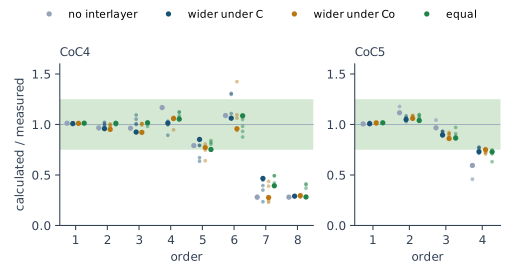
Table 19-4: The interlayer test, five runs per model. χ² of the best run and its range over the runs; the ratio of the weak orders over the runs; and the sample standard deviation over the runs of the Co thickness, which shows whether the split between Co and the interlayers is still fixed. Fitted by X-Ray Calc 3.9.4.1250 and 3.9.4.1270.
| Curve and model | χ², best (range) | Weak orders | Co thickness, spread (Å) |
|---|---|---|---|
| CoC4, no interlayer | 0.9751 (to 0.9760) | order 7: 0.28–0.29; order 8: 0.28 | 0.01 |
| CoC4, wider under C | 0.9548 (to 1.0715) | order 7: 0.24–0.47; order 8: 0.29 | 3.5 |
| CoC4, wider under Co | 0.9595 (to 0.9855) | order 7: 0.23–0.44; order 8: 0.28–0.30 | 4.2 |
| CoC4, equal at 4 Å | 0.9587 (to 1.0804) | order 7: 0.39–0.49; order 8: 0.28–0.41 | 1.3 |
| CoC5, no interlayer | 0.6825 (to 0.7051) | order 4: 0.46–0.59 | 0.2 |
| CoC5, wider under C | 0.5823 (to 0.6179) | order 4: 0.71–0.78 | 2.7 |
| CoC5, wider under Co | 0.5735 (to 0.6146) | order 4: 0.71–0.76 | 1.7 |
| CoC5, equal at 4 Å | 0.5726 (to 0.6393) | order 4: 0.63–0.75 | 1.0 |
CoC4: the model doesn’t need interlayers. Orders 7 and 8 still fail, at 0.23–0.49. Orders 5 and 6 now fail in some runs that passed them before. The best χ² falls by 0.02 at most, from 0.9751 to 0.9548. The runs of each model with interlayers spread over 0.03–0.12 in χ², more than that gain. The equal scan gives 0.959–0.966 from 1 to 4 Å and 1.027 at 6 Å, with no clear minimum. And the Co layer is no longer fixed. Its thickness spreads by 1.3–4.2 Å over the runs, against 0.01 Å without interlayers. Only the period stays fixed, to 0.01 Å. The model without interlayers stands.
CoC5: the model lacks something, and the curve doesn’t say what. Every run of the three models with interlayers in Table 19-4 ends below the best run without them. The best χ² falls by 0.10–0.11. Order 4 rises to 0.63–0.78 and passes in 4 of the 15 runs. The three assignments end within 0.010 of each other, inside their spreads, so the curve doesn’t choose a side (§10.10). The equal scan changes little: 0.573–0.603 from 1 to 6 Å. And the Co thickness spreads by 1.0–2.7 Å. So something at the interfaces is missing. Its width and its side are undetermined.
The measurement: too few counts
The assessment of Chapter 10: When not to fit catches a measurement that can’t carry any fit: a cut plateau, too few points per fringe, a scan that starts too late. A curve that passes it can still be too weak in places. The high orders are the usual place.
A detector counts photons, and photons arrive at random. So the count at one angle is random too. A point of counts scatters about its true value by about counts. Its relative scatter is : 10 % at 100 counts, 25 % at 16 counts, 50 % at 4 counts.
Going Deeper: why the scatter is √N
Divide the counting time into short slices, so short that a slice holds one photon or none. Let be the chance that a slice holds one. The photons arrive independently, so the slices are independent. Each slice adds 1 to the count with chance and 0 otherwise. Its mean is , and its variance is . Means and variances of independent parts add:
As the slices get shorter, goes to 0 at a fixed , and the variance goes to . The standard deviation of the count is . This is the Poisson distribution. The chance of exactly counts is .
Apply it to the orders that fail (Chapter 18: Figure 18-3).
CoC4, orders 7 and 8. Each is one point, of 5 and 4 counts, in a tail of 1 to 3 counts. A point of 4 counts scatters by counts, which is 50 %. That is twice the half-width of the band 0.75–1.25. So the order table can neither pass nor fail the model there. The two points count as orders only because the visibility rule asks for more than 3 times a background of one count.
CoC5, order 4. This is a real peak, and the model follows its shape. On the 24 points where the model stands above half its own peak, the model reaches 9.5 counts. Most of the data there lie at 6–12 counts. The measured maximum is one point of 16 counts. The order table divides by it: 9.5 / 16 = 0.59. With the model’s own value at each of the 24 points, the chance that at least one of them reaches 16 counts by counting alone is 0.27. Summed over the 24 points, the model has 187 counts and the data 227. Their ratio is 0.83, inside the band.
So the fail of CoC4 says nothing about the model. Its peaks hold too few counts for the check. The fail of CoC5 has two parts: the single high point, and the interfaces that the model lacks (Testing the model on CoC4 and CoC5). Write the cause into the verdict. For CoC4: orders 7 and 8 fail, and their peaks hold 4–5 counts, too few to test the 25 % band. A new measurement with a longer counting time at the high angles would test them.
Fitting in stages
The X-Ray Calc Help describes a fit in passes (Fitting → Staged Fitting). Fit, hold the part that has settled, and search the rest. The fitting procedure has no such step: it frees every parameter in every fit (Chapter 15: Freezing a parameter). Staging helps the search. It doesn’t add anything to the model. So it belongs to the first meaning of “won’t converge”: a model with many parameters whose runs don’t settle. The interlayer models of CoC4, whose runs spread by up to 0.12 in χ², are such a case.
- Fit as usual: Calc > Auto Fitting (F7), then Run.
- In the structure panel, right-click the stack that has settled and choose Freeze stack. Its title then shows [frozen] (Figure 19-2).
- Set the weighting for the part that is left. TW χ² = 1/sqr pushes the fit toward the critical edge. The top layers show most there (Chapter 9: The weights).
- Choose Calc > Resume Fitting. The Fitting Limits dialog opens with the button Resume (Figure 19-3). Check the RMax of every free layer, then click Resume.
- Right-click the stack again and choose Thaw stack. Set TW χ² back to the weighting you judge with. Choose Calc > Resume Fitting once more, now with every parameter free.
- Judge the result of step 5 by Chapter 18: Judging a Fit.
![Part of the X-Ray Calc main window. The structure panel shows the stack Top with a C layer of 11.80 angstrom, then the stack titled ML [frozen] with C 31.35 and Co 23.41 angstrom, then the substrate SiO2. In the settings above the chart, Mode Periodic is selected, Free period is ticked at 10 percent, and the TW chi-squared list reads 1/sqr](/MasteringXRR/figures/fig-19-2-frozen-stack.png)
Resume differs from Auto Fitting in the ways the Help lists. It moves every window that is not frozen so that the value reached sits at its center, with the width kept. Figure 19-3 shows it on the contamination layer. Its ρ window of 0.6–1.4 g/cm³ became 0.40–1.20 g/cm³, centered on 0.80. Its H window of 5–40 Å became 0–35 Å. Centered on 11.80 Å, it would start below 0, so it stops at 0. A frozen stack keeps its limits. The Convergence page goes on from the last pass, and the best χ² starts anew. The fit extensions are kept. In Polynomial mode a frozen stack keeps its profile.
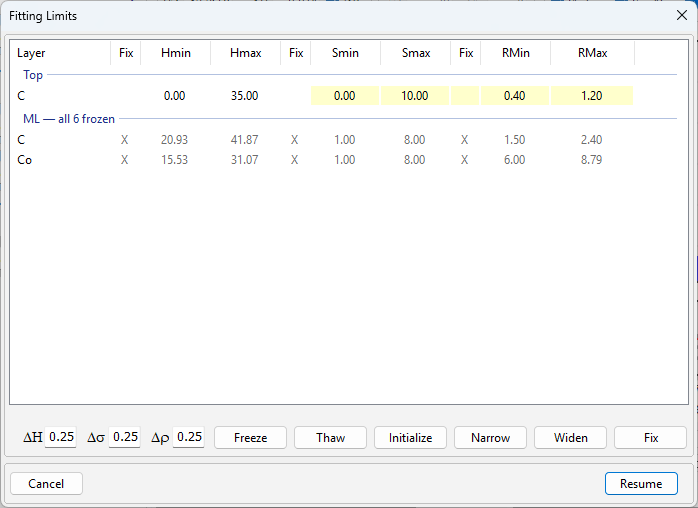
A value on its limit brings a question before the fit starts. For CoC4 it read “Warning: C: S value at lower limit” and “Proceed anyway?”. It named the σ of the contamination layer, which sits at 0. The near-bound rule leaves a σ at 0 alone (Chapter 15: The near-bound rule). Answer Yes for such a value.
Compare the passes by the plain χ² of the Chart Info bar. A new weighting changes the sum that is minimized, so the weighted χ² of the two passes are not on one scale (Chapter 9: The weights). Table 19-5 gives a staged fit of CoC4 in the program.
Table 19-5: A staged fit of CoC4 in X-Ray Calc 3.9.4.1270: Periodic mode with Free period ± 10 %, population 5000, 200 iterations, one run per pass. The χ² is read from the Chart Info bar after Calc > Run.
| Pass | χ² | Plain χ² | Contamination layer: H, σ (Å); ρ (g/cm³) | C, Co of the period: H (Å) |
|---|---|---|---|---|
| 1: everything free, TW χ² None | 1.0631 | 1.0112 | 11.80, 0.02; 0.80 | 31.35, 23.41 |
| 2: ML frozen, TW χ² 1/sqr, Resume | 0.1149 (weighted) | 1.0185 | 11.45, 0.00; 0.76 | frozen |
| 3: everything free, TW χ² None, Resume | 1.0632 | 1.0113 | 11.77, 0.01; 0.81 | 31.34, 23.42 |
The staged fit ended where the first pass ended. The second pass moved the top layer by 0.35 Å and raised the plain χ². The weighting toward the edge had traded some of the rest of the curve for it. The third pass took the layer back. This fit had settled in one pass, so staging had nothing to add. This run of the program also ended in the σ valley with the larger σ in Co, at χ² = 1.063. The five engine runs of the one-period fit all found the other valley, at 0.975. Staging doesn’t move a fit out of its valley either.
When to stop
Stop adding to the model when the next addition doesn’t pass the test of Testing the model on CoC4 and CoC5. Keep an addition only when both hold:
- It is something the specimen can have: a contamination layer, an interlayer or a drift. A layer that only lowers χ² is a stand-in, like a σ on its limit.
- The curve fixes it. Its parameters agree over the runs (Chapter 18: What the runs don’t agree on), and it lowers χ² by more than the runs spread. A χ² difference inside that spread “has not chosen between them” (§10.10).
By this rule, CoC4 keeps the fit of Chapter 18. Its verdict names the counts. CoC5 keeps it too, for its thicknesses. Its report adds the interlayer fits beside it: each assignment with its χ² and its spread, the gain of 0.10 in χ², and the width and side undetermined (§10.10). A fail that the counts explain is a result. Report it with its cause. Don’t loosen a limit of Chapter 18 to make a fit pass. Chapter 23: A complete report for CoC4 puts the verdict into the report.
What this means when you fit
Run the fit five times first. Runs that spread need a better search. Runs that agree and still fail need a better model or a better measurement.
Test the model before you blame the measurement. Add what the specimen can have: a contamination layer, an interlayer, a drift. Fit each addition five times. Fit every interlayer assignment the same way.
Keep an addition only when the curve fixes it: its parameters agree over the runs, and its χ² gain is larger than their spread.
Look at a failing peak in counts. A peak of a few counts can’t test a 25 % band. Report the fail with that cause.
Let the peaks decide when the peaks and the fringes disagree. Suspect the surface first when the fringes miss.
Fit in stages only to help the search. Finish with every parameter free, and judge that fit by Chapter 18: Writing the verdict.
Sources
- Fitting procedure (Penkov, Peng & Fu 2026): §10.13, a fit that can’t be converged, its two causes, the fix by adding what is missing, a σ or ρ that absorbs a feature as the sign, and peaks before fringes, quoted in part; §10.10, each interlayer assignment fitted and a χ² difference inside the spread not choosing, quoted in part; §10.12, the two rules of §3 before anything else; §3, the two rules; §9.3, the sign of a drift. The procedure frees every parameter in one fit and has no staged fitting.
- The procedure’s history (Supplementary S1): the two-causes rule entered in v4, as §10.6 of that version, with the light surface layer added to the starting model in the same revision.
- The expert’s rulings (Supplementary S3): ruling 59, peaks over fringes and the hypothesis of light hydrocarbons on the surface, quoted; ruling 60, the two causes, quoted; ruling 61, “Right.”, the surface layer joining the standard starting model.
- The methods paper on the procedure (Penkov, Peng & Fu 2026, arXiv:2609.28926): §7.4 and Table 4, CoC4 without and with a carbon surface layer (χ² 7.94 and 6.09, the period stack unchanged); Supplementary S4.6, the band between orders 2 and 3 (+0.133 and −0.064).
- The procedure’s preset (
skill-v5\presets\csmic-empyrean.json):acceptance.thresholds(order band 0.25, visible factor 3);optimizer.seeds.list(the five seeds);interfaces.modeexplore. - X-Ray Calc Help, Charts → Residual Strip (the strip under the chart shows misfits the log-scale curves hide, such as a stretch between two orders sitting high or low); Troubleshooting → Fitting does not converge (the ten items of Table 19-1, quoted by their first words); Fitting → Staged Fitting (fit, freeze, change the weight type, Resume Fitting; the windows re-centered, the extensions kept, the convergence chart continued, the best χ² not carried across; a frozen stack keeping its profile in Polynomial mode). The steps of both sections agree with the code as far as this chapter uses them. The Help doesn’t mention the “Proceed anyway?” question that a value on its limit brings before Run and Resume.
- The X-Ray Calc 3 source: the Calc menu with Auto Fitting and Resume Fitting (
XRayCalc3\Forms\frm_Main.dfm); Resume re-centering every window that is not frozen, and frozen parameters handed to the engine as an empty range (XRayCalc3\Units\unit_CalcOrchestrator.pas,GetFitParams;unit_SmartLimits.pas,RecentreOnValue,CollapseFixed); the TW χ² list None, sqr, line, sqrt, 1/sqr, 1/sqrt (XRayCalc3\Views\frame_CalcSettings.dfm,cbTWChi); the freeze flags of the model text,HF,SFandRF. The order check reads the largest measured point in the window of each order. An order is visible above 3 times the background, the median of the last 100 points (XRC_MCP\units\unit_MCPFitReport.pas). - Counting statistics are derived on the page (the Poisson limit of independent arrivals). The chance for CoC5 order 4 is one minus the product, over the 24 points where the model stands above half its peak, of the Poisson probability of fewer than 16 counts at the model’s value there. The counts are the value on the chart divided by one count (R min) at the solved scale.
- The measured curves CoC4 and CoC5 are from the fitting procedure’s data deposit (CC BY 4.0), prepared as in Chapters 14 to 18.
- Calculated for this chapter (2026-09-25).
scripts/figures/ch19_engine_data.pyruns the engine fits, five runs each with the preset’s seeds, population 5000 and 200 iterations: CoC4 and CoC5 with CoC interlayers under the three assignments, the equal one at four frozen widths (figures-src/ch19/coc4-inter.json,coc5-inter.json); CoC4 without the contamination layer (coc4-nosurf.json); and the CoC4 fit of Chapter 18 again with the same seeds, to keep its fringe report (coc4-withsurf.json, the same χ² as Chapter 18). The near-bound rule ran two rounds for the ordered assignments and none for the equal scan. A first set of these runs gave the interlayers ρ limits of 2.0–8.79 g/cm³, above the bulk density of the CoC table (6.2 g/cm³); it was redone with the limits of the chapter (the first set is kept ascoc4-inter-v1-rho2-879.jsonandcoc5-inter-v1-rho2-879.json; it led to the same reading of both curves).scripts/figures/fig_19_figures.pydraws Figure 19-1 and writes the numbers of Tables 19-3 and 19-4 (figures-src/ch19/summary.txt). The five runs without interlayers are those of Chapter 18 (figures-src/ch18/coc4-free.json,coc5-free.json). The staged fit of Table 19-5 was run in X-Ray Calc 3.9.4.1270 (x64, 2026-09-25) from the best free-period fit of Chapter 18, with the limits of the Chapter 17 fits for the period and the preset’s windows for the contamination layer (H 5–40 Å, σ 0–10 Å, ρ 0.6–1.4 g/cm³); the first run, on 3.9.4.1030 from the program’s own Chapter 18 fit, gave the same passes within 0.03 Å; the script that drove it, its log with the Fit report text of each pass, and the screenshots are infigures-src/ch19/gui-staged.py,gui-staged-log.jsonandfigures-src/screenshots/ch19-staged-*.png. The engine fits were first made on X-Ray Calc 3.9.4.1030. They were run again with the same seeds on 3.9.4.1270, and the fits of Chapter 18 on 3.9.4.1250 (2026-09-25), and every value came out the same. 3.9.4.1270 changed only the χ² the program shows.
Cross-references: Chapter 2: The main window; Chapter 7: The dirty surface; Chapter 7: Interlayers; Chapter 9: The weights; Chapter 9: Shakes; Chapter 10: When not to fit; Chapter 11: Putting the period into the model; Chapter 12: The top of the stack; Chapter 13: Two rules for reading a curve; Chapter 14: Letting the fit solve the scale; Chapter 15: Freezing a parameter; Chapter 16: Several runs, and their spread; Chapter 17: Decide on the drift; Chapter 18: Asymmetric interlayers; Chapter 18: When an order fails; Chapter 18: The residual by band; Chapter 22: The W/BN mirror; Chapter 23: A complete report for CoC4; Chapter 24: A layer that stands in for a missing one; Chapter 25: Is the model complete?; Chapter 26: The layers in the model; Appendix B: Menus, Buttons and Keys; Appendix D: Glossary.