Every fit searches between limits. Each free parameter has a lowest and a highest value, and X-Ray Calc never looks outside them. This chapter sets the limits for the Co/C multilayer CoC4. It uses the starting model of Chapter 12: The model as text and the data prepared in Chapter 14: What this means when you fit. Then it runs the fits of Chapter 14 again with one limit moved.
What is free, and what the limits are for
X-Ray Calc fits a parameter when its Min and Max differ and it is not frozen. The fitting procedure frees the thickness H, the roughness σ and the density ρ of every layer, the contamination layer included. Two things stay as you entered them. The substrate is never fitted (Chapter 12: The substrate). Periodic mode keeps the period of the starting model (Chapter 11: Putting the period into the model). The fits of Chapters 14 to 16 hold it. Free period ± frees it (Chapter 17: Step 1, one period with the period free). For CoC4 that leaves nine free parameters: three for the contamination layer, three for the C layer of the period and three for the Co layer.
With SeedR checked, the limits are the whole search space (Chapter 9: Where the swarm starts). They don’t describe your sample. Their job is to keep the swarm away from the edges. The author of the fitting procedure put it this way: “The fitting limits must be generous: LFPSO works badly if it approaches the boundary.” A particle that crosses a limit is sent back into the range at half its speed (Chapter 9: How a particle moves). One limit is different. The upper limit of the density is the only one that states a physical fact, the density of the bulk material. The density ceiling treats it.
The Fitting Limits dialog
The dialog opens in two ways:
- The Limits button at the top of the structure panel opens it at any time. Its action button then reads Save. Save stores the limits in the model. Cancel drops your changes.
- Calc > Auto Fitting (F7) opens it before every fit, with the action button Run. Calc > Resume Fitting opens it with Resume. Cancel starts no fit.
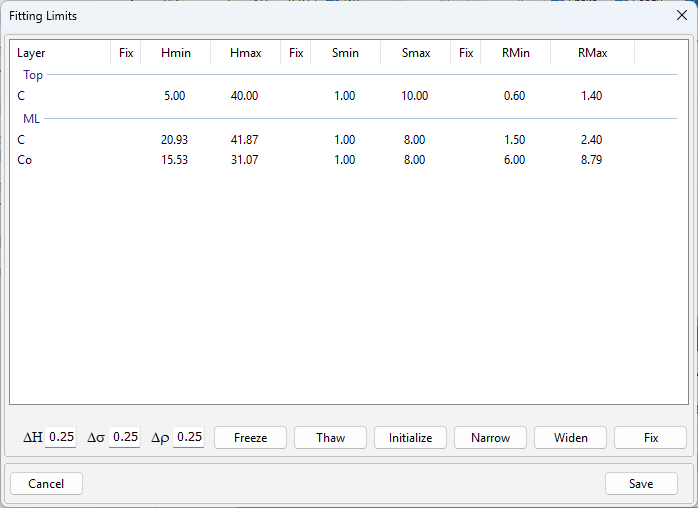
Each row is a layer, under the name of its stack, from the surface down. The substrate has no row. Each parameter has three columns: Fix and its two limits. The limits are Hmin and Hmax for the thickness, Smin and Smax for σ, and RMin and RMax for ρ. The dialog doesn’t show the values themselves. Read those in the structure panel. To change a limit, click its cell, type the number and press Enter.
X-Ray Calc checks the limits as you type. A red cell has an error: its Min is larger than its Max, or its Min is negative. Run, Resume and Save then list the errors and do nothing else. A yellow cell has a warning:
- the value lies outside its limits, or within 5 % of the range from one of them;
- Max is more than 100 times Min, or the range is narrower than 1 % of the value;
- RMax is above 23 g/cm³, the density of osmium, the densest stable element.
With yellow cells, Run lists the warnings and asks “Proceed anyway?”. It asks the same when no parameter is free.
Generous limits
One laboratory’s preset sets the limits this way:
- Thickness: from two thirds to four thirds of the start value.
- σ: 1–8 Å.
- ρ: from the material’s own entry where the preset has one: C 1.5–2.4 g/cm³ and Co 6.0–8.79 g/cm³. Any other material runs from 0.7 to 1.0 times the bulk density of its table.
- The contamination layer: H 5–40 Å, σ 1–10 Å, ρ 0.6–1.4 g/cm³.
Every start value lies inside its limits. The σ limits were tested on curves calculated from a known structure. A true σ of 7.5 Å, 0.5 Å from the upper limit, was found within 0.22 Å. Widening the limits to 0.5–12 Å changed nothing. The author’s own choice, generous limits with the density capped at bulk, was also tested against known structures. It held.
Initialize fills the dialog quickly. For every parameter that is not frozen, it sets Min = V(1 − Δ) and Max = V(1 + Δ). V is the value. Δ comes from the ΔH, Δσ or Δρ box, 0.25 by default. A value you pinned with Min = Max gets a window too. A density of 0 is first set to the bulk density of the table. For ρ it never puts RMax above the bulk density of the material’s table, unless your value is already above it. Table 15-1 compares the result for CoC4 with the laboratory’s limits.
Table 15-1: The limits that Initialize gives for the CoC4 starting model with ΔH, Δσ and Δρ at 0.25, the defaults, and one laboratory’s limits. Initialize stops RMax at the bulk densities of the tables, 2.266 g/cm³ for C (shown as 2.27) and 8.79 g/cm³ for Co. Read from the dialog of X-Ray Calc 3.9.4.1030.
| Layer | Parameter | Start | Initialize | One laboratory |
|---|---|---|---|---|
| C (Top) | H (Å) | 15 | 11.25–18.75 | 5–40 |
| σ (Å) | 3 | 2.25–3.75 | 1–10 | |
| ρ (g/cm³) | 0.9 | 0.67–1.12 | 0.6–1.4 | |
| C (ML) | H (Å) | 31.40 | 23.55–39.25 | 20.93–41.87 |
| σ (Å) | 4 | 3.00–5.00 | 1–8 | |
| ρ (g/cm³) | 2.0 | 1.50–2.27 | 1.5–2.4 | |
| Co (ML) | H (Å) | 23.30 | 17.47–29.13 | 15.53–31.07 |
| σ (Å) | 4 | 3.00–5.00 | 1–8 | |
| ρ (g/cm³) | 8.0 | 6.00–8.79 | 6.0–8.79 |
The thickness windows are close. Initialize gives σ far less room than 1–8 Å. For ρ it gives ±25 % around the start value, with RMax stopped at the bulk density of the table. The laboratory’s own C ceiling, 2.4 g/cm³, lies above bulk on purpose (The density ceiling). So use Initialize for the thicknesses and type the rest:
- Click Limits in the structure panel.
- Type 0.33 in ΔH and click Initialize. The thickness windows become ±33 %, close to one third.
- Type the σ and ρ limits of every layer, and the thickness limits of the contamination layer. For CoC4 they are the right-hand column of Table 15-1.
- Check that no cell is red or yellow, and click Save.
The density ceiling
The upper limit of ρ is the one limit with a physical meaning. In the author’s words, “The only meaningful thing is the upper limit of density”. Set RMax to the bulk density of the material’s table (Chapter 4: Where δ and β come from). For Co that is 8.79 g/cm³. Initialize puts it there for you.
Raise the ceiling only with a stated reason, one that says why your material, as you deposit it, is denser than the table. The laboratory’s preset has one such reason: sputtered carbon reaches 2.4 g/cm³, above the table’s 2.266. So its C ceiling is 2.4. The previous version of the procedure had Co at 8.9 g/cm³, above the table’s 8.79, with no reason. The current version corrected it.
A density that ends on its ceiling is reported at the ceiling. Before you read it as a dense layer, check the conditioning of the data. A wrong scale and a smoothing pass both push the density of a heavy layer up (Chapter 14: Letting the fit solve the scale). In Table 14-2 the scale held at the anchor gave Co a density 0.49 g/cm³ higher than the solved scale did.
The demo of Chapter 3: What the fit found shows what a ceiling above bulk does. Its Si limit was 2.40 g/cm³, above the table’s 2.332. The fit put the top Si density on 2.40. The true value was 2.33.
The near-bound rule
A fitted value that ends on a limit was set by the limit. The data had no part in it. Chapter 3 met this with a density, and Chapter 9: Random seeds met it with one run of five. The procedure’s rule:
- A value counts when it ends on a limit, or within 5 % of the range from it.
- Extend that limit in that direction and fit again.
- One run is enough. If one run of the set reaches a limit, the limit has shaped the search.
- Repeat until no free parameter of any run ends on or near a limit.
- Report every extension you made.
The rule holds for every free parameter except the density ceiling. A density at its lower limit is extended too. After the extension, a low density of a thin metal layer may point to intermixing at its interfaces. The author’s words were “it might indicate intermixing.” Chapter 20: A low density reads such a density. The previous version of the procedure extended only H, σ and the period, and left a density at a limit alone.
X-Ray Calc uses the same 5 %. It colors such a value yellow in the Fitting Limits dialog, and Widen acts on it. For σ with limits of 1–8 Å, 5 % of the range is 0.35 Å. A fitted σ below 1.35 Å or above 7.65 Å counts.
- After each fit, choose Result > Fit report …. Its group Parameters within 5 % of a bound lists every free value on a limit or near it (Chapter 18: Near a limit). The Fitting Limits dialog shows the same cells in yellow.
- Choose Calc > Auto Fitting (F7). The Fitting Limits dialog opens with your limits as they are. Calc > Resume Fitting would move every window, as the warning in The density ceiling explains.
- Click Widen, or type the new limit.
- Check that RMax is still at the ceiling. Click Run.
CoC4. In all five fits of Table 14-2 with the window of 0.2, the σ of the contamination layer ended at its lower limit of 1 Å, between 1.00 and 1.06 Å. All five lie within 5 % of the range, so their cells are yellow. Widen moves the lower limit out by half the range, to 1 − 9 / 2 = −3.5 Å, and the rule that no Min goes below 0 stops it at 0. The limits become 0–10 Å. Table 15-2 repeats the five fits with this one change.
Table 15-2: CoC4 fitted with the σ of the contamination layer limited to 1–10 Å, as in Chapter 14, and to 0–10 Å after Widen. Each row gives the mean and the standard deviation of five fits with different seeds. Everything else is the fit of Table 14-2 with Solve scale in χ² on and Window 0.2, and the limits of Table 15-1. Fitted by X-Ray Calc 3.9.4.1250.
| Limits of the top σ | Top σ (Å) | Top H (Å) | Top ρ (g/cm³) | ρ of C (g/cm³) | ρ of Co (g/cm³) | χ² |
|---|---|---|---|---|---|---|
| 1–10 Å | 1.015 ± 0.023 | 11.64 ± 0.05 | 0.758 ± 0.006 | 2.003 ± 0.004 | 7.346 ± 0.010 | 1.2840 ± 0.0011 |
| 0–10 Å | 0.015 ± 0.011 | 11.62 ± 0.03 | 0.751 ± 0.004 | 2.002 ± 0.003 | 7.352 ± 0.006 | 1.2780 ± 0.0002 |
The σ went to between 0.002 and 0.028 Å in all five runs. Every other parameter moved by 0.015 or less, in Å or in g/cm³, about as much as the runs differ from each other. χ² fell from 1.2840 to 1.2780. So the limit had held that one σ and nothing else.
The σ now sits on 0, and no σ can be lower. This limit can’t be extended. Report the σ at 0 and say that the curve sets no lower value. Do this only after checking that the other parameters did not move when the limit was extended, as here. The curve then can’t tell the outer surface of the contamination layer from a sharp one.
Freezing a parameter
A frozen parameter keeps its value in the next fit. Its limits stay as you set them, and Thaw gives them back. Setting Min = Max also pins a value, but the window is lost. The value then stays pinned until you type new limits or click Initialize. A limit left out of the model text pins the value in the same way (Chapter 12: The model as text).
There are four ways to freeze:
- Click a cell in a Fix column. An X marks it, and its limits turn gray. Click it again to thaw.
- Select one or more rows and click Freeze or Thaw. This acts on every parameter of those layers.
- Right-click in the list for Freeze this stack, Freeze this layer, Freeze all and Thaw all.
- In the structure panel, right-click a stack and choose Freeze stack or Thaw stack. Its title then shows [frozen], or a count such as [3/6 frozen].
The project saves what is frozen. Initialize, Narrow, Widen and Fix leave a frozen parameter alone. Its cells never turn red or yellow. Every parameter is free in the fitting procedure, so the procedure never freezes one. Freeze a value when you know it from another measurement. X-Ray Calc also supports fits in stages: fit the periodic stack, freeze it, then fit the rest. A frozen value is your input. It is not a fitted result.
What this means when you fit
Free H, σ and ρ of every layer, the contamination layer included. The substrate stays as you entered it. So does the period in Periodic mode, unless Free period ± is ticked.
Set generous limits, with every start value inside. Use Initialize for the thicknesses only, then type σ and ρ.
Put RMax at the bulk density, unless you have a stated reason. A ceiling you raise above bulk can move, so check it before every Run and Resume.
After every fit, compare each value with its limits. Extend any limit that a run ended on or within 5 % of, and fit again. Report every extension.
Then choose the fit settings and the number of runs (Chapter 16: Fit Settings). Chapter 18: Judging a Fit checks the result. Chapter 20: Density explains why a fitted density is never a property of the material.
Sources
- Fitting procedure (Penkov, Peng & Fu 2026): §7.1, the thickness, σ and density of every layer free, the surface layer included; §7.2, generous limits, the thickness ± one third, σ from the preset, every start value inside; §7.3, the density limits from the material’s named entry or as fractions of the table’s bulk density, and the surface layer’s own limits; §7.4, limits keep the swarm away from the edges and are not prior knowledge, the density ceiling at bulk the one physical limit; §7.5, a value on a limit or within the near-bound fraction of its range extended and refitted, one seed enough, repeated until none remains, every extension reported; §7.6, the ceiling raised only with a stated reason, a density on it reported there and the scale and smoothing checked first, a density at its lower limit extended; §11.2, a low density of a thin metal layer near its lower limit read as intermixing after the extension. §7.1 also frees the period within ± 10 %; X-Ray Calc’s Periodic mode holds it, and the chapter follows the program.
- The procedure’s preset (
skill-v5\presets\csmic-empyrean.json), one laboratory’s values:materials.named(C 1.5–2.4 g/cm³ with the reason “Sputtered carbon reaches 2.4, above the Henke bulk table value of 2.266”; Co 6.0–8.79 g/cm³ with the reason that v4’s 8.9 contradicted the bulk ceiling and was corrected in v5);materials.default_rule(0.7–1.0 × bulk);materials.sigma_A.bounds1–8 Å and its reason (a true σ of 7.5 Å recovered within 0.22 Å; widening to 0.5–12 Å changed nothing);surface.contamination_layer.bounds(5–40 Å, 1–10 Å, 0.6–1.4 g/cm³);acceptance.thresholds.near_bound_fraction0.05. - The procedure’s history (Supplementary S1): v4 widened a thickness, period or σ within 5 % of a bound and noted a density at a bound without extending it; v4 set Co at 6.0–8.9 g/cm³.
- The expert’s rulings (Supplementary S3): ruling 32 (2026-09-18) on generous limits and the density ceiling, quoted in two parts; ruling 41 (2026-09-18) on a Co density near its lower limit, quoted.
- The methods paper on the procedure (Penkov, Peng & Fu 2026, arXiv:2609.28926), Table 1 (parameter limits “generous, because the optimizer misbehaves near a bound; density capped at bulk”: held when tested) and Table 2 (step 7, the program’s fitting table with all parameters free and wide limits).
- The X-Ray Calc 3 source: the dialog, its caption Fitting Limits, its columns and buttons, the ΔH, Δσ and Δρ boxes (Symbol-font
DH,Ds,Dr) at 0.25, and the right-click menu (XRayCalc3\Forms\frm_Limits.dfm); Initialize as V(1 ± Δ), with RMax stopped at the table’s bulk density unless the value is above it, frozen parameters skipped, a window pinned with Min = Max opened again, and a density of 0 first set to bulk (ApplyMaterialDensity), the action button’s caption, and the action button (Run, Resume or Save) refusing on errors and asking “Proceed anyway?” on warnings (frm_Limits.pas,btnInitClick,ShowLimits,btnSetClick); the checks, the physical rules (Min ≥ 0, ρ ≤ 23 g/cm³, σ Max no larger than the layer’s H or the H of the layer above), the near-limit margin of 5 % (NEAR_BOUND_FRACTION), Narrow, Widen by half the range, Fix, the re-centering of Resume, a density maximum at or below bulk (within the dialog’s rounding of 0.005) held by Widen, Fix and Resume (DensityCeiling), and freezing as an empty range handed to the engine (XRayCalc3\Units\unit_SmartLimits.pas:ValidateLimits,ClampToPhysics,ApplyGeometryCoupling,NarrowLimits,WidenAtLimit,AutoFixErrors,RecentreOnValue,CollapseFixed; Narrow and Widen skip a window with Min = Max); the group Parameters within 5 % of a bound of Result > Fit report … (XRayCalc3\Forms\frm_FitReport.dfm); the dialog before Auto Fitting with Run and before Resume Fitting with Resume, re-centered only for Resume (XRayCalc3\Units\unit_CalcOrchestrator.pas,GetFitParams); the Limits button with Save (XRayCalc3\Views\frame_StructurePanel.dfm;XRayCalc3\Forms\frm_Main.pas,OnSetFitLimits); Freeze stack, Thaw stack and the [frozen] titles (XRayCalc3\Components\unit_XRCStackControl.pas). The bulk densities are theNrofields of the Henke tablesC.bin(2.266),Co.bin(8.79) andSi.bin(2.332) shipped with the program. The chapter follows X-Ray Calc release 3.9.4.1250. - X-Ray Calc Help, Fitting: Setting Fit Limits (Min = Max pins a parameter), Freezing Parameters (the Fix columns, the buttons and menus, the stack titles, saved in the project, skipped by the limit actions and the checks), Limit Actions, Validation and Visual Feedback, Physics Constraints, Staged Fitting (fit the periodic stack, freeze it, fit the rest; Resume re-centers every window). Reported with this chapter and corrected in the program and the Help: Initialize centered the ρ window on bulk and ran it to 1.25 × bulk; Widen, Fix and Resume could lift a ceiling set at bulk, with no word of it in Staged Fitting; the near-limit margin was 1 % against the procedure’s 5 %; Setting Fit Limits named “the Set Fit Limits button” and “the Limits dialog” (first reported with Chapter 3). The two-decimal display of a bulk ceiling (2.27 for 2.266) was found and fixed in the same pass.
- The measured curve CoC4 is from the fitting procedure’s data deposit (CC BY 4.0),
curves/CoC4.xrdml, prepared as in Chapter 14. - Calculated for this chapter (2026-09-24, rerun 2026-09-25) with the X-Ray Calc 3.9.4.1250 engine.
scripts/figures/ch15_engine_data.pyruns the five fits of Table 15-2 with the lower limit of the top layer’s σ at 0, as Widen sets it, and compares them with the five Chapter 14 fits (figures-src/ch15/near-bound.json).scripts/figures/fig_15_figures.pymakes Figure 15-1 from the capture, recomputes the Initialize column of Table 15-1 as the code does and checks it against a capture of the dialog after Initialize, and prints every number of the chapter (figures-src/ch15/numbers.txt). The example windows of the density-ceiling warning (2.4 + 0.9 / 2 and 1.55–2.45) and the 5 % of 1–8 Å are computed on the page.
Cross-references: Chapter 1: Table 1-1; Chapter 2: The main window; Chapter 3: What the fit found; Chapter 4: Where δ and β come from; Chapter 9: Where the swarm starts; Chapter 11: Putting the period into the model; Chapter 12: The model as text; Chapter 13: Doing it in X-Ray Calc; Chapter 14: What this means when you fit; Chapter 16: Several runs, and their spread; Chapter 17: Decide on the drift; Chapter 18: Near a limit; Chapter 20: Density: A Free Parameter, Not a Result; Chapter 24: A value decided by its limit; Chapter 25: Is the number clear of its limits?; Appendix A: Notation and Units; Appendix B: Menus, Buttons and Keys; Appendix C: Where Optical Constants Come From; Appendix D: Glossary.